EasyManua.ls Logo

Craftsman 22299 - User Manual

Craftsman 22299
8 pages
Print Icon
To Next Page IconTo Next Page
Loading...
Owner's Manual
[ I
I,CR"FTS"nNI!
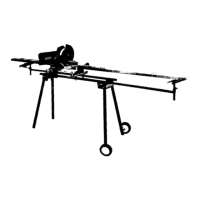
Folding Miter Saw Stand
Stock No. 22200
HTC Products
Safety
Assembly
Operation
Parts
CAUTION:
Before using this product, read this manual and follow
all its Safety Rules and Operating Instructions.
SEARS, Roebuck and Co., Hoffman Estates, IL 60179 U.S.A.
Visit our Craftsman Website: www.sears.com/craftsman
Question and Answer IconNeed help?

Do you have a question about the Craftsman 22299 and is the answer not in the manual?

Summary

Parts Identification

Component List and Diagram

Lists and illustrates all components and hardware for the miter saw stand.

General Safety Instructions for Power Tools

General Safety Guidelines

Key safety practices for operating any power tool, emphasizing awareness and caution.

Safety Instructions for Miter Saw Stands

Miter Saw Stand Specific Safety

Precautions for folding, placement, stability, and securing the miter saw on the stand.

Assembly Instructions

Attach Wheel Axle Brackets

Secure wheel axle brackets to the left end of the frame using bolts and nuts.

Install Snap Buttons on Legs

Insert snap buttons into the top of straight and curved legs for frame attachment.

Attach Straight Legs to Frame

Connect the straight legs to the frame using carriage bolts, washers, and nuts.

Continued Assembly Instructions

Attach Curved Legs and Tube Plugs

Connect curved legs to the frame and install tube plugs at the bottom of all legs.

Install Outrigger Supports and Ts

Secure outrigger supports and support T's using 3-point knobs.

Mounting Hooks and Clamp Brackets

Attach mounting hooks and clamp brackets to aluminum extrusions.

Mount Miter Saw

Position and secure the miter saw onto the aluminum extrusion using T-bolts.

Final Assembly and Setup

Position Saw and Extrusions

Place saw and extrusions onto the leg/frame assembly and adjust for balance.

Install Multi-stop

Attach the multi-stop to the support T for repetitive cuts or squaring.

Install Wheels

Attach wheels to axle brackets using integrated spacers and latch pins.

Set-up; Knockdown Procedure

Folding the Stand

Step-by-step guide for folding the stand for storage or transport.

Setting Up the Stand

Reverse procedure for unfolding and setting up the stand for use.
Summary

Parts Identification

Component List and Diagram

Lists and illustrates all components and hardware for the miter saw stand.

General Safety Instructions for Power Tools

General Safety Guidelines

Key safety practices for operating any power tool, emphasizing awareness and caution.

Safety Instructions for Miter Saw Stands

Miter Saw Stand Specific Safety

Precautions for folding, placement, stability, and securing the miter saw on the stand.

Assembly Instructions

Attach Wheel Axle Brackets

Secure wheel axle brackets to the left end of the frame using bolts and nuts.

Install Snap Buttons on Legs

Insert snap buttons into the top of straight and curved legs for frame attachment.

Attach Straight Legs to Frame

Connect the straight legs to the frame using carriage bolts, washers, and nuts.

Continued Assembly Instructions

Attach Curved Legs and Tube Plugs

Connect curved legs to the frame and install tube plugs at the bottom of all legs.

Install Outrigger Supports and Ts

Secure outrigger supports and support T's using 3-point knobs.

Mounting Hooks and Clamp Brackets

Attach mounting hooks and clamp brackets to aluminum extrusions.

Mount Miter Saw

Position and secure the miter saw onto the aluminum extrusion using T-bolts.

Final Assembly and Setup

Position Saw and Extrusions

Place saw and extrusions onto the leg/frame assembly and adjust for balance.

Install Multi-stop

Attach the multi-stop to the support T for repetitive cuts or squaring.

Install Wheels

Attach wheels to axle brackets using integrated spacers and latch pins.

Set-up; Knockdown Procedure

Folding the Stand

Step-by-step guide for folding the stand for storage or transport.

Setting Up the Stand

Reverse procedure for unfolding and setting up the stand for use.
Craftsman 22299 Specifications

General IconGeneral
BrandCraftsman
Model22299
CategorySaw
LanguageEnglish

Related product manuals