32
• Powerful:
o When three lights are on, the device is operating in powerful mode with a
maximum power of 60 W. This mode allows for cutting thicker materials and
at higher speeds.
Notes:
1. The laser module's alarm function is enabled by default but can be turned off
manually. Even when the alarm function is disabled, the indicator light will still show
the current status. Refer to the "Laser Module Alarm Functions" section in the TF card
for more details.
2. When an alarm is triggered, press Reset on the laser module to stop the alarm.
However, be mindful of the current working status of the laser. For more information
on the alarm function, refer to the "GRBL Configuration Parameters" in the TF card.
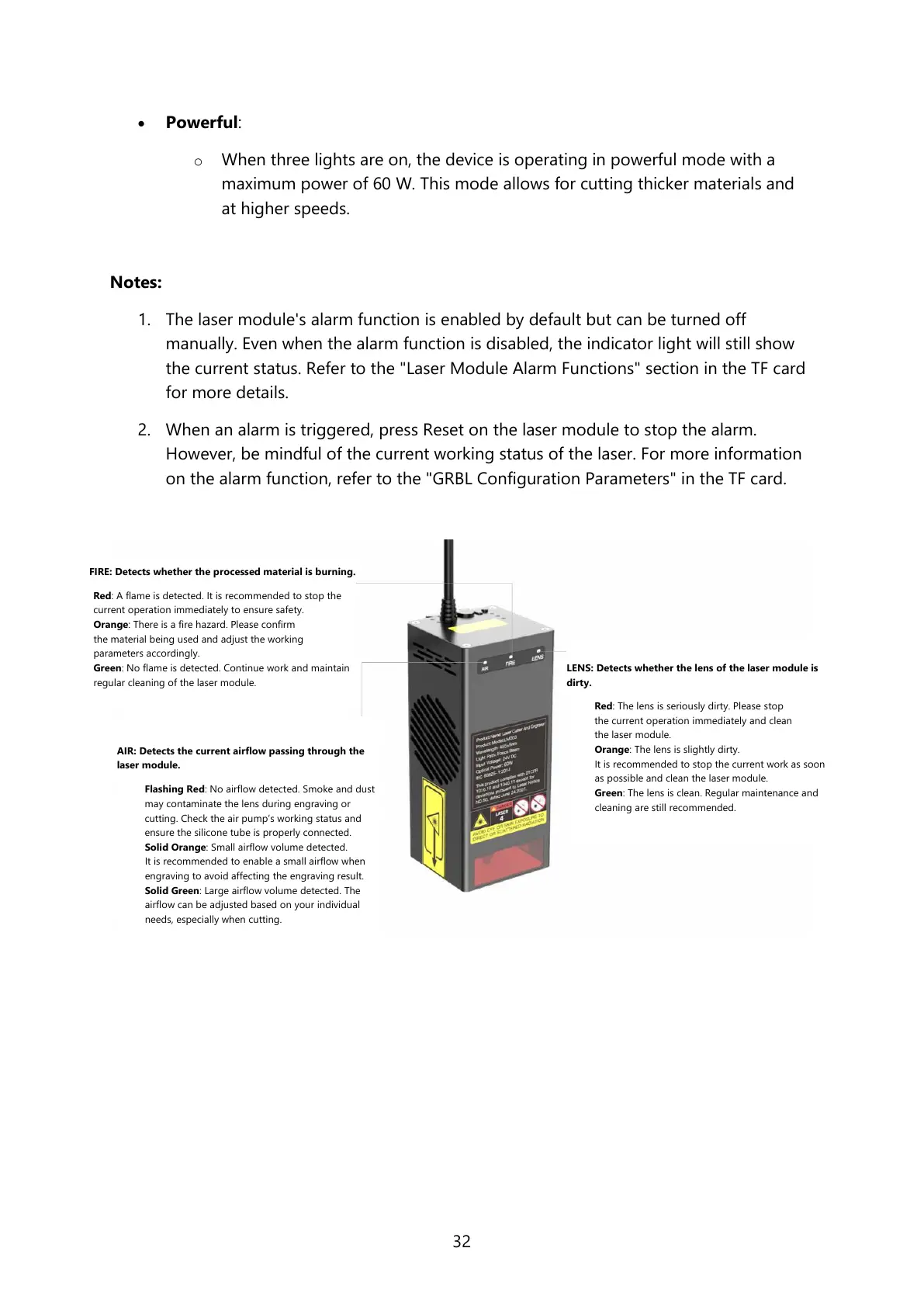
FIRE: Detects whether the processed material is burning.
Red: A flame is detected. It is recommended to stop the
current operation immediately to ensure safety.
Orange: There is a fire hazard. Please confirm
the material being used and adjust the working
parameters accordingly.
Green: No flame is detected. Continue work and maintain
regular cleaning of the laser module.
AIR: Detects the current airflow passing through the
laser module.
Flashing Red: No airflow detected. Smoke and dust
may contaminate the lens during engraving or
cutting. Check the air pump’s working status and
ensure the silicone tube is properly connected.
Solid Orange: Small airflow volume detected.
It is recommended to enable a small airflow when
engraving to avoid affecting the engraving result.
Solid Green: Large airflow volume detected. The
airflow can be adjusted based on your individual
needs, especially when cutting.
LENS: Detects whether the lens of the laser module is
dirty.
Red: The lens is seriously dirty. Please stop
the current operation immediately and clean
the laser module.
Orange: The lens is slightly dirty.
It is recommended to stop the current work as soon
as possible and clean the laser module.
Green: The lens is clean. Regular maintenance and
cleaning are still recommended.



 To Next Page