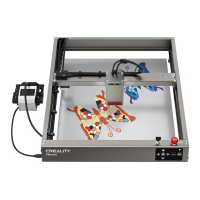
The Creality Falcon Pro 10W is a laser engraving and cutting machine designed for various creative and industrial applications. It offers both PC-controlled and offline (TF card) operation modes, providing flexibility for users.
Function Description:
The primary function of the Creality Falcon Pro 10W is to engrave and cut materials using a high-density laser beam. It is capable of processing a wide range of materials, including cardboard, wood, bamboo, rubber, leather, fabric, acrylic, and plastic. The machine operates by directing a focused laser beam onto the workpiece, causing gasification without combustion, which allows for precise and detailed engraving or cutting.
The device supports both real-time control via a PC (using LaserGRBL or LightBurn software) and offline operation using a TF card. For offline use, users can generate G-code files from LightBurn, save them to a TF card, and then insert the card into the machine. The machine will then automatically process the file. The control box features a button for initiating, pausing, resuming, and stopping engraving tasks, as well as for entering preview mode to frame the working area. An integrated air pump system is included to assist in clearing debris and improving cutting performance.
Important Technical Specifications:
- Model: Creality Falcon 10W
- Machine size: 568mm x 638mm x 198mm
- Net weight: 5.6 Kg
- Operation system: Windows / MacOS
- Input: 100-240V~ 50-60Hz
- Output: DC 24.0V 3.0A
- Range of operating temperature: 0℃-35℃
- Safety certification: IEC60825, FDA, CE, ROHS, FCC, UKCA, UL, PSE
- Engraving size: 400mm x 415mm
- Laser source: Semiconductor laser unit
- Laser wave length: 455±5nm
- Laser power: 10W
- Safety class: Class IV (FDA classification standard)
- Laser engraving software: LaserGRBL, LightBurn
- Format files: jpeg, jpg, png, bmp, svg, dxf
- Type of supporting materials: Cardboard, wood, bamboo, rubber, leather, fabric, acrylic, plastic, etc.
Usage Features:
The Creality Falcon Pro 10W offers several features designed to enhance user experience and safety:
- Flexible Control: Users can control the machine either directly from a PC via a Type-C cable or by loading G-code files onto a TF card for offline operation. An adapter is provided for computers without a USB-A port.
- Multi-level Fixed Focus Bar: This accessory helps users easily set the correct focal length for different material thicknesses, ensuring optimal engraving and cutting results. It is recommended to elevate the laser module as far as possible from the workbench while maintaining the correct focal length.
- Preview Mode: Before starting an engraving or cutting job, the machine can enter a preview mode where the laser module emits a weak beam to outline the target working area. This allows users to adjust the material position accurately.
- Pause and Resume Functionality: During operation, users can pause the engraving process by pressing the control button and resume it later.
- Emergency Stop: The machine is equipped with an emergency stop button and a safety lock for immediate shutdown in case of an emergency.
- Safety Features: The device includes a safety lock and will turn off the laser if it overturns or moves suddenly during operation, accompanied by an alarm and flashing indicator light. Goggles are provided to protect users' eyes from laser exposure.
- Air Pump Integration: An air pump is included to provide airflow during engraving and cutting, which helps to clear smoke and debris, resulting in cleaner cuts and improved performance. The air pump connects to the control box and the laser module via a silicone tube.
- Firmware Updating: The firmware can be updated by downloading the latest ".bin" file from the Creality website, saving it to the root directory of a TF card, and inserting it into the machine before powering on. The machine will automatically update, indicated by a buzzer sound.
Maintenance Features:
- Regular Cleaning: Users are advised to regularly clean the tripod and laser module with a dry cloth when the power is off to ensure optimal performance and longevity.
- Protective Lens: The machine comes with a protective lens, which should be maintained to ensure clear laser output. A clean cloth is provided for this purpose.
- Safe Storage: The machine should be stored in a well-ventilated, cool, and dust-free place, away from combustible and explosive substances, volatile solvents, or heat sources.
- Power Cord Usage: Only the specific attached power cord should be used during installation to prevent electrical issues.
- Laser Module Handling: The laser module should only be installed and removed when the machine is powered off to prevent damage or injury.

 Need help?
 General






 To Next Page