Software Operation
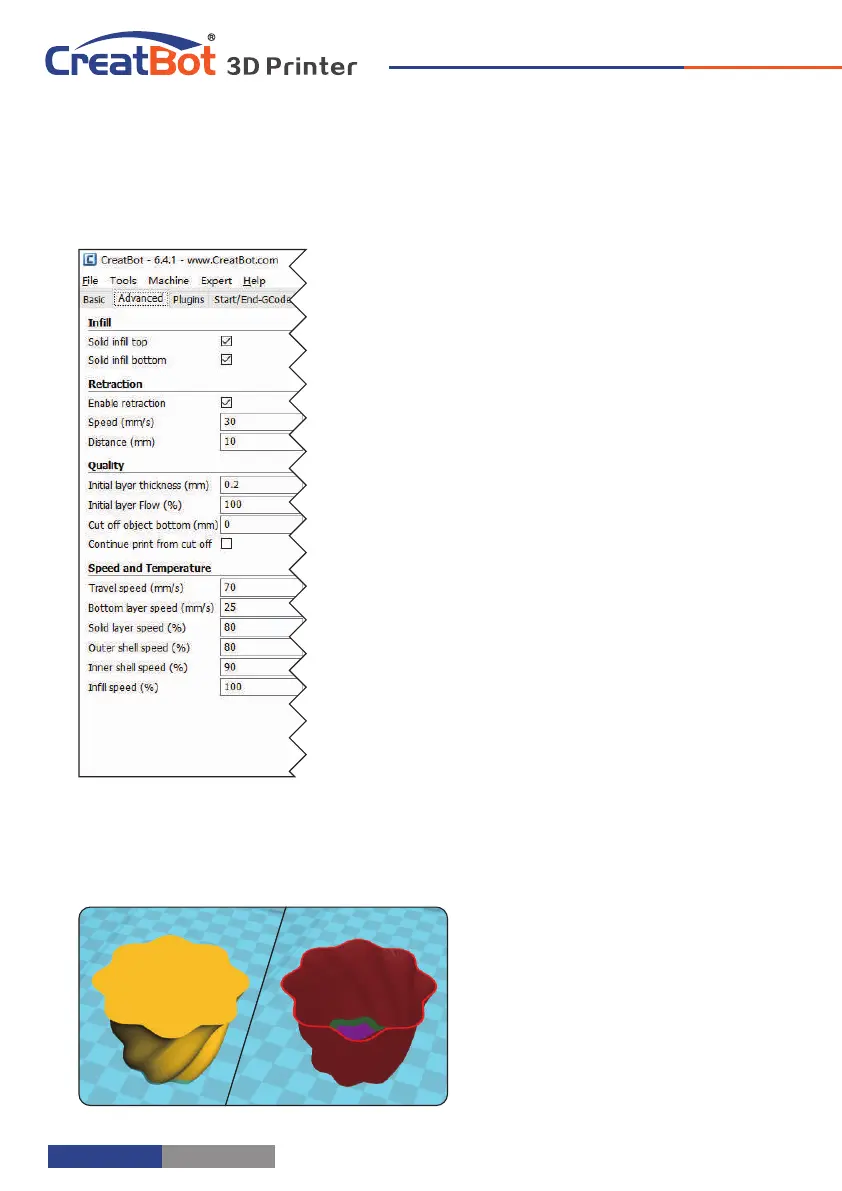
Advanced Setting
Solid fill top: Refers to whether to print the top surface of the
model, uncheck will print it with infill method.
Solid fill bottom: Same as above, and so on.
Spiralis print: Refers to the method of spiral printing the outer
wall of the model (single layer), and this feature is very
suitable for print glass vase model.
Enable retraction: When the nozzle is moving over a none-
printed area, withdraw a certain length length filament to
prevent overflow.
Retract speed: The speed of retraction, too fast can lead
motor out of step, too slow increase printing time.
Retract distance: The length of the filament when enable
retraction.
First layer thickness: Height of the first layer of printing,
generally greater than 0.15mm.
First layer flow: When the set of the first layer is too high, it
can be appropriate to increase the extrusion.
Cut off object bottom: This can be used for objects that do
not have a flat bottom.
Continue print: Being "power outages continued" be
substituted.
Travel speed: The speed when moving over a non-printed
area.
First layer speed: Slightly slow speed can enhance adhesion
model on the platform.
Solid layer speed: The speed is a percentage here, which reference to the global print speed, a
combination of different speeds, you can both get a good print quality and a faster print
time.
Spiralise Printing
- 28 -
Export Setting
Software Operation
Notice: Most of the setting have been optimized, If you want
restore default configuration,use the menu "Tools"->"Reset
profile to default".
Nozzle size: Set the nozzle
size.
Diameter: Accurate
measurement of your
filament gives better
quality prints.
Minimum travel: The
minimum distance
which can trigger
filament retract.
Minimum extrusion: The
minimal amount of
extrusion that needs to
be done before
retracting.
Enable combing: Combing
is the act of avoiding
holes in the print for the
head to travel over.
Wipe tower: Is a small
tower next to your
print where the nozzle
wipes itself clean when
switching nozzles.
Dual extrusion switch amount: Amount of retraction when switching nozzle with dual-
extrusion, a value of 15mm seems to generate good results.
Cooling fan: The extra cooling fan is essential while printing small model, but when print
ABS material, the max fan speed should not more than 50%.
Skirt: The skirt is a line drawn around the model at the first layer. This helps to prime your
extruder, and to see if the model fits on your platform.
Brim: The amount of lines used for a brim, more lines means a larger brim which sticks better.
- 29 -



 To Next Page