13
ENGLISH
You can choose to display the 12 or 24 hour clock by pressing the DEFROST/CLOCK button.
1. In standby mode, press and hold DEFROST/CLOCK button for 3 seconds to choose 12-hour
clock. (If you want the 24-hour clock, press again.)
2. Rotate the MENU/WEIGHT/TIME dial to set the hour.
3. Press the DEFROST/CLOCK button to conrm.
4. Rotate the MENU/WEIGHT/TIME dial to set the minutes.
5. Press the DEFROST/CLOCK button again to conrm.
Note: During cooking you can check the current time by pressing the DEFROST/CLOCK
button.
In standby status, turn the MENU/WEIGHT/TIME selector repeatedly to set the cooking
time. The maximum time is 10 minutes and the oven will automatically start working at
100% power.
To cook with microwave power only, press the POWER button several times to select the
cooking power. Then turn the MENU/WEIGHT/TIME dial to set the desired time. The max-
imum cooking time is 60 minutes. The oven will start to work after pressing the MENU/
WEIGHT/TIME selector.
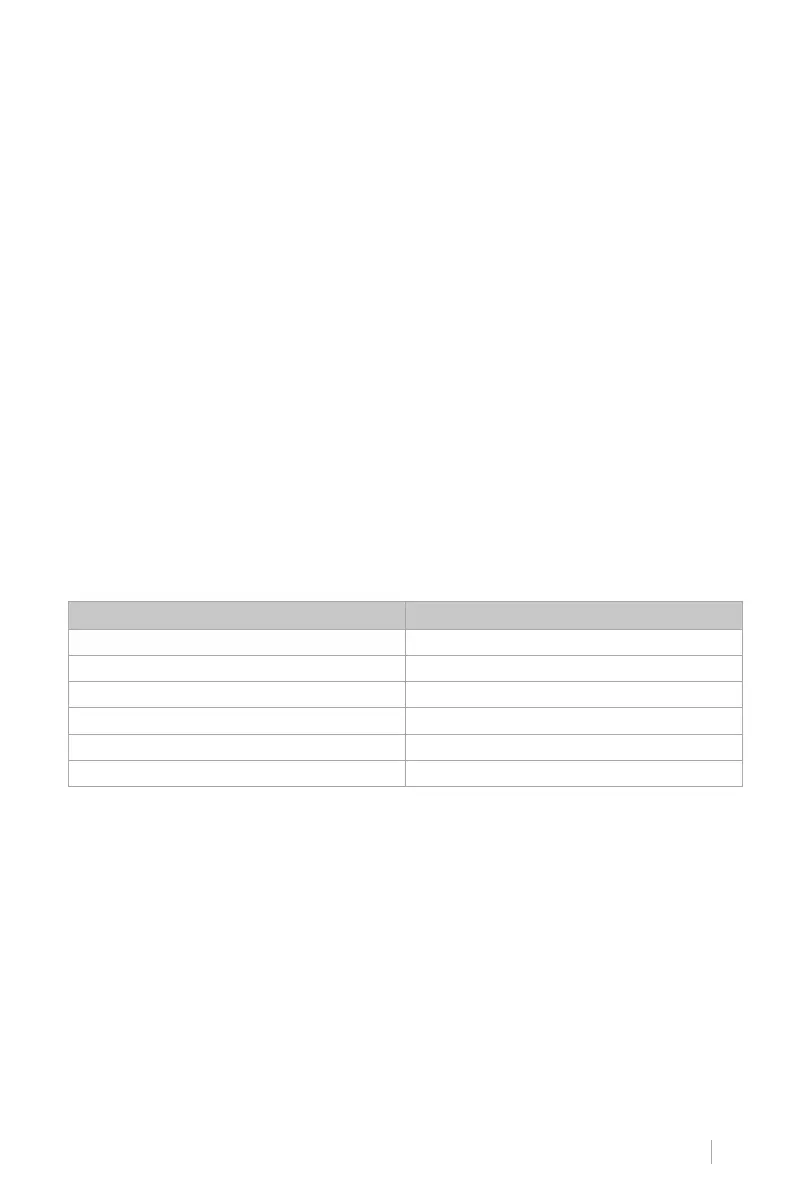
Choose the power by pressing the POWER button:
CLOCK SETTING
QUICK START
MICROWAVE COOKED
POWER BUTTON PRESSES COOKING POWER
Once 100%
Twice 80%
3 times 60%
4 times 40%
5 times 20%
6 times 0%
For example, if you want to cook for 5 minutes at 60% microwave power.
1. Press the POWER button repeatedly until 60 is displayed on the screen.
2. Turn the MENU/WEIGHT/TIME dial to 5:00.
3. Press the MENU/WEIGHT/TIME selector to conrm.
Note: During cooking, you can check the current cooking power by pressing the POWER but-
ton.


 To Next Page
 Loading...