12
ENGLISH
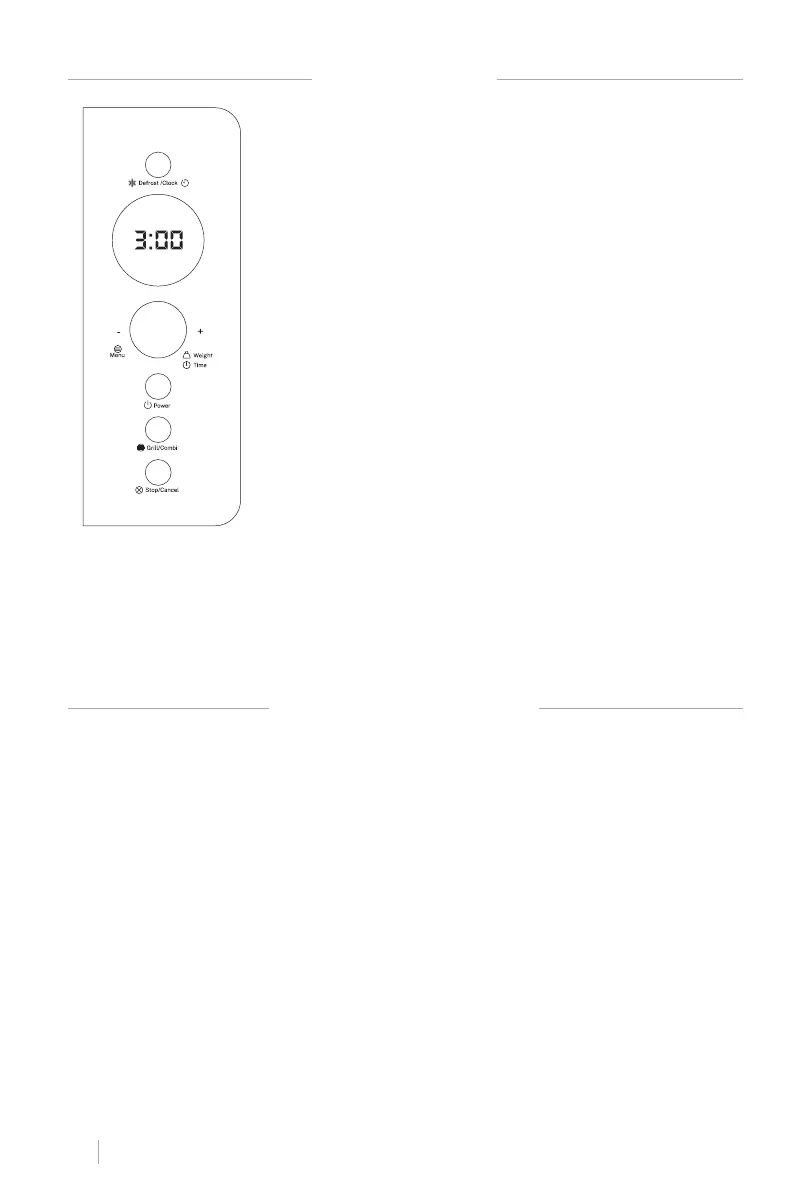
CONTROL PANEL
SCREEN
• Cooking time, power indicators and time are displayed.
DEFROST/CLOCK
• Press once to set the fast defrost program.
• Press twice to set defrost program by weight. Both the defrost
time and power are set automatically once the food category
and weight are chosen.
• Press to set the microwave clock.
MENU/WEIGHT/TIME (+,-)
• Turn the selector to enter the weight of the food, the cooking
time or the hour.
• Press to start cooking or defrosting programs.
• Press to set the quick start schedule.
• Turn the selector to choose a self cook menu.
POWER
• Use it to adjust the power level. To check the power during
cooking, press the power button.
OPERATING INSTRUCTIONS
• When the microwave is plugged in for the rst time, you will hear a beep and the display
will show “1:00” and a clock symbol.
• During setting mode, the system will return to standby mode if there is no action within 20
seconds.
• During cooking, if you press the STOP/CANCEL button once or open the door, the program
will pause. Press MENU/WEIGHT/TIME button to restart it, but if you press STOP/CANCEL
twice, it will cancel the program.
• When nishing cooking, the system will beep several times every two seconds to remind
the user until they press any button or open the door.
• For all cooking modes whose time is more than 2 minutes, when the door is opened or the
program is stopped, the oven fan will keep running for 3 minutes automatically to cool the
oven and prolong the oven life.
GRILL/COMBI
• Use it to adjust grill cooking.
• Use it to set the combined grill and microwave cooking.
STOP/CANCEL
• Press to cancel previously programmed power level, cook or defrost times.


 To Next Page
 Loading...