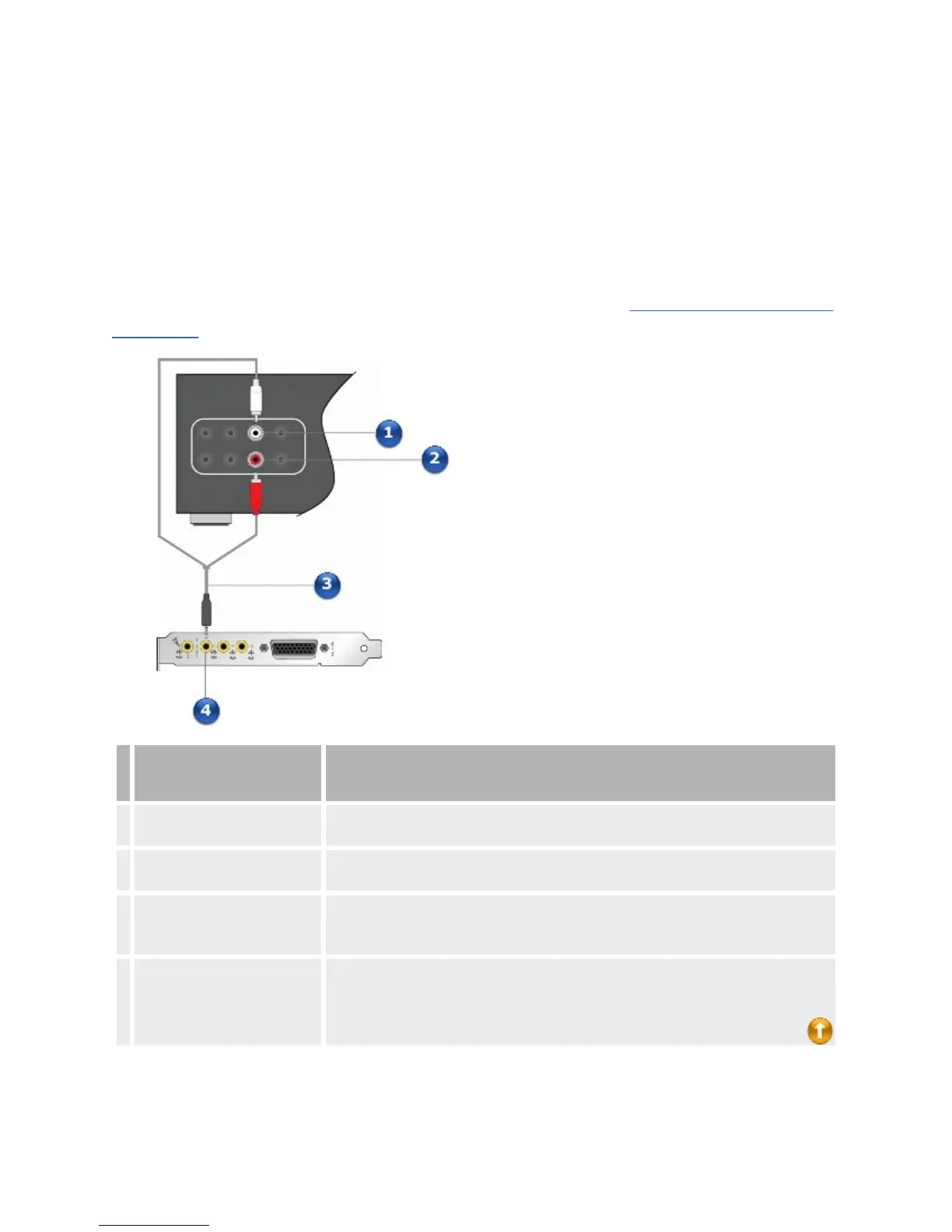
Connectingamultichannelhometheaterreceiver
Ifyouhaveamultichannelhometheaterreceiver,youcanconnectitdirectlyto
theSoundBlasterX-Fiaudiocard'sLineOut1,LineOut2andLineOut3jacks
asshownbelow.Formoreinformationonmultichannelhometheaterreceiver
speakerconnections,consulttheUser'sGuideofyourhometheaterreceiver.
Formoreinformationontheappropriatejackstouse,seeStereoand4-PoleJack
Diagrams.
Jack,Connectoror
Cable
Description
1. FrontLeftjack
ConnectthisjacktotheLineOut1jackonyourSoundBlasterX-Fiaudiocard,using
a3.50mm(1/8-inch)stereo-to-RCAcable(availableseparately).
2. FrontRightjack
ConnectthisjacktotheLineOut1jackonyourSoundBlasterX-Fiaudiocard,using
a3.50mm(1/8-inch)stereo-to-RCAcable(availableseparately).
3.
3.50mm(1/8-inch)stereo-to-
RCAcable(available
separately)
ConnectstheSoundBlasterX-Fiaudiocardandhometheaterreceiver.
4. LineOut1jack
ConnectthisjacktotheFrontLeftandFrontRightjacksonamultichannelhome
theaterreceiver,usinga3.50mm(1/8-inch)stereo-to-RCAcable(available
separately).














 To Next Page