1. Headphonejack
Connectstereoheadphoneswitha6.35mm(1/4-inch)stereoplugtothisjack.Speakeroutputwillbe
mutediftheAutomaticallymutespeakerscheckboxisselectedinAudioConsoleorEntertainment
Mode.Formoreinformation,refertotheironlineHelp.
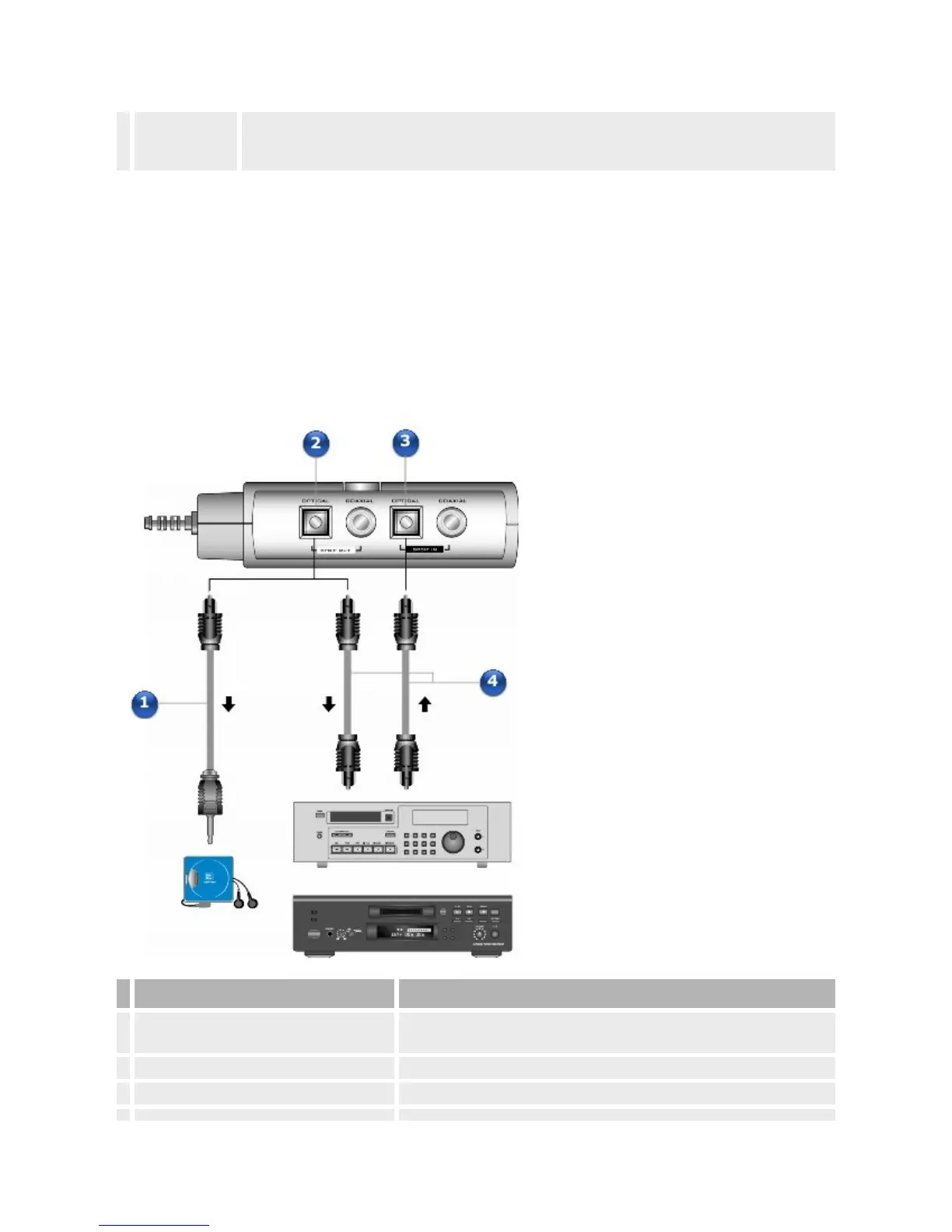
TorecordmusictoyourDATorMiniDiscrecorder,connectyourrecording
devicetotheOpticalorCoaxialSPDIFOutconnectorontheDigitalI/O
Module*,X-FiI/ODriveorX-FiI/OConsole.
YoucanplaybackmusicfromyourDATorMiniDiscplayerbyconnectingitto
theOpticalorCoaxialSPDIFInjack.
ConnectingyourDATorMiniDiscrecordingdevicetotheDigital
I/OModule
Jack,ConnectororCable Description
1.
3.50mm(1/8-inch)opticalminiplug-to-
opticalSPDIFcable(availableseparately)
ConnectstotheOpticalSPDIFOutjackonyourDigitalI/OModuleand
totheOpticalInjackonyourportableMiniDiscplayer/recorder.
2. OpticalSPDIFOutjack ConnecttheOpticalSPDIFInjackonrecordingdevicestothisjack.
3. OpticalSPDIFInjack ConnecttheOpticalSPDIFOutjackonplaybackdevicestothisjack.














 To Next Page