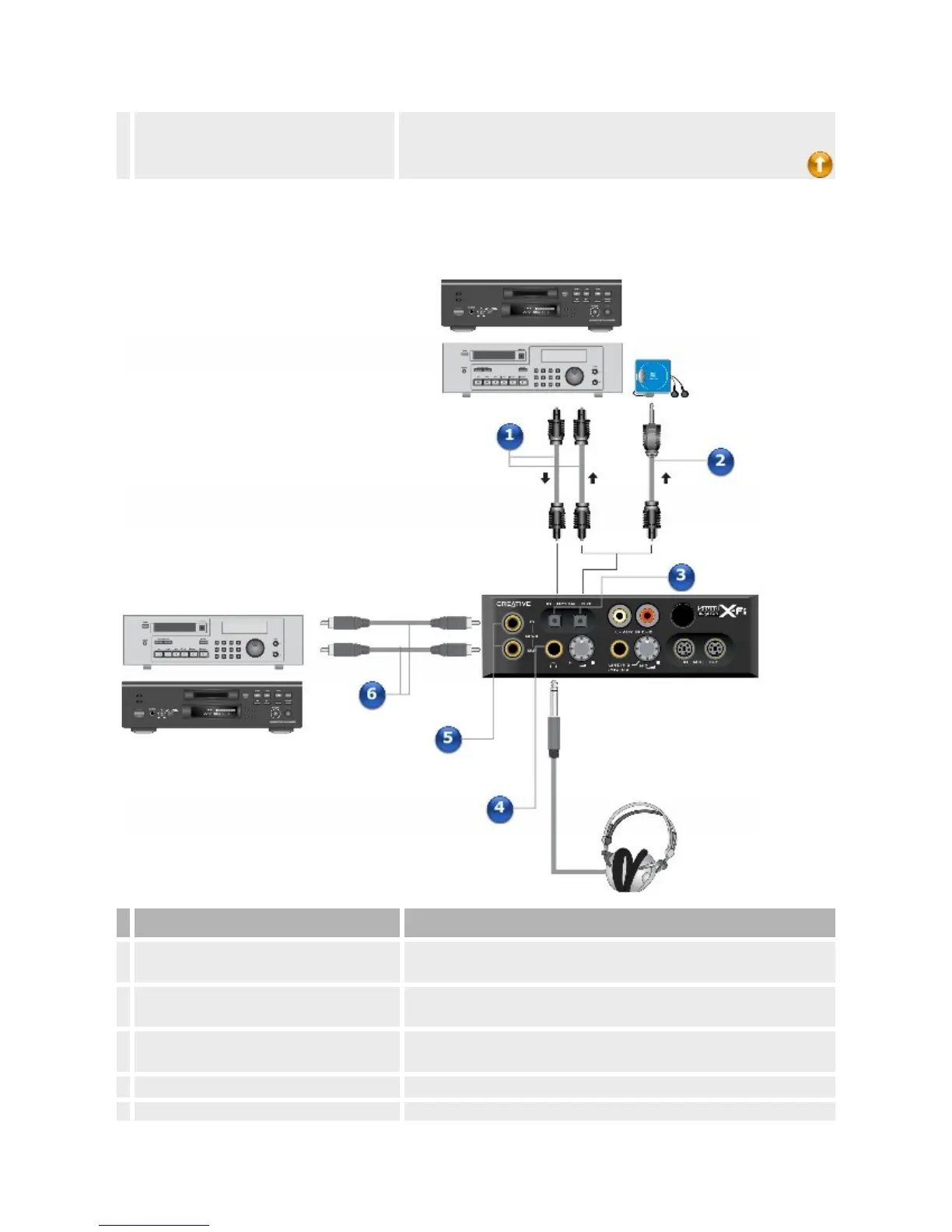
4. Opticalcables(availableseparately)
ConnecttotheOpticalSPDIFIn/OutjacksonyourDigitalI/OModule
andyourplayback/recordingdevice.
ConnectingyourDATorMiniDiscrecordingdevicetotheSound
BlasterX-FiI/ODrive
Jack,ConnectororCable Description
1. Opticalcables(availableseparately)
ConnecttotheOpticalSPDIFIn/OutjacksonyourX-FiI/ODriveand
yourplayback/recordingdevice.
2.
3.50mm(1/8-inch)opticalminiplug-to-
opticalSPDIFcable(availableseparately)
ConnectstotheOpticalSPDIFOutjackonyourX-FiI/ODriveandto
theOpticalInjackonyourportableMiniDiscplayer/recorder.
3. OpticalSPDIFIn/Outjacks
ConnecttheOpticalSPDIFIn/Outjacksonrecording/playbackdevices
tothesejacks.
4. Headphonejack Connectstereoheadphoneswitha6.35mm(1/4-inch)plugtothisjack.














 To Next Page