ConnectingYourPlayertoaTV
Toviewyourplayer'scontentonalargerscreen,connectyourplayertoaTV
usingthesuppliedaudiovideocable.
1. SlidethePowerswitchonyourplayertowardsthePower iconandhold
itthereuntilthedisplaylightsup.
Ifyouarenotinthemainmenu,pressandholdtheMenu/Back button.
SelectSettings Photo/VideoSettings VideoOut.
SelectAuto(NTSC)orAuto(PAL).RefertotheUser'sGuideforyourTVif
youarenotsureaboutyourTV'sdisplayformat.
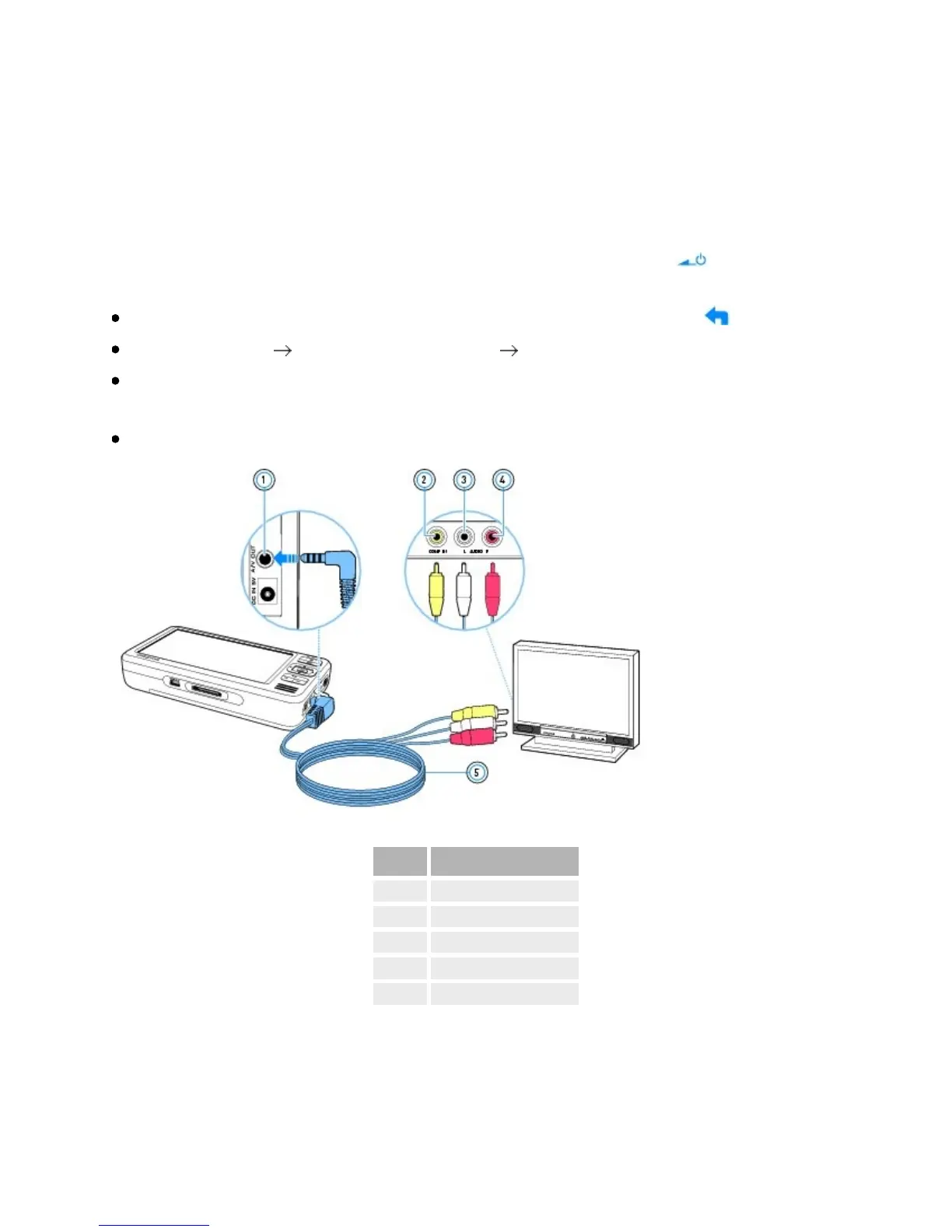
ConnectyourplayertoaTVwiththeaudiovideocable.
Component
1. A/VOutjack
2. VideoInjack
3. AudioIn(Left)jack
4. AudioIn(Right)jack
5. AudioVideocable



 To Next Page