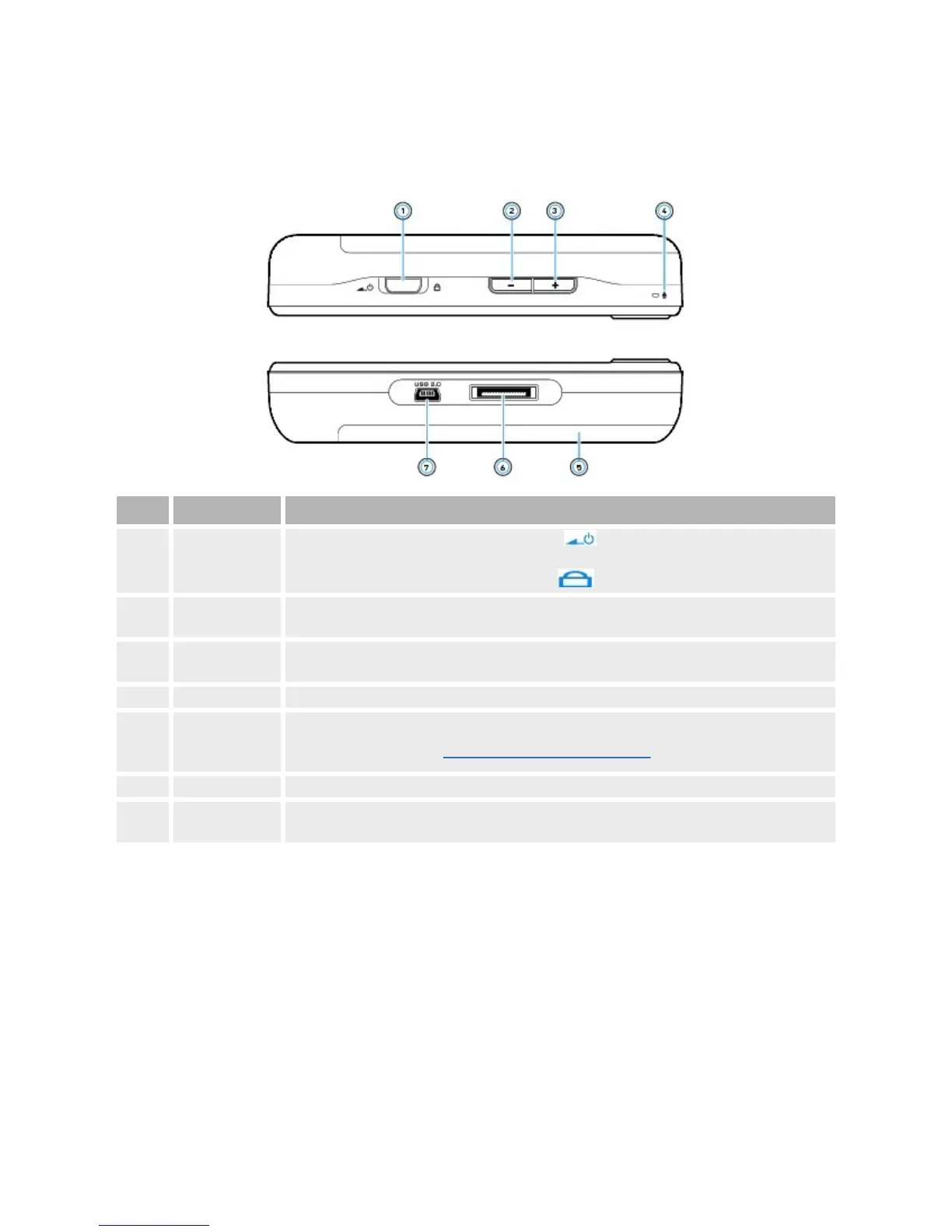
Topandbottomviews
Component WhatItDoes
1. Powerswitch
SlidethePowerswitchtowardsthePowericon andholdittheretoturnyourplayeron
andoff.
SlidethePowerswitchtowardstheLockicon todisableyourplayer'scontrols.
2.
VolumeDecrease
button
Presstodecreasethevolume.
3.
VolumeIncrease
button
Presstoincreasethevolume.
4. Microphone Makevoicerecordingswiththisbuilt-inmicrophone.
5.
Removeable
Lithium-Ion
battery
Removeandreinsertthebatterytoresetyourplayer.
Toremovethebattery,seeRemovingandInsertingtheBattery.
6. Dockconnector Connectstoadockingstation(availableseparately).
7. USB2.0port
Tochargeyourplayer'sbatteryortransferfiles,connectoneendofthesuppliedUSBcableto
thisport,andtheotherendoftheUSBcabletoyourcomputer'sUSBport.



 To Next Page