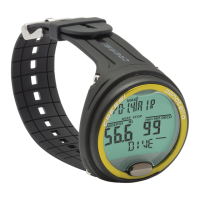
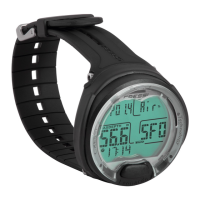
206
5 DIVE program; picture 8a GAGE program; picture 8b FAEE pro-
gram) and following the already described procedures. At
this point, depress button C ( ) once to switch on
the possibility of selection. Use again button C ( )
to select the maximum depth alarm and set the wished value
(between 0 and 324,7 ft.), by depressing button D ( ).
When the wished depth has been set, use again buttons C
( ) and D ( ), to switch on or off the alarm.
Depress button A ( ) for some seconds to revert back
to the normal display (picture 1).
Related topics:
• 2.4.1. - DIVE program parameters setting
• 2.5. - GAGE (or depth gauge/timer) program parameters
setting
• 2.6. - FAEE (or apnoea) program parameters setting
2.7.2. - Date and time adjustment (
SET
).
To adjust dare and time, depress button A ( ) in
sequence until the (SET) icon is displayed; then, depress button
C ( ) to select the function you wish to vary, accor-
ding to following sequence (picture 10):
1) Seconds; 2) Minutes; 3) Hours; 4) 12/24h;
5) Year; 6) Month; 7) Day.
The values are varied by pressing button D ( ).
Depress button A ( ) for some seconds to revert back
to the normal (picture 1).
NOTE: always check tome and date in order to get cor-
rect entries in you computer’s logbook.
Related topics:
• 2.2. - Clock function
• 4.2. - Dive logbook (LOG)
2.7.3. - Units of measure setting.
Cressi-sub computer can make computations both by
metric units (depth in meters and temperature in °C) and by
feet units (depth in feet and temperature in °F).
To change the units of measure, depress button A ( )
in order to get to the first menu of (DIVE) program (picture 5).
Then, depress button C ( ), making the (DIVE) flash.
At this point, depress buttons C+D in sequence and keep
them both depressed for about 6 seconds. While doing so,
PO2 value will be flashing, a sound alarm will start and the
new unit of measure will be displayed.
Depress button A ( ) for some seconds to revert back
to the normal display (picture 1).


 To Next Page