223
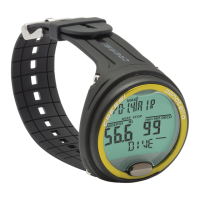
It supplies the following data (picture 42):
1 Mixture used for the dive: if an air dive, the (Air) icon
appears; if a Nitrox dive, the display will give its FO2%;
2 Water temperature at the maximum depth, given in °C or °F.
3 Surface interval since the previous dive, given in hours and
minutes.
4 The use of a safety factor SF1/2) .
To view the previous dives’ modes recorded in the logbook,
depress button D ( ) again. By keeping the button
depressed, you will enter a rapid sequence of the first display
modes related to the previous dives.
By depressing button C ( ), the display mode will
change, while by keeping it depressed you will enter a rapid
sequence of the first display modes related to the subse-
quent dives.
Related topics:
• 2.4.1. - DIVE program dive parameters setting
• 2.7.2. - Date and time adjustment
• 2.7.3. - Units of measure setting
• 3.1. - Air dive (DIVE )
• 3.2. - Hyper-oxygenated Nitrox mixture dive
• 3.3.3. - CNS toxicity display.
• 3.3.4. - PO2 alarms.
• 3.4.1. - Ascent rate
• 4.1.1. - Surface interval after a DIVE program
4.2.2. –
GAGE
program logbook
Cressi-sub computer stores data related to the last 30
hours’ dives (or to the last 60 dives) conducted in GAGE pro-
gram: the data are entered every 30 seconds in the logbook
(dive journal). To activate the logbook, while on surface,
depress button A ( ), in sequence, until the (LOG) icon
appears on the display (picture 43).
NOTE: Any dive lasting less than 30 seconds (data ente-
ring frequency) will not be stored.
‘s logbook is a multifunction instrument that allows to
view, on three different display modes, a full series of data rela-
ted to dives, starting with the most recent one in chronologi-
cal order.
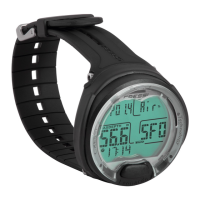
The main display mode (picture 43) shows the (LOG) function,
which supplies the following information:
1
GAGE icon
2 Dive’s year
3 Dive’s date (month and day) – in brackets the dive’s num-
ber in the daily series
NOTE: the first dive of the daily series is noted in brackets
with 1 (meaning dive 1), the second with 2 (dive 2), and so on.
4 Maximum depth reached during the dive, given in m or ft.
5 Dive’s number: the most recent dive’s information is given
first. When more than 60 dives are conducted, the oldest
dives are cancelled out.
6 Indicator of altitude level at which the dive has been con-
ducted (see chapter 2.2.);
7 SLOW icon meaning the maximum ascent rate has started
To view the second logbook display mode, just depress but-
ton D ( ). The mode’s number 1/3 is replaced by 2/3,
meaning the second of the available logbook modes related
to the dive.
ENGLISH


 To Next Page