FlipTop Touch Screen Crestron FT-TS600
14 • FlipTop Touch Screen: FT-TS600 Operations & Installation Guide – DOC. 7585B
Ethernet Setup
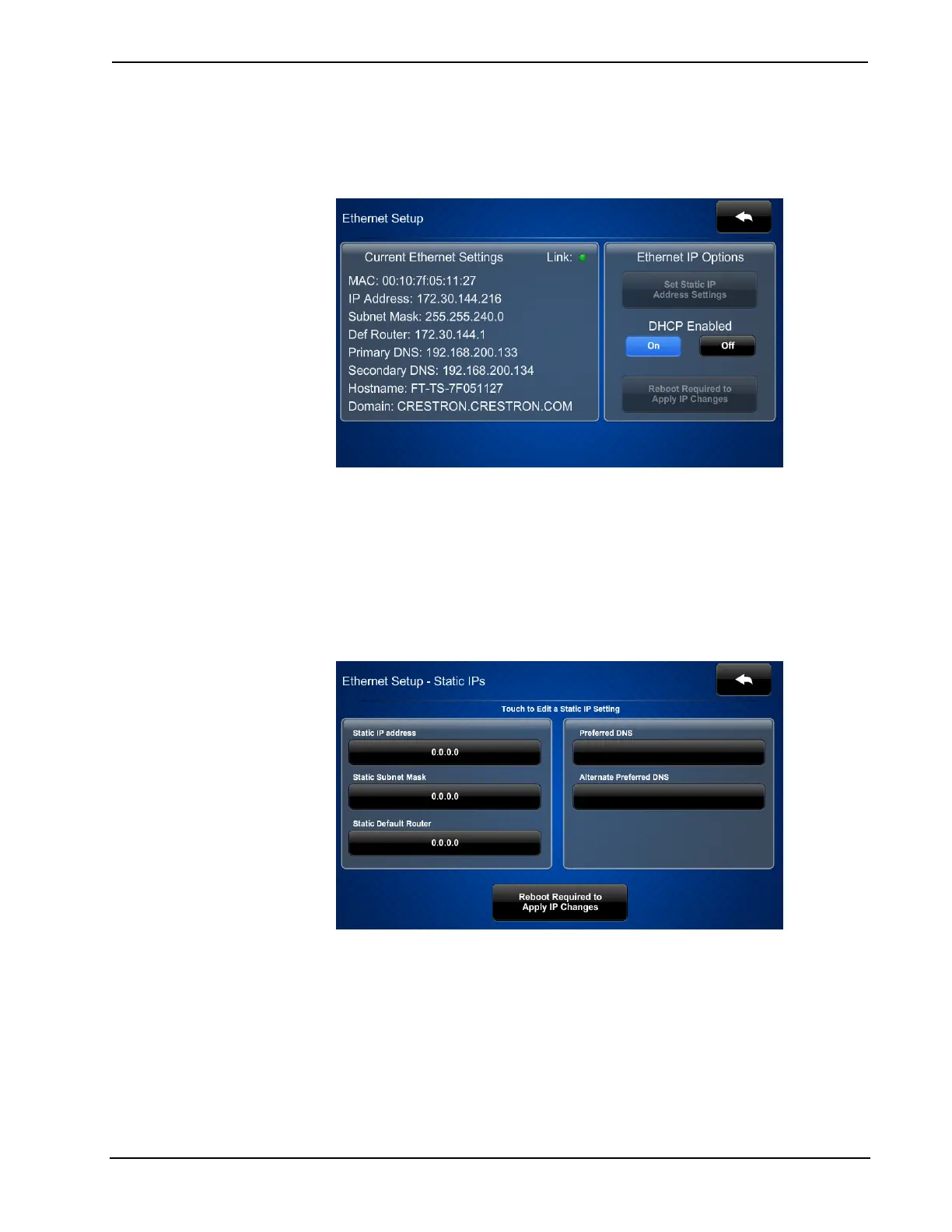
On the “Setup” menu, touch Ethernet Setup to display the “Ethernet Setup” menu.
“Ethernet Setup” Menu
The “Ethernet Setup” menu displays the touch screen’s Mac and IP Address, Subnet
Mask, Def Router, Primary DNS, Secondary DNS, Hostname and Domain. There are
controls for turning DHCP On or Off as well as a Set Static IP Address Settings
button, which provides access to controls which allow editing of these settings. This
screen also contains a Link indicator to show the status of the Ethernet connection.
Touch Set Static IP Address Settings to display the “Ethernet Setup – Static IPs”
screen.
“Ethernet Setup – Static IPs” Screen
To edit the Static IP Address, Static Subnet Mask, Static Default Router, Preferred
DNS or Alternate Preferred DNS, touch the button directly under the label for the
entry to edit. The on-screen numeric keypad opens.











 To Next Page