16 GB
Getting started / Use
Getting started
default 60 kg appear on the LCD screen. Press the MODE
4
and CLEAR
1
buttons to set the required weight.
Note: The weight can be set within a range of 30 to 150 kg.
j Confirm your entry by pressing the SET button
3
. Time
23
and
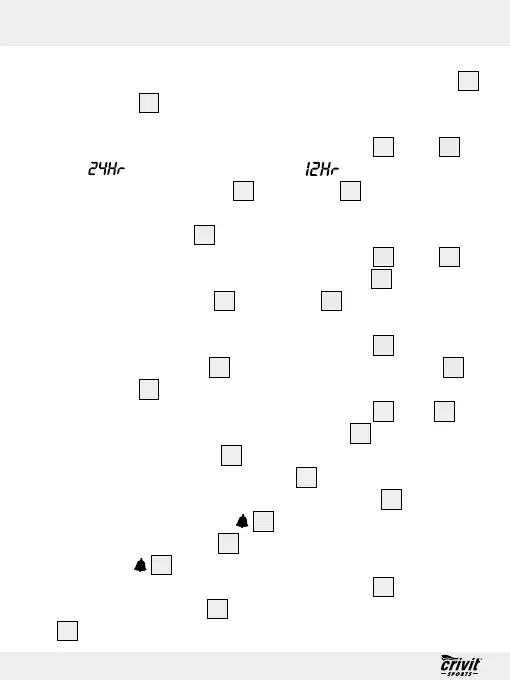
(24-hour format) and / or (12-hour format)
light up. Press the MODE
4
and CLEAR
1
buttons to set the
required time format.
Note: The PM icon
19
stands for afternoons in 12-hour format.
j Confirm your entry by pressing the SET button
3
. Time
23
appears and the hours of the numeric display
18
start to
flash. Press the MODE
4
and CLEAR
1
buttons to set the
required time.
j Confirm your entry by pressing the SET button
3
. The minutes
of the numeric display
18
start to flash. Press the MODE
4
and CLEAR
1
buttons to set the required time.
j Confirm your entry by pressing the SET button
3
. Alm
21
ap-
pears and the hours of the numeric display
18
start to flash.
Press the MODE button
4
to set the required alarm time.
IMPORTANT! The CLEAR button
1
has a different function
when setting the alarm. Press the CLEAR button
1
to activate
the alarm. The alarm icon
22
appears on the LCD screen.
Press the CLEAR button
1
again to deactivate the alarm. The
alarm icon
22
disappears (see “Alarm Function”).
j Confirm your entry by pressing the SET button
3
. The minutes
of the numeric display
18
start to flash. Press the MODE button
4
to set the required alarm time.



 To Next Page