21 GB
Use
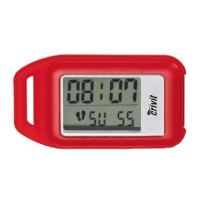
Using the stopwatch alone (the device is in count or
hold mode):
j Press the FUNC button
2
twice to enter stopwatch
mode. Stopwatch
24
appears on the LCD screen.
Note: The pedometer is not active in stopwatch mode.
appears on the LCD.
j Press the MODE button
4
to start the stopwatch.
j Press the MODE button
4
again to stop the stopwatch.
j Press the CLEAR button
1
to set the stopwatch to 0.
j Press the FUNC button
2
to return to count mode.
Using the stopwatch with the pedometer (the device
must be in count mode):
j Press the FUNC button
2
twice to enter stopwatch
mode. Stopwatch
24
appears on the LCD screen.
j Press the MODE button
4
to start the stopwatch.
j Press the FUNC button
2
to switch to count mode. The
pedometer is active. The stopwatch continues running in the
background.
j Press the FUNC button
2
twice to return to stopwatch mode.
j Press the MODE button
4
again to stop the stopwatch.
j Press the CLEAR button
1
to set the stopwatch to 0.
Note: The stopwatch can only be set to 0 in stopwatch
mode.
j Press the FUNC button
2
to return to count mode.



 To Next Page