Operation Manual
page 7
LPS Series Power Amplifiers
Wiring
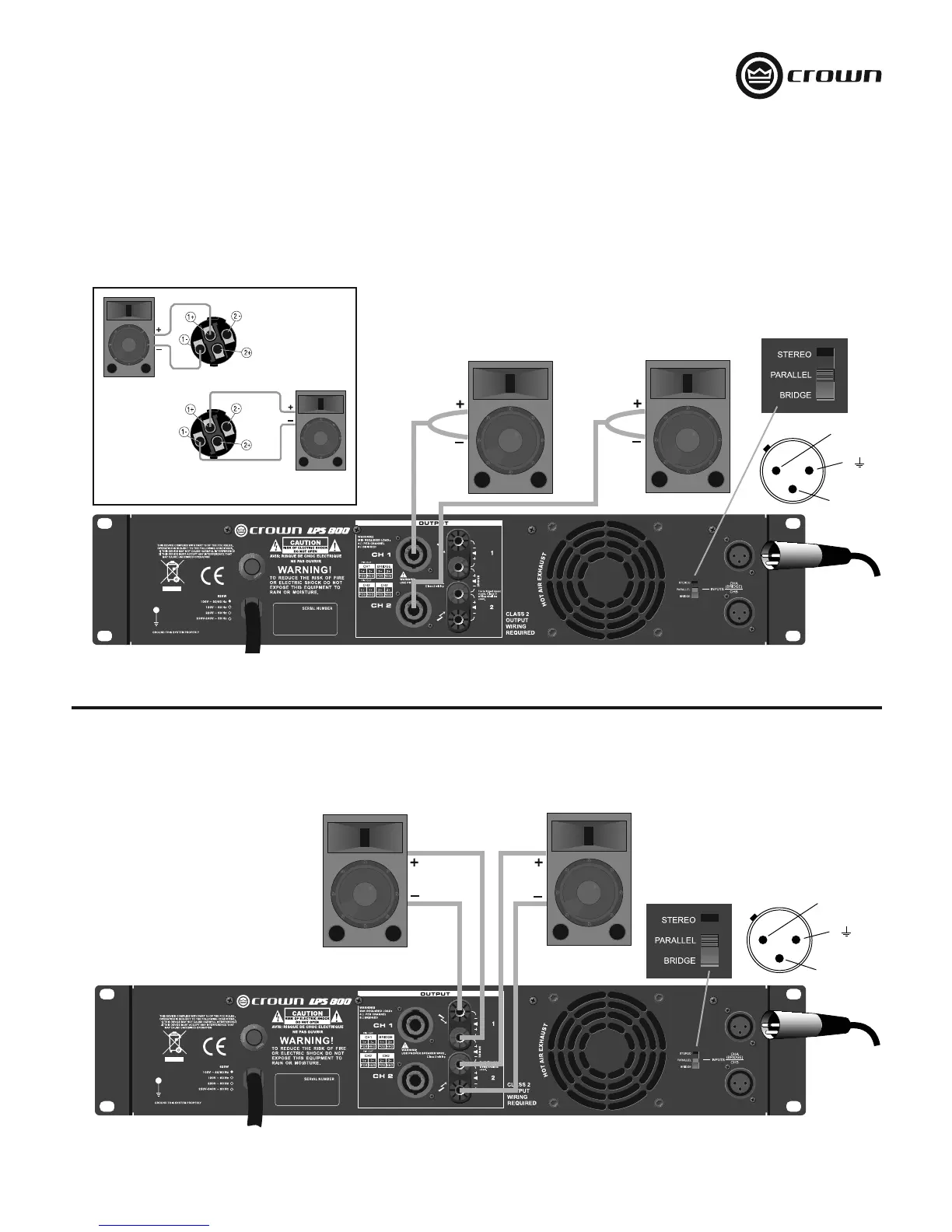
Figure 7. Parallel Wiring With Speakon
®
Connectors
Figure 8. Parallel Wiring With Binding Post Connectors
PARALLEL WIRING USING THE SPEAKON
®
CONNECTORS
With this wiring, a signal sent to Channel 1 is paralleled to both channels so that it is reproduced by both speakers.
1. See Figure 7. On the back panel, set the Output Mode Switch to PARALLEL.
2. Wire the speakers to the Speakon
®
connectors as shown.
PARALLEL WIRING USING THE BINDING POST CONNECTORS
With this wiring, a signal sent to Channel 1 is paralleled to both channels so that it is reproduced by both speakers.
1. See Figure 8. On the back panel, set the Output Mode Switch to PARALLEL.
2. Wire the speakers to the binding post connectors as shown.
2 +
1
3
–
Channel 1
Loudspeaker
Channel 2
Loudspeaker
Top Speakon
(Channel 1)
Bottom
Speakon
(Channel 2)
2 +
1
3
–
Input signal
Input signal


 To Next Page