Commercial Audio Series Mixer-Amplifiers
Operation Manualpage 12
Commercial Audio Series Mixer-Amplifiers
Operation Manual page 13
3 Operation 4 Troubleshooting
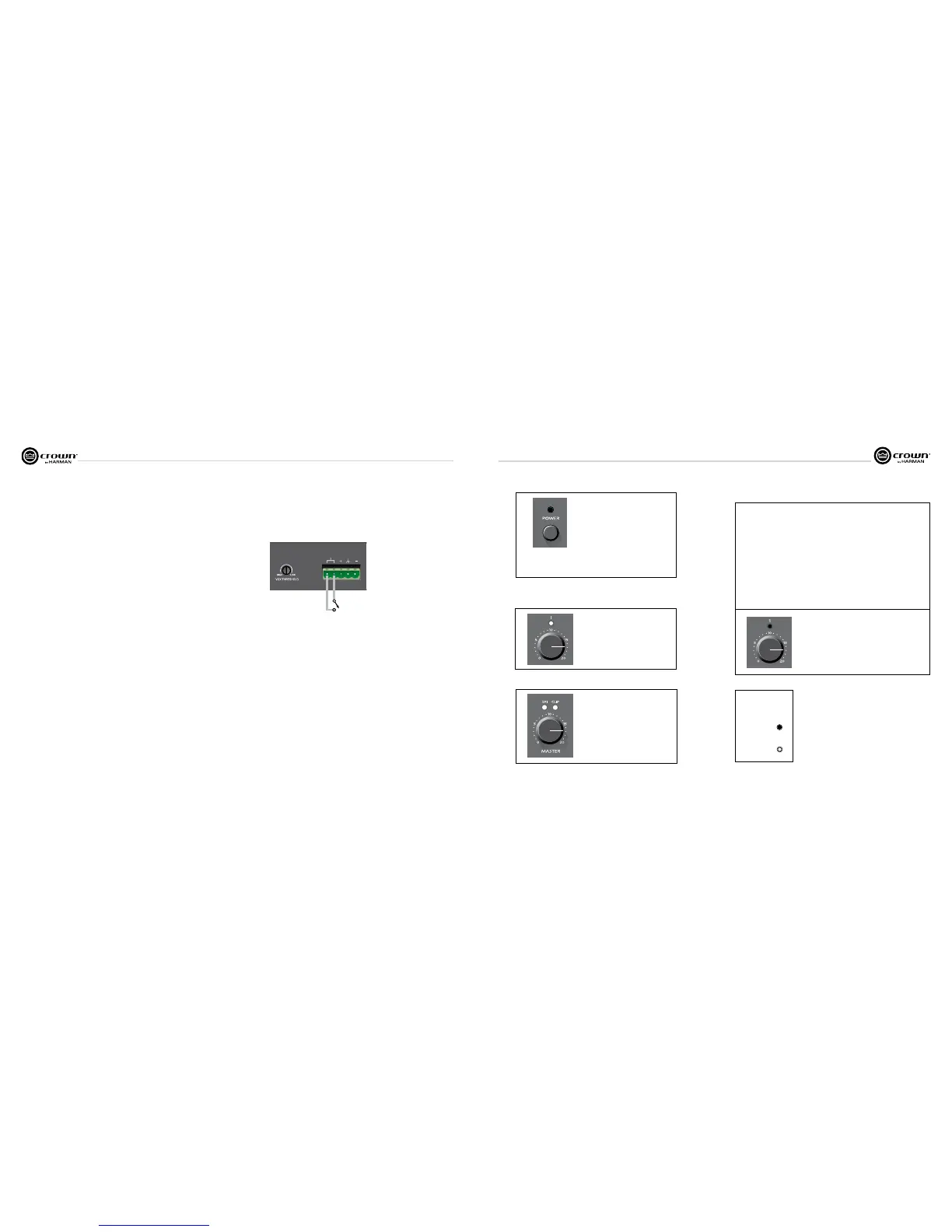
Figure 3.1 Priority Muting Controls and Connectors
3.1 Powering Up
1. Turn off any equipment connected to the Preamp Output connector.
2. Plug the amplifier’s power cord into a 3-wire grounded AC outlet.
3. Turn down the input volume controls.
4. Turn down the master volume control.
5. Turn on the Power switch. The Power indicator should glow.
6. Turn the input volume controls in use about 3/4 up.
7. Turn up the master volume control(s) until the desired loudness or power level is achieved.
8. Touch up the input levels as needed for music and voice.
9. Turn on any equipment connected to the Preamp Output connector.
If you ever need to make any wiring or installation changes, disconnect the power cord.
3.2 Priority Muting
If you want a microphone’s push-to-talk switch to mute the background music or other input
signals, follow this procedure. On the back of the 135MA or 160MA,
1. Turn DIP switch 2 off. Turn DIP switch 3 on.
2 . Connect a push-to-talk mic contact to the Priority Connector (Figure 3.1). Input 1 is the
priority input for the amplified output, so Input 1 mutes the other inputs.
3.3 Voice-Activated (VOX) Muting
If you want a voice to mute the background music or other input signals, follow this proce-
dure. On the back of the 135MA or 160MA,
1. Turn DIP switch 4 on. Turn DIP switches 2 and 3 off.
2. Talk into the microphone. Adjust the VOX Threshold trim pot on the back of the unit to set
how loud the voice must be before muting occurs. It can be set for no muting.
3.4 Music-On-Hold
On the back of the unit, adjust MOH Level Control to obtain the desired level of Music-On-
Hold in your phone system.
3.5 Security Knobs
To prevent user tampering with the knobs, you can order the accessory 10-pack of security
knobs from your Crown dealer, part no. S-Cover.
1. Pull off an existing knob.
2. Remove the nut.
3. Screw the security knob over the potentiometer shaft. The knob will not rotate.
CONDITION: No power to the
mixer-amplifier.
POSSIBLE REASON:
• The mixer-amplier’s Power switch is off.
• The mixer-amplier is not plugged into the
power receptacle.
• The mixer-amplier’s high-voltage power sup-
ply circuit breaker has tripped. Verify that the
AC mains voltage is correct.
CONDITION: Distorted sound.
POSSIBLE REASON:
• Input signal level is too high. Turn down your
input volume controls. NOTE: Your mixer- am-
plifier should never be operated at a level which
causes the Clip LEDS to illuminate constantly.
CONDITION: Distorted sound.
POSSIBLE REASON:
• Input signal level is too high. Turn down your
input volume controls. NOTE: Your mixer- am-
plifier should never be operated at a level which
causes the Clip LEDS to illuminate constantly.
• Master volume level is too high. Turn it down to
about 3/4 of maximum level.
CONDITION: No sound.
POSSIBLE REASON:
• The amplier is in “fault” mode. A Fault status
can be triggered when one of the amplifier’s
protection circuits is activated. First disconnect
your speakers from the affected channel(s)
one by one to determine if one of the loads is
shorted. If an amplifier channel has a thermal
fault, there will be no indication on the front
panel, but the amp will recover after cooling.
If operation does not return to normal after
restarting your amp, return the unit to Crown
or an authorized Crown Service Center for
servicing.
• No input signal.
• Input signal level is very low.
KEY
LED OFF
LED ON
Input 1
PRIORITY
Mic push-to-talk switch
CONDITION: No sound.
POSSIBLE REASON:


 To Next Page