ReDi 50A Quick User Manual
V . I p i r o u 4 5 , 1 5 1 2 5 M a r o u s i , Τ el: 210-8098700, Fax: 210-6122512
Site: w w w . c r y p t o . g r , Email: crypto@crypto.gr
2
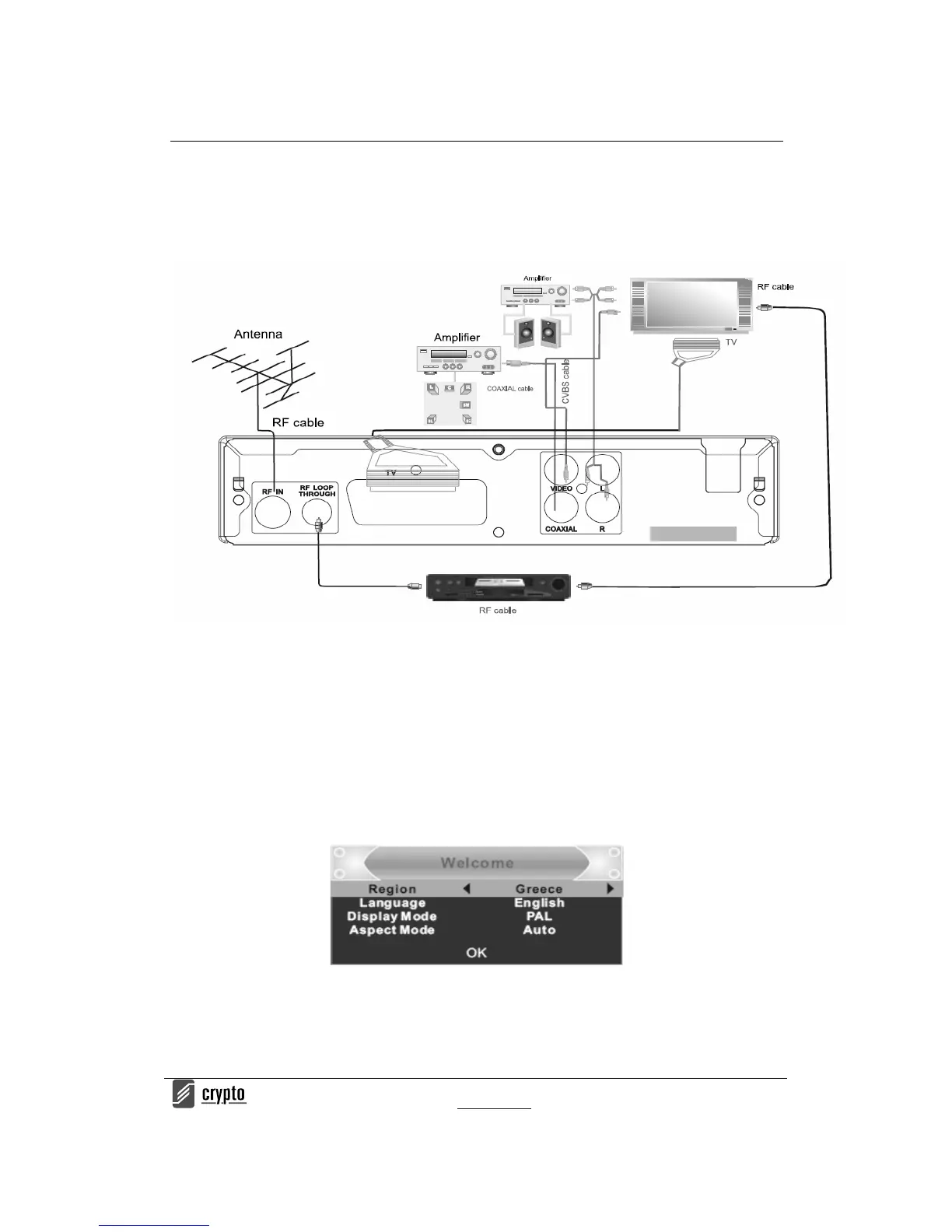
SYSTEM CONNECTIONS
GETTING STARTED FOR THE FIRST TIME
The very first time that the device is going to be used the “welcome” menu will a ppear. Press
the cursors buttons to adjust the region, language, Display Mode, Aspect Mode (according to
yo ur T V t yp e yo u c a n a dj us t b et w e en 16 :9 o r 4 :3 o r a u to t o l et t he de vi c e t o p ick o ne
automatically according to the TV type that you have).
When you are done just select ok and press ok button on your remote to start the channel
search.
Channel Scan
T o b e a b l e t o s c a n f o r c h a n n e l s a f t e r y o u s t a r t t h e d e v i c e f o r t h e f i r s t t i m e d o t h e f o l l o w i n g .


 To Next Page