6
ULTRASONIC CLEANING SYSTEMS ULTRASONIC CLEANING SYSTEMS
CONTROL PANEL AND FUNCTIONS
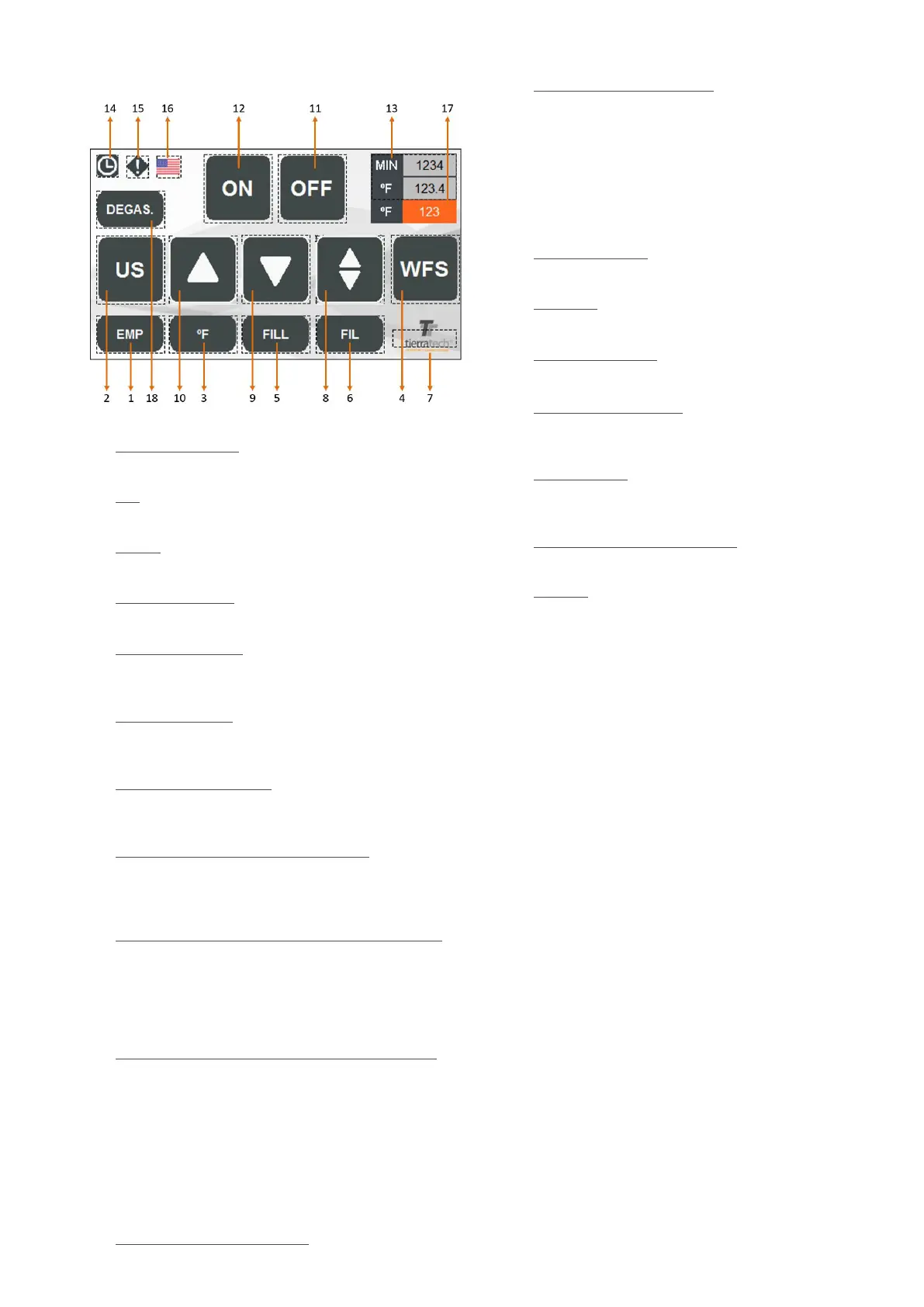
1. EMP (if installed): On/Off drain tank function. If this
function is On, the button is highlighted in white.
2. US: On/Off ultrasound function.
If this function is On, the button is highlighted in white.
3. ºC / ºF: On/Off heating function. If this function is On, the
button is highlighted in white.
4. WFS (if installed): On/Off WFS function. If this function
is On, the button is highlighted in white.
5. FILL (if installed): Enables or disables lling tank
function.If this function is On, the button is highlighted
in white.
6. FIL (if installed): Enables or disables tank ltering
function.If this function is On, the button is highlighted
in white.
7. SETTING UP SCREEN: Private access to set up the
machine programming . This option is only available for
the manufacturer.
8. MOVEMENT FUNCTION (if installed): Activates or
deactivates an oscillating movement of the platform
during the cleaning process. If this function is On, the
button is highlighted in white.
9. PNEUMATIC LOWERING PLATFORM FUNCTION (if
installed): Lowers platform for pieces immersion. If this
function is On, the button is highlighted in white.
Movement is activated pressing simultaneously both
buttons “dead man”. If there is only one button you
should press simultaneously the one on the screen.
10. PNEUMATIC LIFTING PLATFORM FUNCTION (if
installed): Raises the platform for loading and unloading
of parts. If this function is On, the button is highlighted
in white.
The movement is accomplished exactly the same way
than the lowering platform.
Any movement (8,9 and 10) that we select it will disable
any other which is ON. Also, if we press an activated
button, we will disable it immediately.
11. AUTOMATIC CYCLE “OFF”: When automatic cycle
is ON this button turns in red. Allows to disable the
12. AUTOMATIC CYCLE “ON”: Automatic cycle activated
(this button turns in green). Once the automatic cycle is
ON all the manual functions will be off. Automatic cycle
connects and disconnects all the consecutive functions.
The timer and the working temperature for each function
will set up in each recipe.
If the platform is installed , it will make a first down
movement automatically, afterwards it will start to make
a continuous movement automatically.
13. MIN FUNCTION: Time left for automatic cycle
(
countdown).
ºC / ºF : Current tank temperature. Pressing on this
button we enter in the recipe screen for automatic cycle.
14. PROGRAMMING: This function allows you to set up a
weekly program.
15. HISTORICAL ALERTS: This button allows you to check
the alarms or warnings . The button will blink and turns in
blue, if there are alarms.
16. LANGUAGES: It allows to change the language on the
screen (If you change to USA it will change to degrees
Fahrenheit).
17. TEMPERATURE SET VALUED:
It shows you the target
temperature and pressing on it you can modify.
18. DEGAS: Activates or deactivates ultrasound operating
mode for degassing water (additionally it is required to
activate the US function, button 2). If this option is
active, the border is highlighted in white.



 To Next Page