7
ULTRASONIC CLEANING SYSTEMS ULTRASONIC CLEANING SYSTEMS
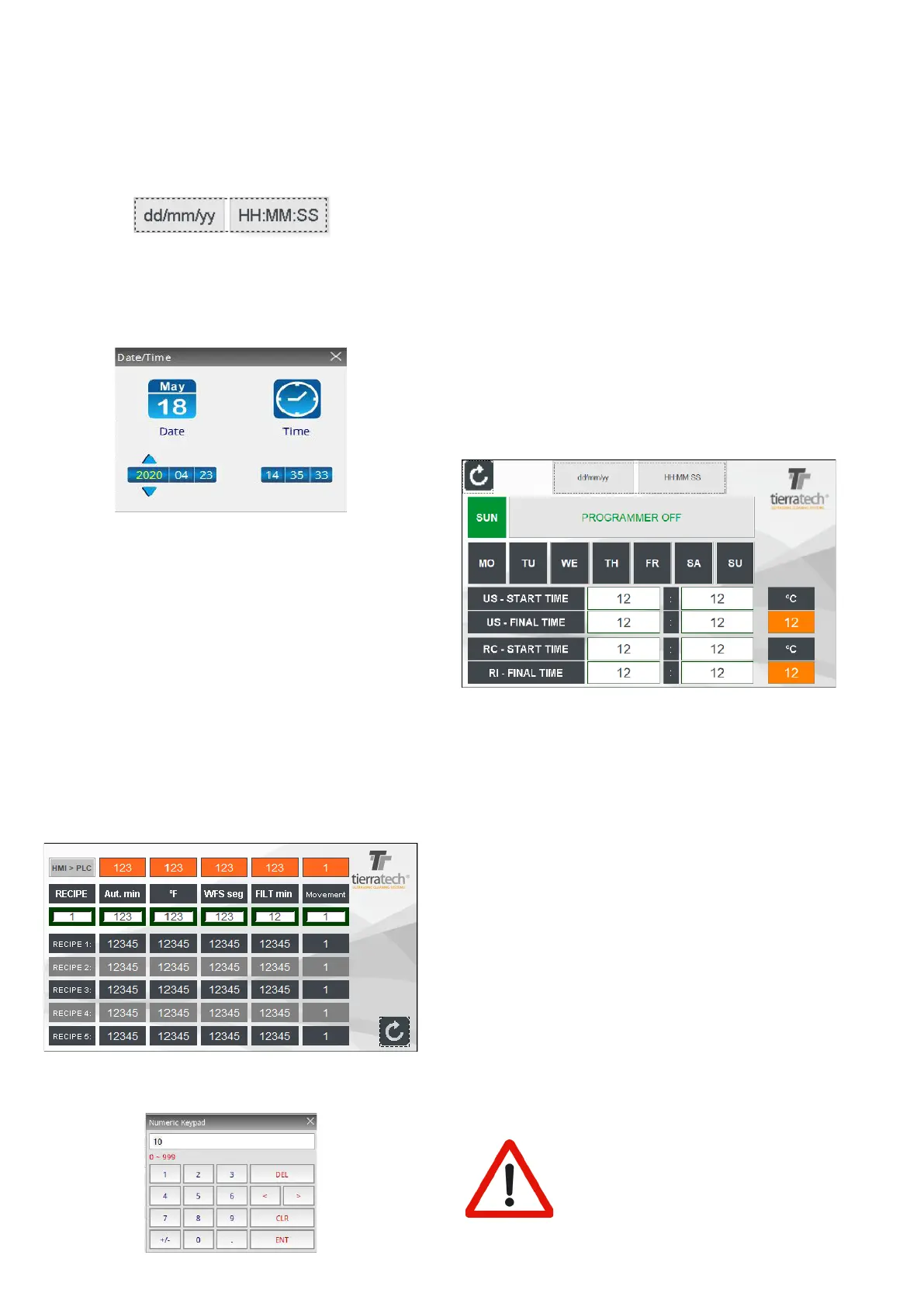
• RECIPE NUMBER: Set up the recipe number which
you would like to modify. It can be realize until ve
recipe.
• AUT. MIN: Time (minutes) for automatic cycle.
• ºC / ºF : Working temperature.
• WFS SEG: Time (seconds) during the WFS pump is
working.
• FILT MIN:Time (seconds) during the FILTER pump
is working.
• MOVEMENT: Selecting “1”, you will activate the
movement (in platform) on automatic cycle. If “0” is
selected the movement will be disable.
Once a recipe is modied the changes will be released
below. To upload a recipe to the machine you should
select a recipe and press the button HMI>PLC.
To return to main screen press on right below arrow
button.
3. If it´s required, you
are allowed to set up a weekly
programming. You must be press the function (14) on
the main screen.
On this screen, it shows a temperature program on a
weekly schedule. To start up this function you should
introduce a “START TIME” ( press ENTER to conrm)
and
minutes ( press ENTER to conrm) and active the
weekday button. After, you have to introduce the hours
and minutes in “FINAL TIME” to stop the program.
Once the programming days are selected the buttons
turns in green and you should press the PROGRAM
ON function to release. This function will be disabled if
we selected PROGRAM OFF.
This function will always work with the previous xed
temperature. To set up our cleaning program we press
on the number which is showed the temperature. On
this screen appears a numeric board and you should
press the desired temperature for working. Conrm with
ENTER ( It is not allowed to fix the temperature higher
than 90ºC / 194ºF).
4. The rst program must be to DEGAS the water, applying
ultrasound long enough to stop small bubbles emerge.
The process will last at least 3 hours (it depends on water
hardness). The water must be degassed whenever the
whole bath is changed.
WHEN RUNNING ULTRASOUND, KEEP
TRANSDUCER BOXES UNDER REQUIRED
LIQUID LEVELS. IMPORTANT FAILURE
MAY RESULT IN THE EQUIPMENT IF YOU
DO NOT FOLLOW THESE INSTRUCTIONS.
IMPORTANT:
If, for any reason, the date and time are reseted (because
the touch screen battery is damaged, because the
machine takes a long time off, etc.) you need to follow
the protocol below:
1. Click on the main screen ,option (14) and press on the
following area to set up the date and time:
2. Click on arrows to move along the date and time. Press
on + (to increase number) or press on - ( to decrease
number). Click on SAVE to release the changes. If you
wish to cancel the changes or to exit of the screen, click
on QUIT.
START UP AND CLEANING PROCEDURES
Setting up and initial operations must only be carried
out by CRYSTAL CLEAN personnel. At the time of
installation, a representative of CRYSTAL CLEAN will
conduct a demonstration and give all the explanations
deemed appropriate.
Installation and commissioning carried out by
unauthorized personnel can cause damage to both
operators and the machine.
1. Turn on the switch located on the rear / on the right side
of the equipment (it depends on the model).
2. Select the function (13) to set up the information for the
recipe.
Press on white gaps to set the numeric data for the
following options



 To Next Page