CUBICON Single Plus User Manual
18
7. Filament replacement (Loading/unloading)
Filament-printing material shall be inserted into the extruder for filament melting with a nozzle and for pushing
it. The extruder inserted filament shall be removed to replace another filament.
Loading means process of inserting filament into the extruder by melting with nozzle and pushing it, in an
empty extruder condition to print a material out. On the other hand, unloading means the process of taking out
filament from extruder.
7-1. Loading
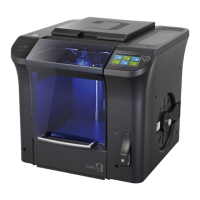
Select ‘filament’ from main menu.
Press ‘loading’ button, once you select the filament to load.
Select ‘start’ button, once temperature reach the target temperature.


 To Next Page