CUBICON Single Plus User Manual
33
* Menu composition of pre-print and printing under process are different.
*. Menu composition is subject to change in accordance with a firmware and cubicreator version.
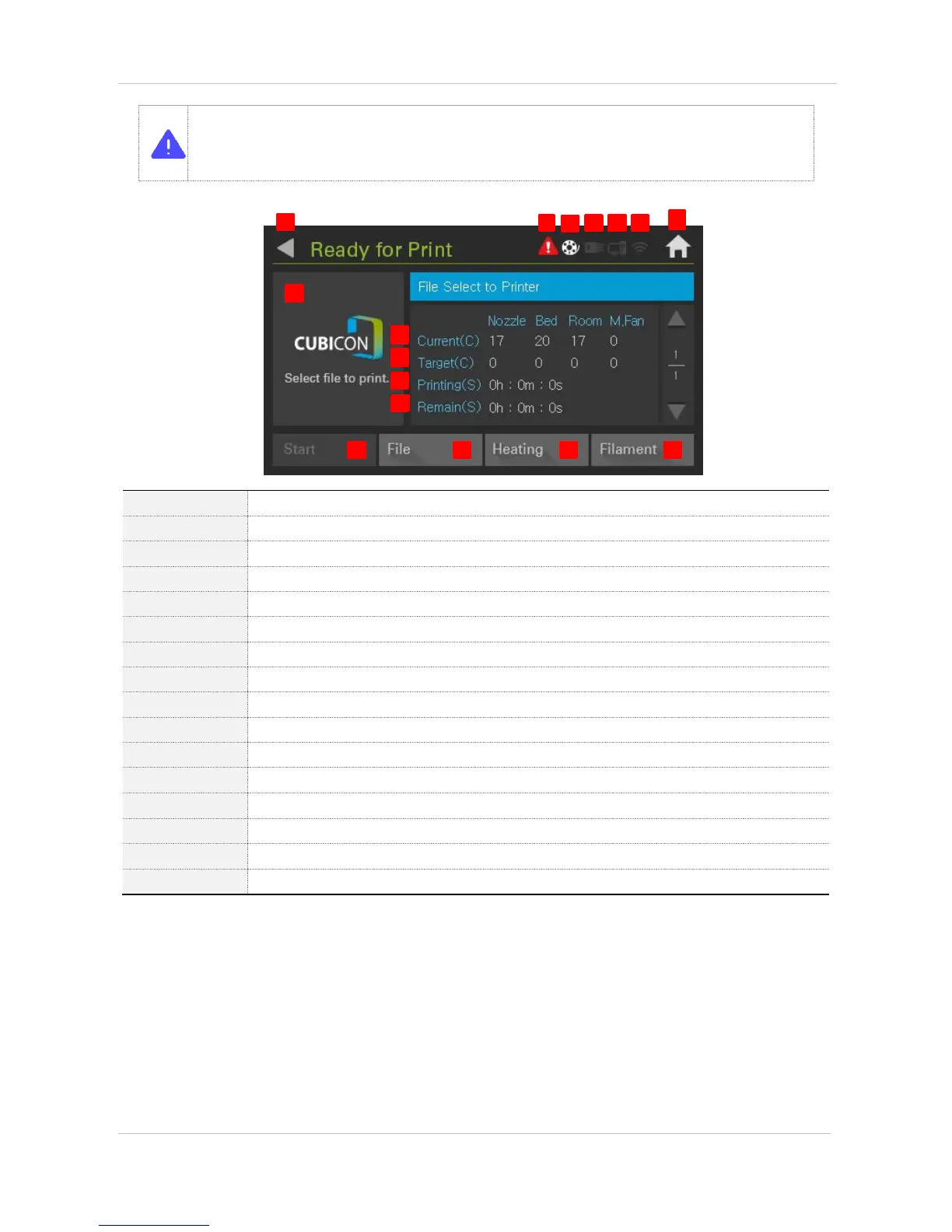
Main > Print > Ready for Print
Goes back to previous screen
Notifies the printer problem. (if ‘Error’ is pressed on main screen, it enters to ‘Diagnostic’)
Is the icon indicating the filament presence
Is the icon, which indicates USB memory activation
Is the icon, which activates in the time of connection with PC
Is the icon, which activates in the time of WIFI connection
Goes back to the main screen
Indicates printing file image and is activated in the time of Gcode formation with Cubicreator 3
Indicates current temperature
Indicates fixed temperature of Gcode
Indicates process time of printing model
Indicates remaining time of printing model
Is in deactivation mode in the first start
Selects file to print out


 To Next Page