Wired Touch Panels - User Manual
19© CUE, a.s. | All Rights Reserved.
WIndoWs loCal netWork settIngs
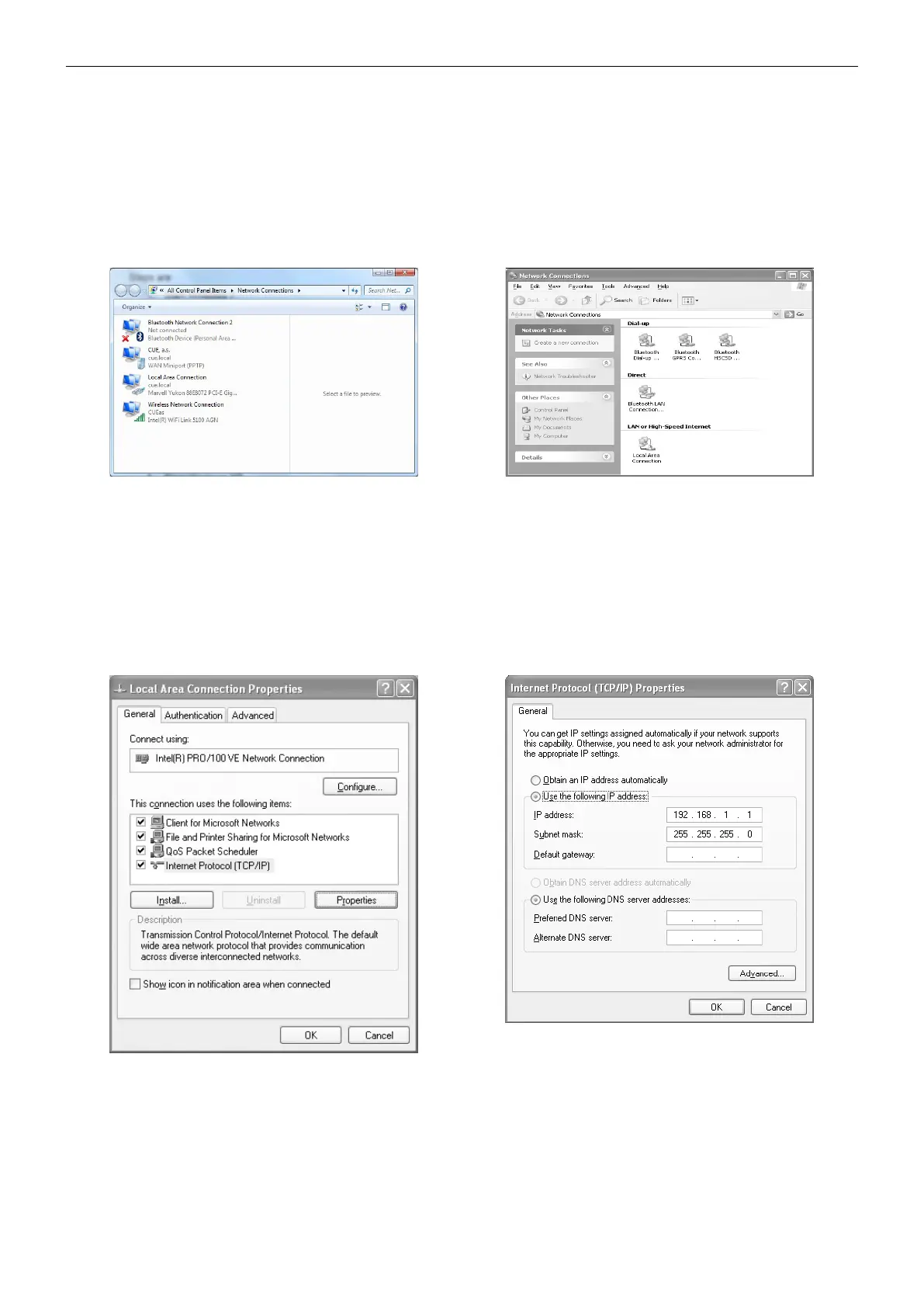
For Windows 7 steps are
1. Start Windows 7.
2. Click Start.
3. Enter ncpa.cpl to the Search Box and press Enter.
Following window is displayed.
For Windows XP steps are
1. Start Windows XP.
2. Click Start, then click Control Panel choose the option
to switch to Classic View.
3. Double-click Network Connections.
Following steps are
1. Right-click on network adapter used for connection
with touch panel and then right-click and select
Properties.
2. Select Internet Protocol (TCP/IP) and click Properties
button.
3. Select Use the following IP address option. Set IP
address to 192.168.1.1 (or other address different
from 192.168.1.127 and from 192.168.1.128) and
Subnet mask to 255.255.255.0. Leave other options
unchanged and click OK.



 To Next Page