12
01040692 B 04/21
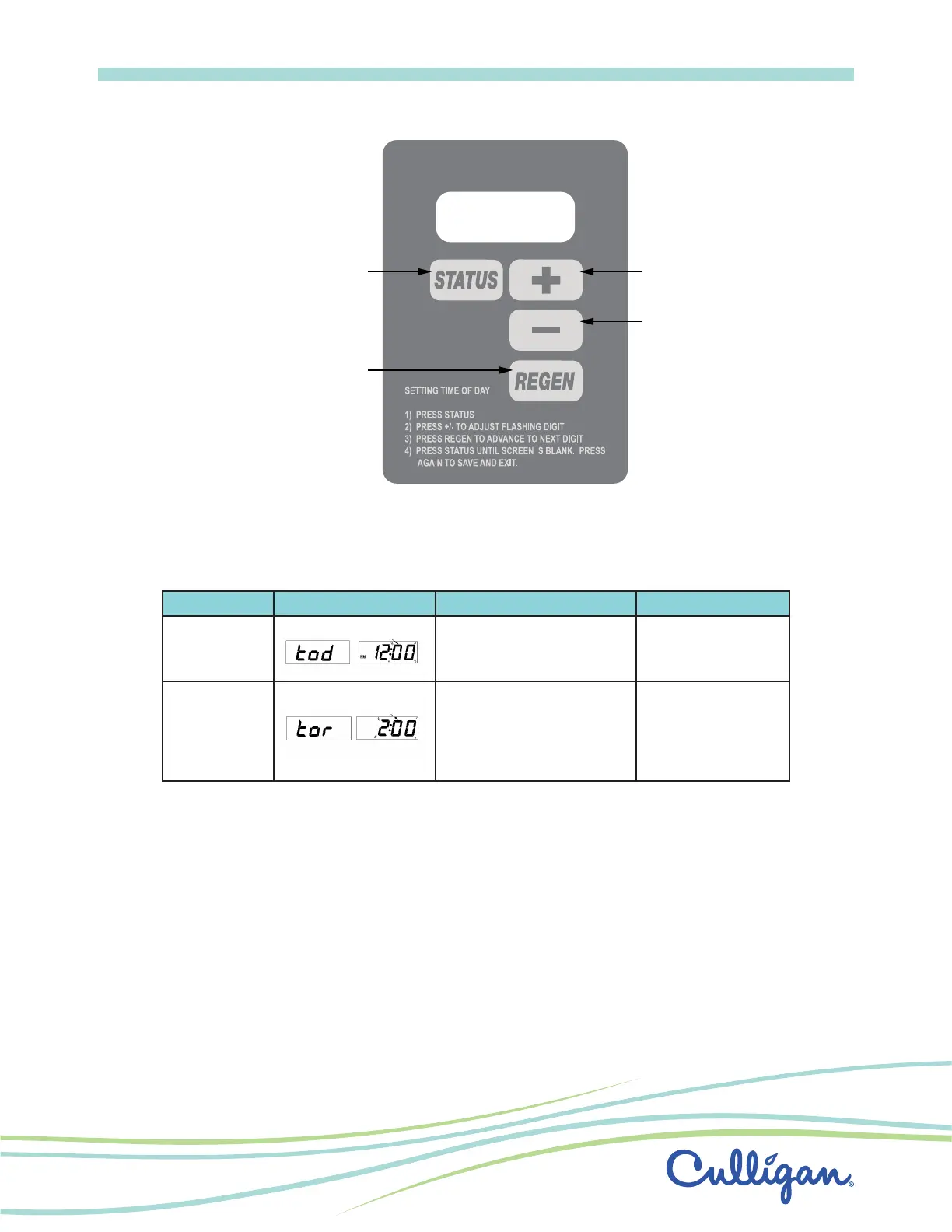
Menu Navigation
Advance timer
through display options
Initiate a regeneration
Decrease
the setting
Increase
the setting
The programming menu for Select is outlined in the following table�
Table 1� Setting Time of Day
Setting Display Range Limits Default
Time of Day
12:00 AM - 11:59 PM (12 hr)
00:00 - 23:59 (24 hr)
12:00 PM
12:00
*Time of
Regeneration
12:00 AM - 11:30 PM (12 hr)
00:00 - 23:30 (24 hr)
2:00 AM
02:00
Regeneration
There are several conditions that will cause the control to initiate a regeneration cycle� The “REG” annunciator will light
when the control has signaled for a regeneration� The “REG” annunciator will flash while the control is in regeneration�
The following are conditions that will call for regeneration:
1� When the flow meter has recorded the passage of a predetermined number of gallons�
2� At the preset time, when the number of days without a regeneration is equal to the Timeclock Backup setting�
3� At the preset time, when the “REGEN” button is depressed once� “REG” will light�
4� Immediately, when the “REGEN” button is depressed for three seconds� “REG” will light and blink�
5� Immediately, if power to the unit has been off for more than 3 hours and time of day has been restored�


 To Next Page
 Loading...