C.5.3 Logos management from Embedded Web Server
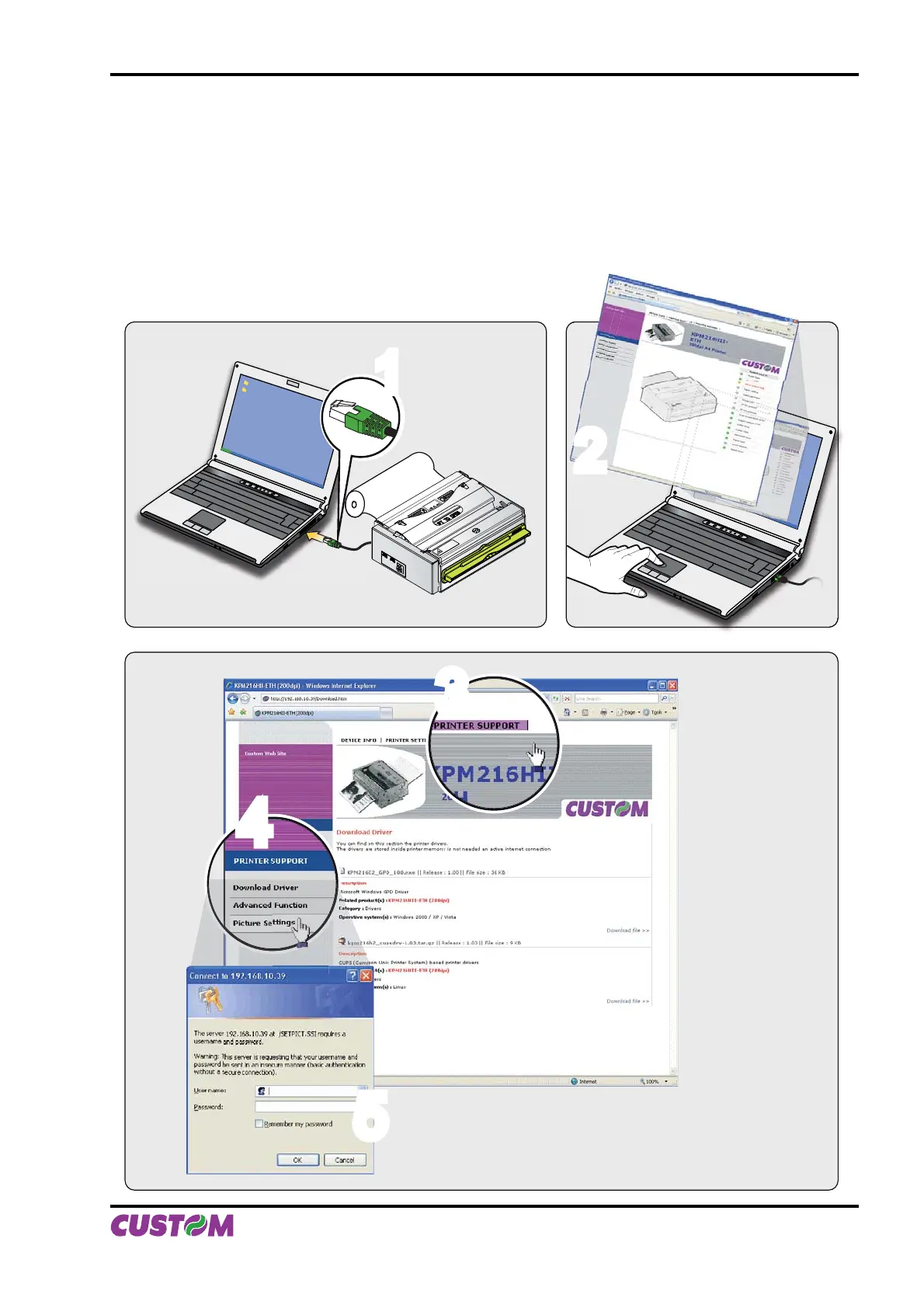
To manage logos from the Embedded Web Server, proceed as follows:
Connect to the network the printer and the computer (see fi g.C.30).1.
Enter into the Embedded Web Server following the instruction of the par.C.2.2.2.
Enter into the “Printer Support” section (see fi g.C.31)3.
Enter the page related to “Picture Settings” tool (see fi g.C.32)4.
Make the registration to obtain the access to the restricted page related to the logos management (see 5.
fi g.C.32).
44
33
22
WARNING!
MOVING PARTS
PUSH HERE
TO CLOSE
11
55
(Fig.C.30) (Fig.C.31)
(Fig.C.32)
APPENDIX C - ADVANCED FUNCTIONS
User Manual KPM216H II C-17


 To Next Page