EasyManua.ls Logo

CVS BP3AC1-1PC - User Manual

CVS BP3AC1-1PC
46 pages
Print Icon
To Next Page IconTo Next Page
Loading...
DIGITAL
ADVANCED
AUTOMATIC
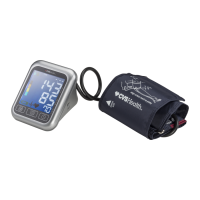
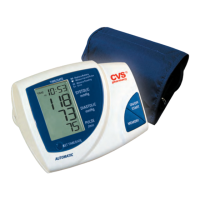
Blood Pressure Monitor
Model #BP3AC1-1PC
ID #3AC1-AP/271244
Instruction Manual
Instrucciones de Uso
Questions? Preguntas?
1-866-464-6184
PLEASE NOTE:
THIS MEDICAL INSTRUMENT MUST BE USED ACCORDING
TO INSTRUCTIONS TO ENSURE ACCURATE READINGS.
by

Table of Contents

Question and Answer IconNeed help?

Do you have a question about the CVS BP3AC1-1PC and is the answer not in the manual?

Summary

1. Introduction to the Blood Pressure Monitor

1.1. Features of Your Blood Pressure Monitor

Details the monitor's features including MAM Technology and Irregular Heartbeat Detection for user-friendly home use.

1.2. Important Information About Self-Measurement

Provides critical advice on self-measurement, emphasizing it's for control, not diagnosis, and cautions against altering medication or relying solely on pulse display.

Blood Pressure Analyzer Software

Information on optional PC software for data monitoring, including system requirements and contact details for purchase.

2. Blood Pressure and Measurement Information

2.1. Causes of High;Low Blood Pressure

Explains how blood pressure is regulated in the body, defining systolic and diastolic values and their relation to heart activity.

2.2. Normal Blood Pressure Values

Defines normal, pre-hypertension, and hypertension blood pressure ranges according to NIH JNC7 standards, advising consultation with a physician.

2.3. Managing High or Low Blood Pressure

Offers advice on managing abnormal blood pressure readings, including lifestyle changes in diet, exercise, and habits, and consulting a doctor.

2.4. Irregular Heartbeat Detector

Explains the function of the Irregular Heartbeat Detector symbol, its meaning for cardiovascular health, and when to consult a doctor.

2.5. MAM Technology Explained

Describes Microlife Averaging Mode (MAM) technology, highlighting its benefit for reliability by averaging three consecutive measurements.

3. Monitor Components

3.a. Measuring Unit Overview

Identifies and labels the key components of the blood pressure monitor's main measuring unit, including buttons and ports.

3.b. Upper Arm Cuffs

Details the different types of upper arm cuffs available (S101, S102) and their respective arm circumference measurements.

4. Operating the Monitor

4.1. Inserting Batteries

Provides step-by-step instructions for inserting the AA batteries into the blood pressure monitor, including polarity and replacement indicators.

4.2. Using the AC Power Adapter

Explains how to connect and use the optional AC power adapter for operating the blood pressure monitor, including warranty considerations.

4.3. Connecting the Cuff Tube

Instructs users on how to correctly connect the cuff's air tube to the side opening of the blood pressure monitor.

5. Measurement Procedure

5.1. Before Measurement Preparation

Outlines essential preparation steps before taking a blood pressure measurement, such as avoiding exertion and ensuring proper posture.

5.2. Common Measurement Errors

Identifies common errors that can affect blood pressure measurement accuracy, including arm position, cuff fit, and measurement intervals.

5.3. Fitting the Blood Pressure Cuff

Provides detailed, illustrated instructions on how to correctly fit the blood pressure cuff onto the upper arm for accurate readings.

5.4. Setting Time and Date

Guides users through the process of setting the current date and time on the blood pressure monitor, essential for accurate record-keeping.

5.5. Confirming Date and Time Settings

Explains how to confirm the entered date and time settings, after which the monitor's clock will begin to run.

5.6. Selecting Microlife Average Mode

Details how to select and use the Microlife Averaging Mode (MAM) for more reliable blood pressure readings by averaging multiple measurements.

5.7. Selecting User Profile

Describes the procedure for selecting between User 1 and User 2 profiles, allowing personalized data storage for multiple users.

5.8. Performing a Measurement

Details the step-by-step process for performing a blood pressure measurement, from pressing the start button to interpreting results and the MAM function.

5.9. Memory and Stored Readings

Explains how to access, view, and delete stored measurement results (up to 99) from the monitor's memory, including irregular heartbeat indicators.

5.10. Discontinuing a Measurement

Instructs users on how to safely stop or interrupt a blood pressure measurement at any time using the ON/OFF button.

6. Error Codes and Troubleshooting

Error ERR 1: Tube Loose or No Pulse

Addresses ERR 1, its possible causes (loose tube, no pulse), and solutions like ensuring cuff connection and placement.

Error ERR 2: Measurement Artefact

Addresses ERR 2, identifying unnatural pressure impulses due to arm movement (artefact) and recommending still measurement.

Error ERR 3: Cuff Inflation Issues

Addresses ERR 3, related to cuff inflation issues (too long, not seated, hose not tight) and suggests checking connections.

Error ERR 5: Excessive BP Difference

Addresses ERR 5, where systolic/diastolic differences are excessive, advising careful re-measurement under quiet conditions.

Error ERR 6: MAM Average Failure

Addresses ERR 6, occurring in Average Mode when single data differ too much, preventing an average result display.

General Troubleshooting and Error Solutions

8. Care and Maintenance

8. Warranty Information

9. Certifications

10. Technical Specifications

Summary

1. Introduction to the Blood Pressure Monitor

1.1. Features of Your Blood Pressure Monitor

Details the monitor's features including MAM Technology and Irregular Heartbeat Detection for user-friendly home use.

1.2. Important Information About Self-Measurement

Provides critical advice on self-measurement, emphasizing it's for control, not diagnosis, and cautions against altering medication or relying solely on pulse display.

Blood Pressure Analyzer Software

Information on optional PC software for data monitoring, including system requirements and contact details for purchase.

2. Blood Pressure and Measurement Information

2.1. Causes of High;Low Blood Pressure

Explains how blood pressure is regulated in the body, defining systolic and diastolic values and their relation to heart activity.

2.2. Normal Blood Pressure Values

Defines normal, pre-hypertension, and hypertension blood pressure ranges according to NIH JNC7 standards, advising consultation with a physician.

2.3. Managing High or Low Blood Pressure

Offers advice on managing abnormal blood pressure readings, including lifestyle changes in diet, exercise, and habits, and consulting a doctor.

2.4. Irregular Heartbeat Detector

Explains the function of the Irregular Heartbeat Detector symbol, its meaning for cardiovascular health, and when to consult a doctor.

2.5. MAM Technology Explained

Describes Microlife Averaging Mode (MAM) technology, highlighting its benefit for reliability by averaging three consecutive measurements.

3. Monitor Components

3.a. Measuring Unit Overview

Identifies and labels the key components of the blood pressure monitor's main measuring unit, including buttons and ports.

3.b. Upper Arm Cuffs

Details the different types of upper arm cuffs available (S101, S102) and their respective arm circumference measurements.

4. Operating the Monitor

4.1. Inserting Batteries

Provides step-by-step instructions for inserting the AA batteries into the blood pressure monitor, including polarity and replacement indicators.

4.2. Using the AC Power Adapter

Explains how to connect and use the optional AC power adapter for operating the blood pressure monitor, including warranty considerations.

4.3. Connecting the Cuff Tube

Instructs users on how to correctly connect the cuff's air tube to the side opening of the blood pressure monitor.

5. Measurement Procedure

5.1. Before Measurement Preparation

Outlines essential preparation steps before taking a blood pressure measurement, such as avoiding exertion and ensuring proper posture.

5.2. Common Measurement Errors

Identifies common errors that can affect blood pressure measurement accuracy, including arm position, cuff fit, and measurement intervals.

5.3. Fitting the Blood Pressure Cuff

Provides detailed, illustrated instructions on how to correctly fit the blood pressure cuff onto the upper arm for accurate readings.

5.4. Setting Time and Date

Guides users through the process of setting the current date and time on the blood pressure monitor, essential for accurate record-keeping.

5.5. Confirming Date and Time Settings

Explains how to confirm the entered date and time settings, after which the monitor's clock will begin to run.

5.6. Selecting Microlife Average Mode

Details how to select and use the Microlife Averaging Mode (MAM) for more reliable blood pressure readings by averaging multiple measurements.

5.7. Selecting User Profile

Describes the procedure for selecting between User 1 and User 2 profiles, allowing personalized data storage for multiple users.

5.8. Performing a Measurement

Details the step-by-step process for performing a blood pressure measurement, from pressing the start button to interpreting results and the MAM function.

5.9. Memory and Stored Readings

Explains how to access, view, and delete stored measurement results (up to 99) from the monitor's memory, including irregular heartbeat indicators.

5.10. Discontinuing a Measurement

Instructs users on how to safely stop or interrupt a blood pressure measurement at any time using the ON/OFF button.

6. Error Codes and Troubleshooting

Error ERR 1: Tube Loose or No Pulse

Addresses ERR 1, its possible causes (loose tube, no pulse), and solutions like ensuring cuff connection and placement.

Error ERR 2: Measurement Artefact

Addresses ERR 2, identifying unnatural pressure impulses due to arm movement (artefact) and recommending still measurement.

Error ERR 3: Cuff Inflation Issues

Addresses ERR 3, related to cuff inflation issues (too long, not seated, hose not tight) and suggests checking connections.

Error ERR 5: Excessive BP Difference

Addresses ERR 5, where systolic/diastolic differences are excessive, advising careful re-measurement under quiet conditions.

Error ERR 6: MAM Average Failure

Addresses ERR 6, occurring in Average Mode when single data differ too much, preventing an average result display.

General Troubleshooting and Error Solutions

8. Care and Maintenance

8. Warranty Information

9. Certifications

10. Technical Specifications

CVS BP3AC1-1PC Specifications

General IconGeneral
BrandCVS
ModelBP3AC1-1PC
CategoryBlood Pressure Monitor
LanguageEnglish

Related product manuals