EasyManua.ls Logo

CVS CVSBPW-610 - User Manual

CVS CVSBPW-610
2 pages
Print Icon
To Next Page IconTo Next Page
Loading...
®
CVSBPW
-
610
QS-CVSBPW610
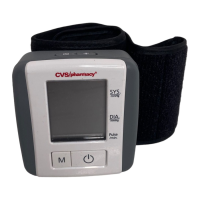
Automatic Wrist
Blood Pressure Monitor
Quick Start Guide
4. Fasten the hook and loop strap securely
so that there is no extra space between
the cuff and your wrist.
5. Place your elbow on a table so that the
cuff is at the same level as your heart.
Relax your entire body, especially
between your elbow and fingers,
and turn your palm up.
6. Press the START/STOP button ( ) and do not move until
measurement is completed.
7. Your measurement results will be displayed.
1. Install 2 AAA alkaline batteries
according to polarity indications inside
the compartment. Replace battery cover.
2. Set date and time using
the and buttons
as shown to the right.
3. Remove all watches, etc. and apply cuff
to left wrist as shown. See instruction
manual for information regarding use
on right wrist.
Systolic pressure
Diastolic pressure
Heart rateTime & date
Hypertension
indicator
Compares readings to
defined levels established
by the U.S. National
Institutes of Health.
Refer to instruction
manual for explanation.
Prehypertension
Stage 1 Hypertension
Stage 2 Hypertension
IMPORTANT: THIS QUICK START GUIDE
IS NOT A SUBSTITUTE FOR READING
AND UNDERSTANDING THE
INSTRUCTION MANUAL.
Press the button
blinking HOUR
increasing HOUR
conrm the entry
repeat process to set
MINUTE, MONTH, DAY and YEAR
Press
Press
Press
1-800-466-3342
COMPLETE INSTRUCTIONS INCLUDED
Read instructions
carefully before use
For more information call:
heart level
Question and Answer IconNeed help?

Do you have a question about the CVS CVSBPW-610 and is the answer not in the manual?

Summary

Important Usage Notice

Quick Start Guide Disclaimer

This quick start guide is not a substitute for reading and understanding the instruction manual.

Operating Your Blood Pressure Monitor

Battery Installation

Install 2 AAA alkaline batteries according to polarity indications inside the compartment.

Setting Date and Time

Set date and time using the clock and plus buttons as shown in the diagram.

Cuff Application and Positioning

Remove watches and apply cuff to left wrist. Place elbow on table at heart level, palm up.

Measurement Procedure

Fasten cuff securely, press START/STOP button, and do not move until measurement is complete.

Understanding Measurement Results

Hypertension Indicator

Compares readings to defined levels established by the U.S. National Institutes of Health.

Display Elements

Shows Systolic pressure, Diastolic pressure, Heart rate, and Time & date.

Summary

Important Usage Notice

Quick Start Guide Disclaimer

This quick start guide is not a substitute for reading and understanding the instruction manual.

Operating Your Blood Pressure Monitor

Battery Installation

Install 2 AAA alkaline batteries according to polarity indications inside the compartment.

Setting Date and Time

Set date and time using the clock and plus buttons as shown in the diagram.

Cuff Application and Positioning

Remove watches and apply cuff to left wrist. Place elbow on table at heart level, palm up.

Measurement Procedure

Fasten cuff securely, press START/STOP button, and do not move until measurement is complete.

Understanding Measurement Results

Hypertension Indicator

Compares readings to defined levels established by the U.S. National Institutes of Health.

Display Elements

Shows Systolic pressure, Diastolic pressure, Heart rate, and Time & date.

CVS CVSBPW-610 Specifications

General IconGeneral
BrandCVS
ModelCVSBPW-610
CategoryBlood Pressure Monitor
LanguageEnglish

Related product manuals