CyberResearch
®
Motherboards MXGE Series
CyberResearch, Inc. 75
25 Business Park Drive P: (203) 483-8815; F: (203) 483-9024
Branford, CT USA www.cyberresearch.com
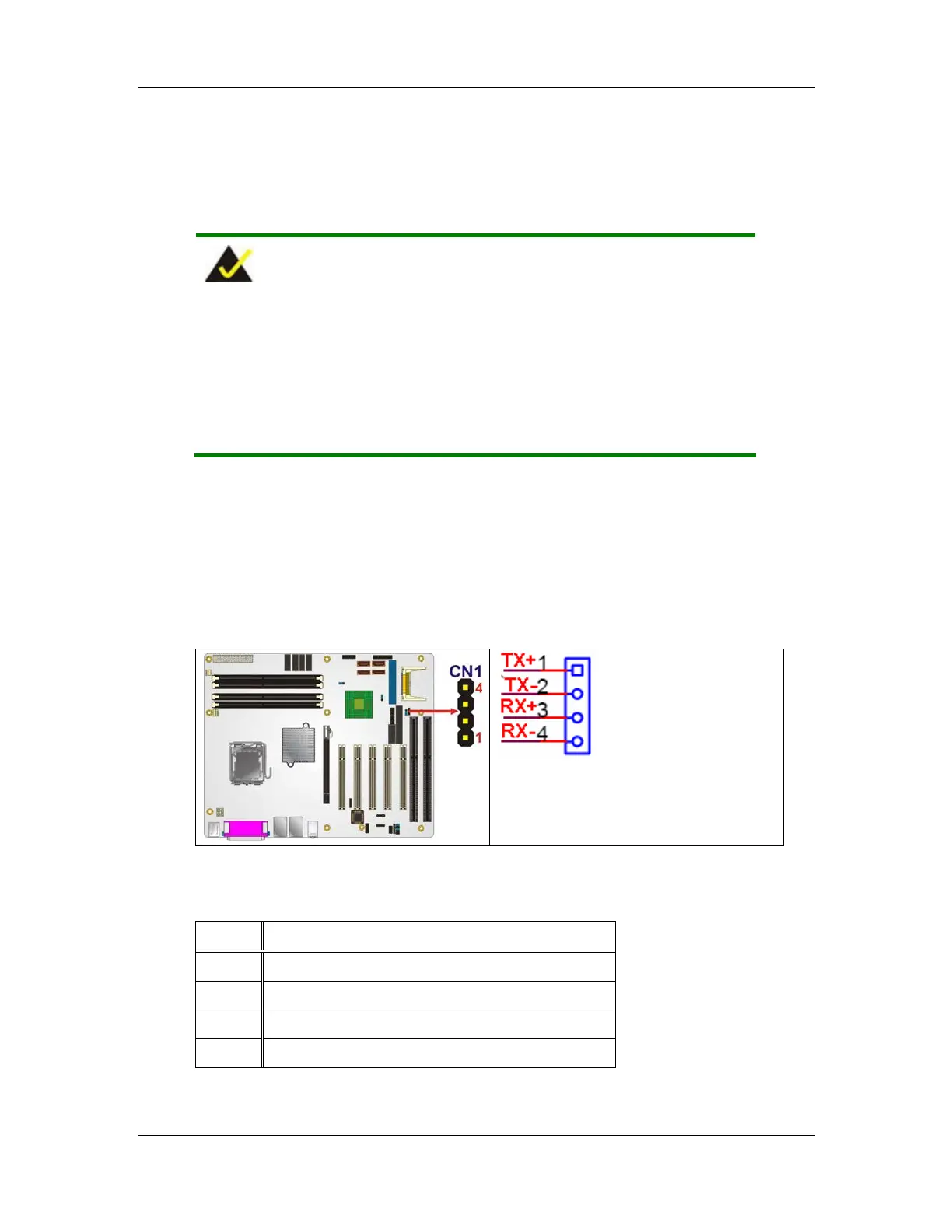
CN Location:
See Figure 4-20
CN Pinouts:
See Table 4-22
NOTE:
This connector and the RS-422/485 pins on the COM2 connector
cannot be used at the same time. For RS-422/485 serial
communications, either this connector can be used or the pins on the
COM2 connector can be used.
The 4-pin serial port connector connects to the COM 2 RS-422 and RS-485 serial
communications channels. The RS-422/485 only COM2 connector can be used instead of
the 14-pin COM2 connector when RS-422/485 communication protocols are
implemented. To use this connector the COM 2 function select jumper must be configured
in the RS-422/RS-485 serial communications mode.
Figure 4-20: RS-422/485 Serial Port Connector Location
PIN NO. DESCRIPTION
1 TXD+
2 TXD-
3 RXD+
4 RXD-



 To Next Page