70
Cypress Confidential
Troubleshooting
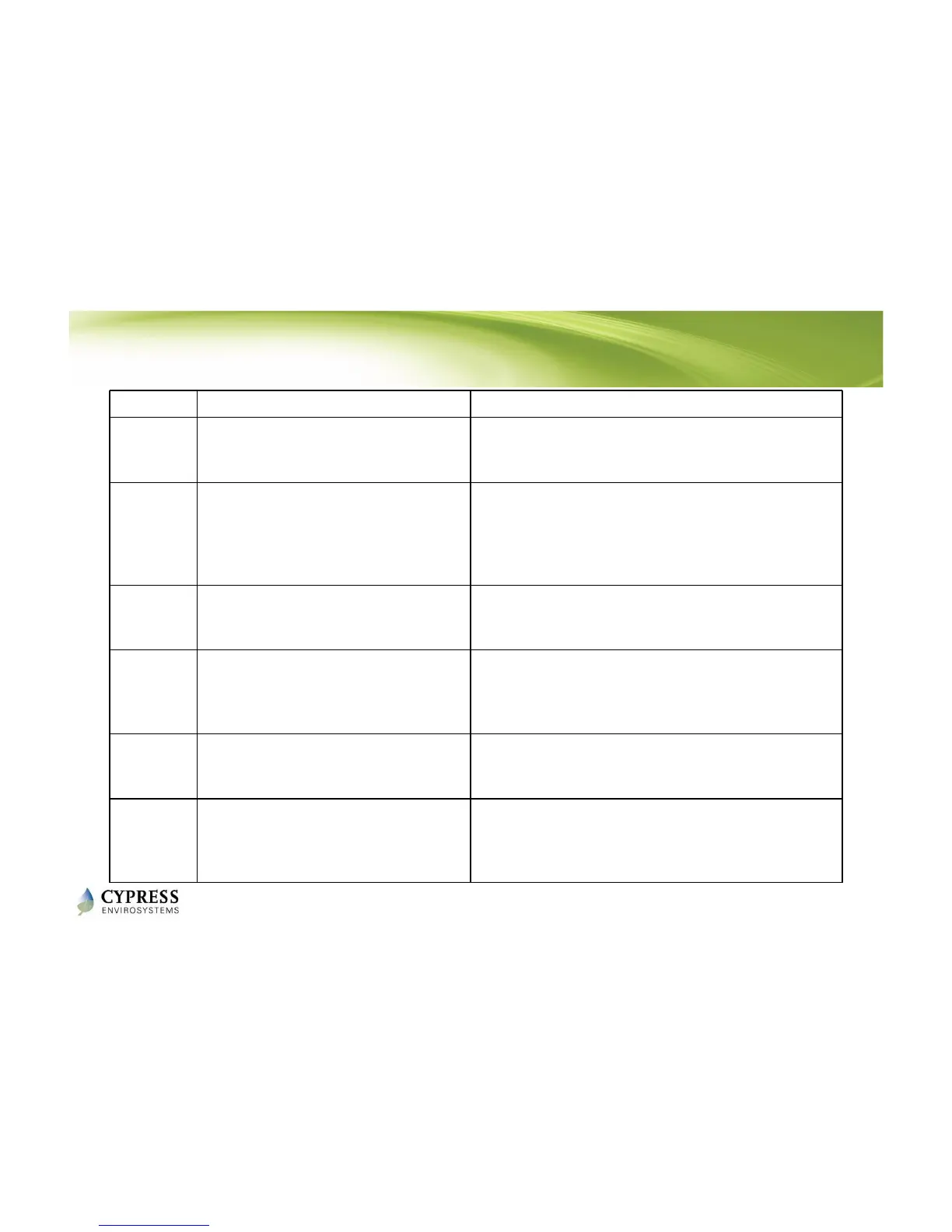
Code Reason Solution
dy
This code indicates that the RWAL is
performing a discovery operation and it
should not be disturbed.
This display goes off automatically after a few seconds.
E0
Discovery error – Not able to connect
to nearest RWAL or Hub
Force Discover to retry.
Check if RWAL or Hub is working.
Reset the RWAL.
Place the RWAL or Hub in a different position, if
feasible.
E1
Time synchronization error – Not able
to synchronize the RWAL time with the
wireless network
The RWAL recovers from this error within a few
refresh cycles, if this error occurs after successful
commissioning of the system.
E2
Radio error – Not able to send/receive
data
Restart the unit by unplugging and plugging the
adapter.
If the error persists, contact the original distributor for
replacement.
E3
Ping Error – Not able to locate a free RF
channel to use due to high RF
interference
Change the position of the RWAL.
E4
Connect error – Not able to connect to
the nearest Hub or RWAL
The RWAL recovers after a few refresh cycles, if this
error occurs after successful installation.
Consider adding a RWAL in the zone if the error
persists.
Reference: RWAL Installation Manual - Section 4



 To Next Page