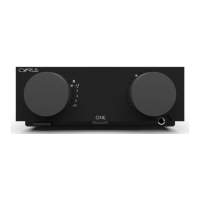
Cyrus ONE
HD User Instrucons
9
Volume
Turn the volume control clockwise to increase the •
volume or an-clockwise to reduce the volume.
The volume indicators will show the volume level.
Listening through headphones
Plug the headphones into the front panel headphone •
jack.
The speakers will switch o and music will play through the
headphones.
Warning: Excessive sound pressure from earphones and
headphones can cause hearing loss.
NOTE: The volume will reduce to a low level when you
unplug headphones and return to speaker listening.
Playing a vinyl turntable
Set the source selector to the • posion.
Start the record playing.•
Playing other analogue sources
Set the source selector to play the source you want to •
hear (posions 5, 6 or AV).
Set the source to play.•
Playing digital sources
Set the source selector to play the source you want to •
hear (posions 3 or 4).
Set the source to play.•
Playing USB digital audio sources (USB B input)
Sources for USB music will generally be les streamed to or
stored on a personal computer.
Before playing USB music, change the audio sengs •
on the computer to output sound to the Cyrus ONE HD
device.
Set the source selector to the •
posion.
Play the music le.•
Playing DSD audio (USB B input)
DSD Audio les will also be stored on a personal computer.
Playback of DSD les will require the installaon on the
computer of a specialist music playback app that supports
DSD playback.
Before playing DSD music, choose, install and congure •
a DSD player app on the computer.
Set the source selector to the •
posion.
Play the DSD music le.•


 To Next Page