26
DIPSWITCH SETTINGS
Auto-close is an option that allows the gate to close automatically after a chosen time delay, this delay
can be from 10 to 70 seconds. Auto-close is selected by using the dipswitches on the main PC Board.
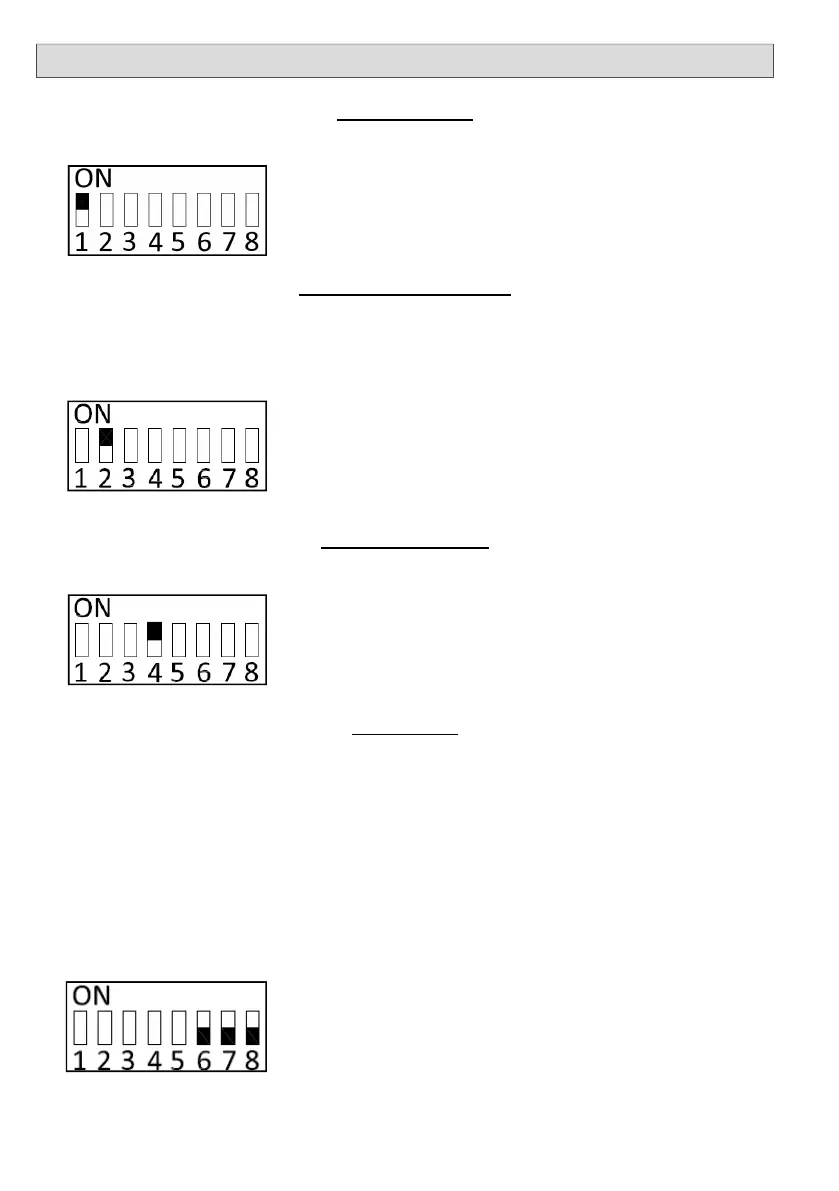
Dipswitch numbers 6,7 and 8 are the auto-close time select switches. The times are as follows.
6 off ; 7 off; 8 off = no auto-close
6 on; 7 off; 8 off = 10 seconds
6 off; 7 on; 8 off = 20 seconds
6 off; 7 off; 8 on = 40 seconds
6 on; 7 on; 8 on = 70 seconds
Any combination can be used to select the desired auto-close time.
It is strongly recommended that DuraOptics safety beams are used when Auto-Close
is selected as this reduces the chance of the gate closing on an object and causing
injury or damage.
No’s 6; 7 & 8: SETTING AUTO-CLOSE
AUTO-CLOSE
Number 2 dipswitch is used to activate the safety beams. If no safety beams are used, number 2 dip-
switch must be in the ON position. If safety beams are connected, number 2 dipswitch must be set to
the OFF position. NOTE if number 2 dipswitch is OFF and there are no beams connected, the gate will
not close.
INFRARED SAFETY BEAMS
No.2: ON IF NO BEAMS
BEAMS AUTO-CLOSE
B.A.C. is not active with swing operators.
No. 4: ON TO ACTIVATE BEAMS AUTO-CLOSE.
PROGRAM MODE
Refer to page 17 & 18 for program sequence.
No. 1: USED DURING PROGRAMMING SEQUENCE.


 To Next Page