41D-Link DAP-1525 User Manual
Section 3 - Configuration
Wireless Settings
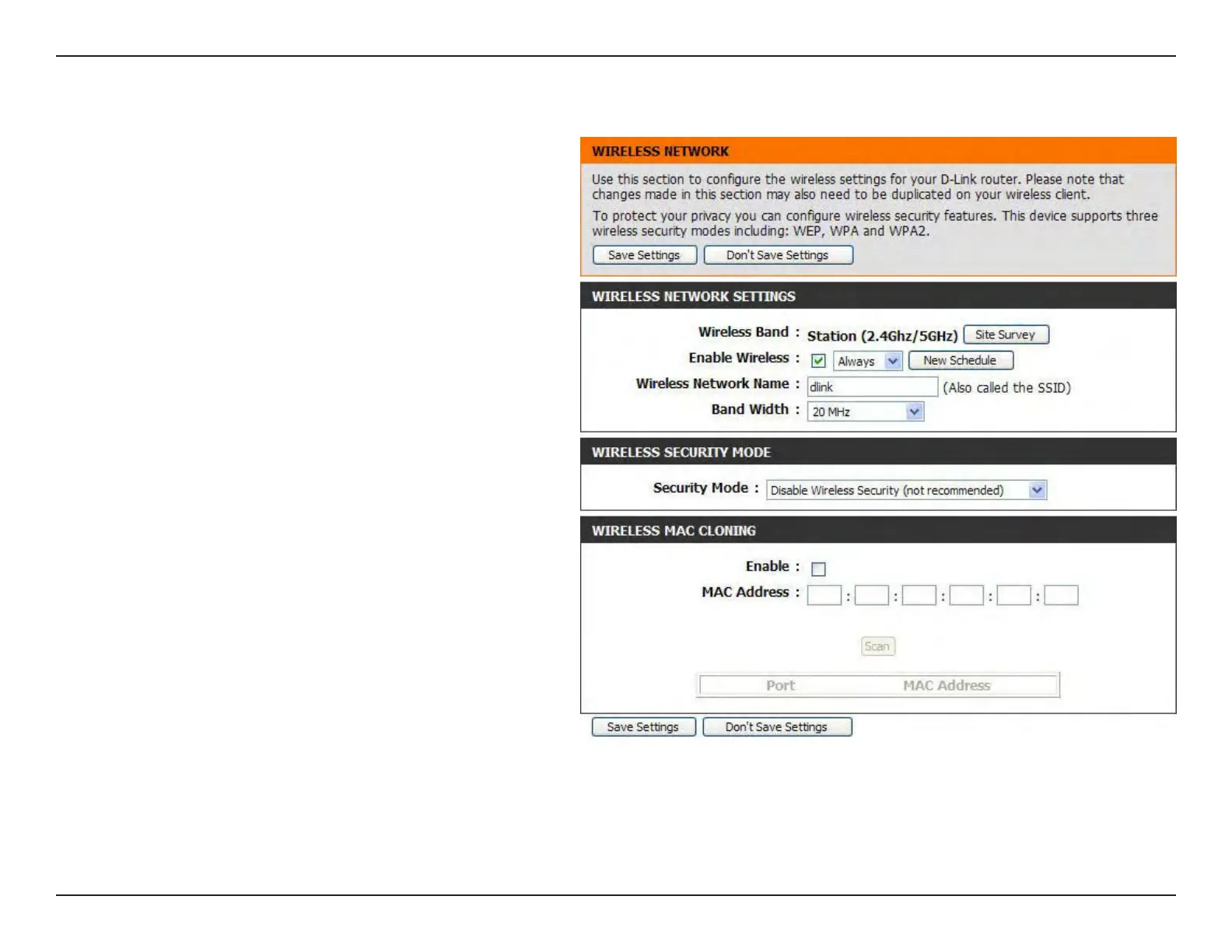
Tick the check box to enable the wireless
function. If you do not want to use wireless, de-
select the check box to disable all the wireless
functions. Use the drop-down menu to select
the time to enable the wireless function, or
click the New Schedule button to create a
new time period.
Enter the Wireless Network Name (SSID) of
the AP, or click the Site Survey button to nd
the AP.
Select the Band Width:
20/40 MHz (Auto) - Select if you are using both
802.11n and non-802.11n wireless devices.
20MHz - Select if you are not using any
802.11n wireless clients.
Refer to Section 4 - Wireless Security for
more information regarding wireless security.
Enable
Wireless:
Wireless
Network Name:
Band Width:
Security Mode:
Wireless Mac Cloning
Enabling this option allows the user to manually assign
the source MAC address to packets forwarded by
the DAP-1525. If not manually assigned, the packet’s
source MAC address field will be automatically
selected as the DAP-1525’s MAC address.
Enter the desired MAC address connected to your DAP-1525 to enable the clone function.
ClicktheScanbuttontosearchforallavailabledevicesconnectedtoyourDAP-1525’sEthernetports.
MAC Address:
Scan:



 To Next Page