15D-Link DCS-8515LH User Manual
Section 3: mydlink
Device
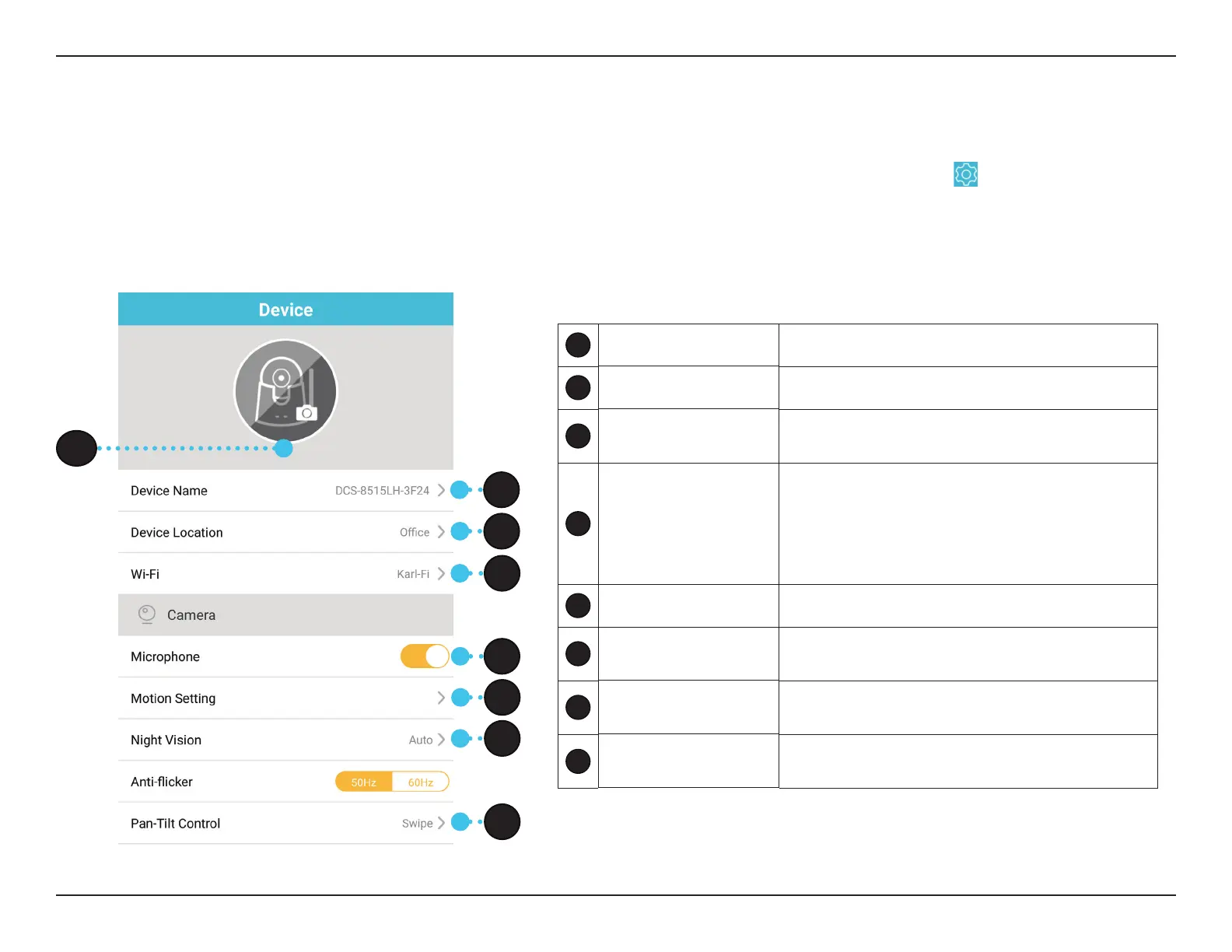
The Device page contains several options for you to congure your camera.
In the camera control page, after you have selected the specic camera you wish to congure, tap the
button to the right of
the camera’s name to enter the Device page.
1
Device Photo Tap to add a customized photo of this device.
2
Device Name Tap to change the device’s name.
3
Device Location
Tap to change or add a new location for this
device.
4
Wi-Fi
Tap to change the wireless network this device
will use to connect to the Internet. Note: The
network must be the same as all your other
mydlink devices that you wish to use the same
account for.
5
Microphone Toggle sound recording on or o.
6
Motion Setting
Tap to further congure sensitivity and active
area of motion detection of camera.
7
Night Vision
Click to change night vision detection to on/o/
auto.
8
Pan-Tilt Control
Click to enter Pan-Tilt Control settings. Can be
set to either Tap or Swipe. Default is Swipe.
1
2
3
5
4
6
7
8








 To Next Page