16D-Link DHP-W611AV User Manual
Section 3 - Conguration
Network Settings
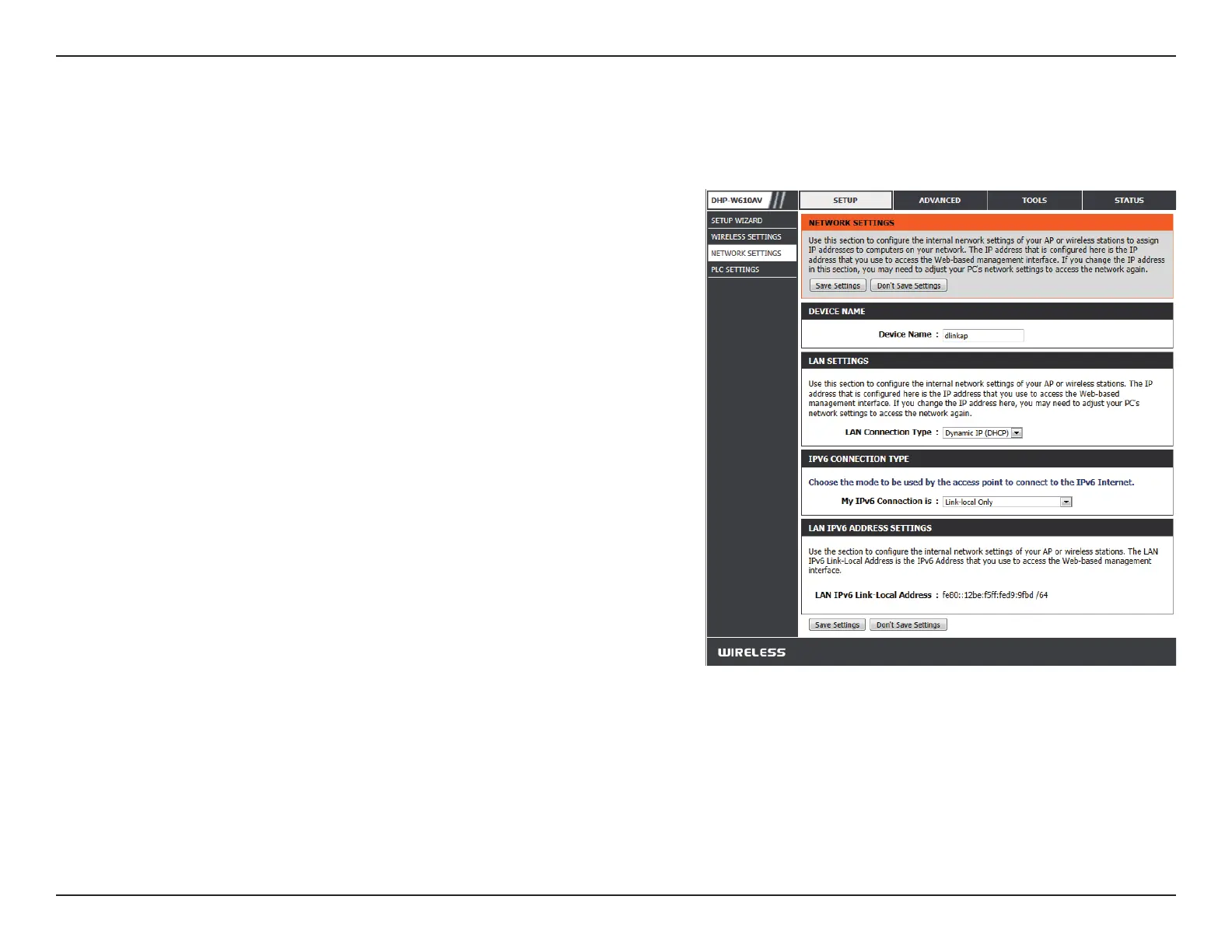
This section will allow you to change the local network settings of the DHP-W610AV and to congure the DHCP settings.
You can customize the Device Name of your DHP-W610AV.
You will use this name to connect to it through a web browser.
The default name is listed on your Wi-Fi Conguration Card.
Use the drop-down menu to select Static IP or Dynamic IP
(DHCP) to automatically obtain an IP address on the LAN/
private network. For Static IP setup, please see the next page.
Your Internet Service Provider (ISP) may require this to be set
a certain way for Internet access. You can choose from Static
IPv6, Autoconguration, or Link-local Only. Contact your
ISP for more help on the above requirements.
This shows the current IPv6 address of the DHP-W610AV on
your network.
Click Save Settings for the changes to take eect.
Device Name:
LAN Connection
Type:
IPv6 Connection
Type:
IPv6 DNS
Settings:


 To Next Page