5D-Link DIR-506L User Manual
Section 1 - Product Overview
Hardware Overview
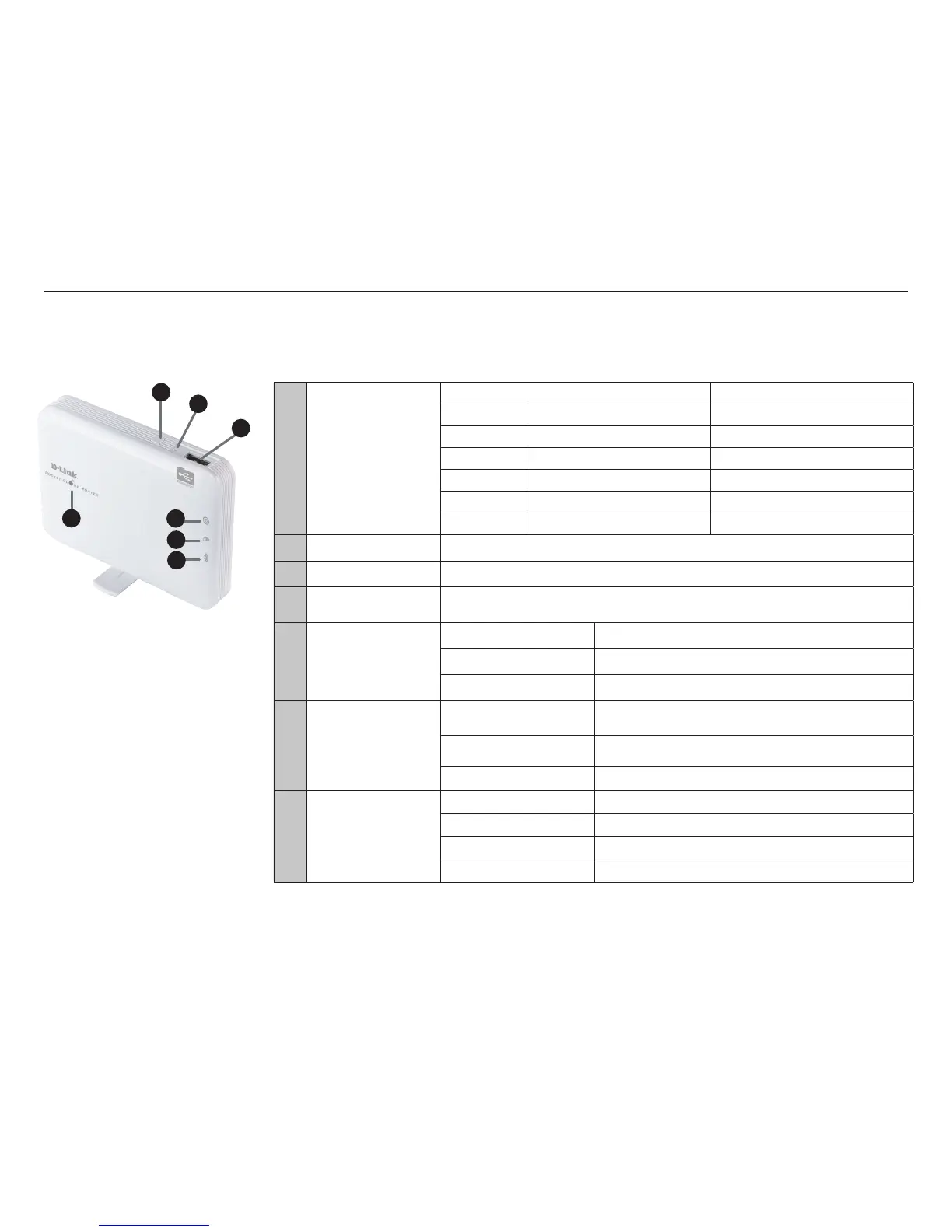
Front/Top
1
Power LED
charging no charging
ashing green high battery capacity
solid green Battery full charged when device on
solid amber Battery in charging
solid red low battery capacity
ashing red need to charge device as soon as possible
o Battery full charged when device o device o
2
WPS Button
Pressing the WPS button allows additional devices to connect securely and automatically.
3
Reset Button
Pressing the Reset button restores the DIR-506L to its original factory default settings.
4
USB Port
Connect a USB ash drive to congure the wireless settings using SharePort™ Mobile and SharePort™
Web File Access. Both allow you to share a USB or a storage device with your local network.
5
USB LED Indicator
regular ashing green Connect to USB (Shareport is not ready)
solid green Connect to USB (Shareport is ready)
O remove USB
6
Ethernet LED Indicator
solid green Normal use: Ethernet connection is established
ashing green Normal use: data packet transferred via Ethernet
O Ethernet is not connected
7
Wi-Fi LED Indicator
solid green WiFi on
ashing green data packet transferred via WiFi
Fast ashing green WPS mode for WiFi Client
O WiFi o
4
5
6
7
3
2
1



 To Next Page