DIR-632 Multifunction Wireless Router Supporting WiMAX,
3G GSM/CDMA with Built-in 8-port Switch
User Manual
Configuring via Web-based Interface
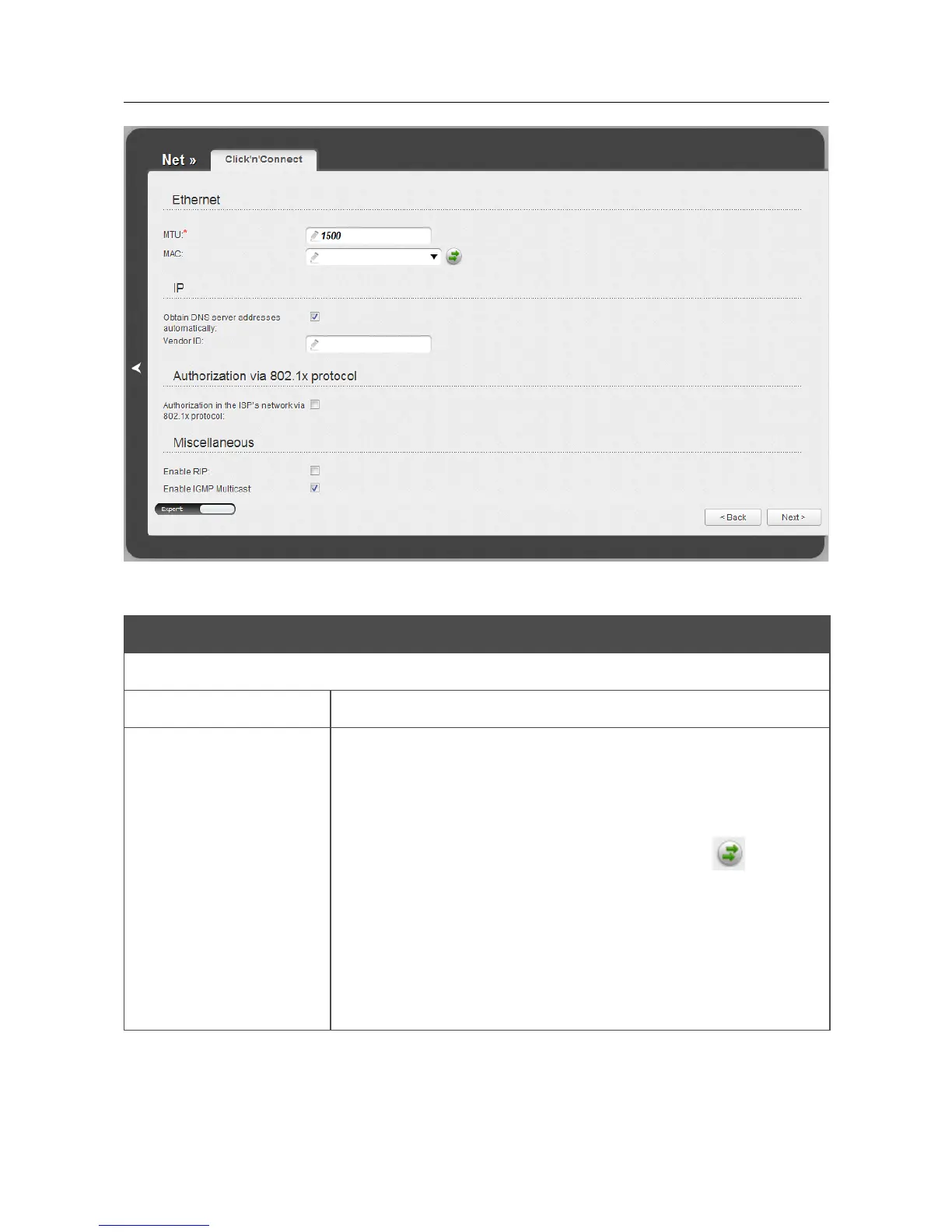
Figure 51. Configuring PPTP + Dynamic IP WAN connection. The expert settings mode. The Ethernet
section.
Parameter Description
Ethernet
MTU
The maximum size of units transmitted by the interface.
MAC
A MAC address assigned to the interface. This parameter is
mandatory if your ISP uses MAC address binding. In the field, enter
the MAC address registered by your ISP upon concluding the
agreement.
You can click the Clone MAC Address button ( ) to set the
MAC address of the network interface card (of the computer that is
being used to configure the router at the moment) as the MAC
address of the WAN interface.
Also you can set the address of a device connected to the router's
LAN at the moment. To do this, select the relevant value from the
drop-down list (the field will be filled in automatically).
Page 68 of 197











 To Next Page