47D-Link DIR-645 User Manual
Section 3 - Software Conguration
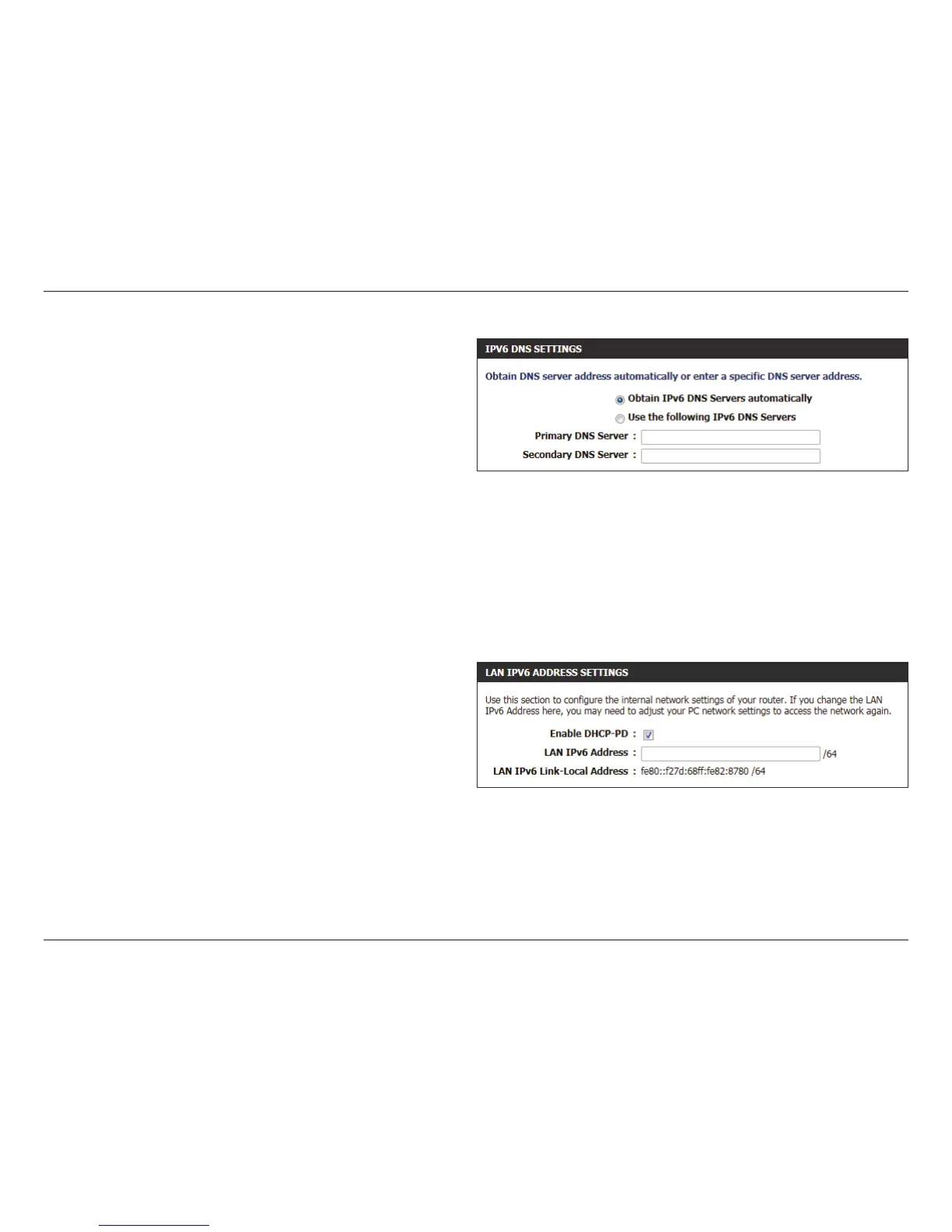
Obtain IPv6
DNS Server
automatically:
Select this option to obtain the DNS Server
addresses automatically.
Use the
following IPv6
DNS Servers:
Select this option to manually enter the DNS
Server addresses used.
Primary DNS: Enter the primary DNS Server address used here.
Secondary DNS: Enter the secondary DNS Server address used
here.
Use the section to congure the internal network settings of your router. The LAN IPv6 Link-Local Address is the IPv6 Address that you use to access
the Web-based management interface. If you change the LAN IPv6 Address here, you may need to adjust your PC’s network settings to access the
network again. DHCP-PD can be used to acquire a IPv6 prex for the LAN interface.
Enable DHCP-
PD:
Select this option to enable DHCP PD.
LAN IPv6
Address:
Enter the LAN IPv6 address used here. This address
must be in the ‘/64’ subnet.
LAN IPv6 Link-
Local Address:
Displays the LAN IPv6 Link-Local address used
here.













 To Next Page