Home
D-Link
Enclosure
DNS-327L
Page 258
D-Link DNS-327L - Page 258
477 pages
Manual
Save Page as PDF
To Next Page
To Next Page
To Previous Page
To Previous Page
Loading...
253
D-Link ShareCenter
DNS-327L
U
ser Manual
Section 4 - Conguration
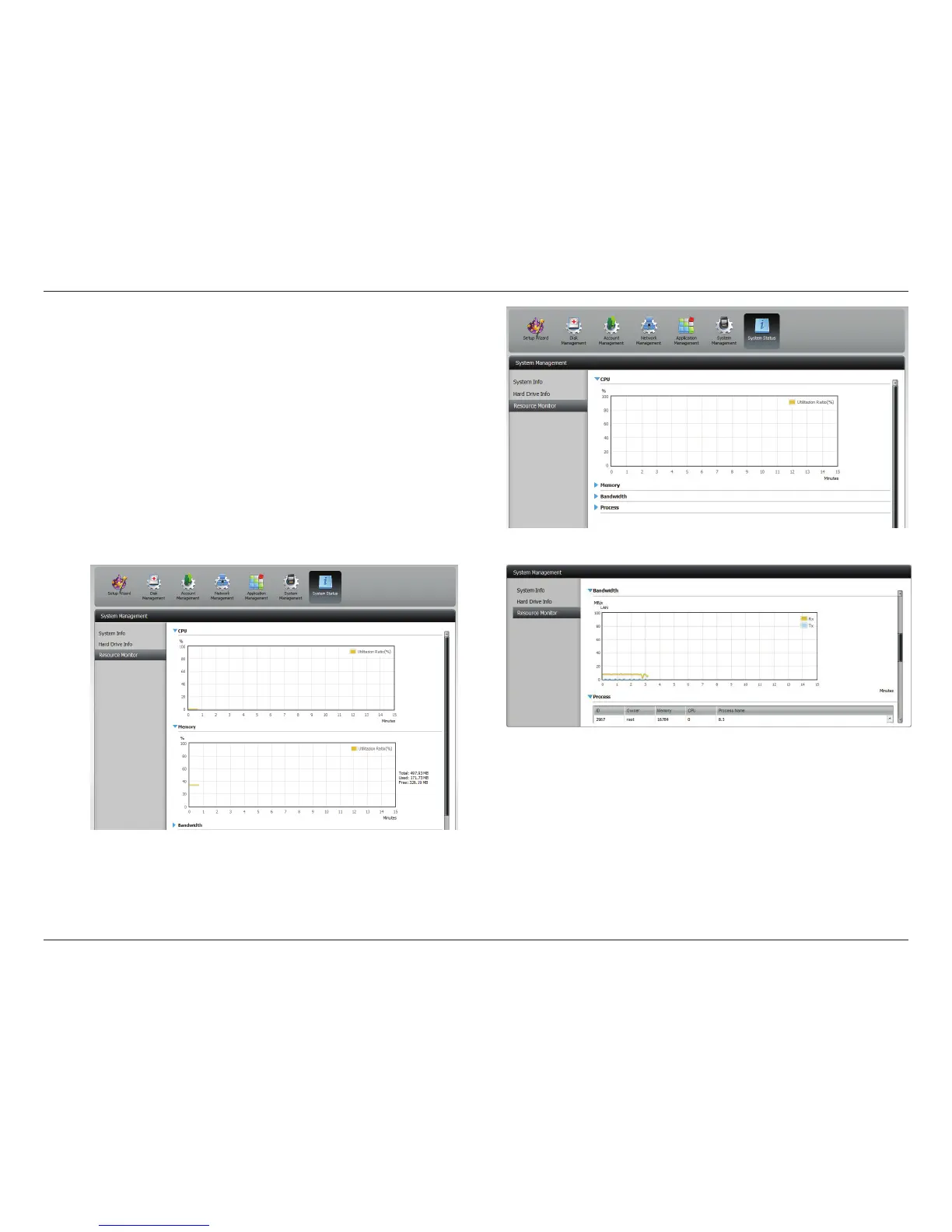
Click
Sy
stem
Status
>
Resource
Mo
nitor
,
the
n
click
the
blue
arrow to r
eveal the resour
ce details.
It
provides
inform
ation
on
the
CPU,
mem
or
y
,
bandw
idth,
and
processes in action.
257
259
Table of Contents
Main Page
Default Chapter
2
Table of Contents
2
Product Overview
6
Before You Begin
7
System Requirements
7
Package Contents
7
Features
8
Checking the Hardware Requirements
12
Hardware Overview
13
Front Panel
13
LED Description
14
Rear Panel (Connections)
15
Bottom Panel
16
Getting Started
17
Hardware Setup
17
Zero Configuration Setup
20
Mydlink on the DNS-327L
27
Windows Installation
28
Setup Wizard
28
Mapping a Drive
67
Alternative Methods to Mapping a Drive
70
Mac - Setup Wizard Installation
71
Configuration
92
Managing Your DNS-327L
92
D-Link Storage Utility
93
D-Link Storage Utility - for Mac
95
Web UI Login
102
Web UI General Layout
103
Home
103
Applications
104
Management
105
Management
106
Setup Wizard (Web UI)
106
Disk Management
111
Hard Drive Configuration
111
Hard Drive Configuration Wizard
112
Jbod
120
Raid 0
126
Raid 1
133
Upgrade from Standard Mode to RAID 1
141
S.M.A.R.T. Test
147
Creating a Schedule
149
Scan Disk
150
Volume Encryption
152
Account Management
156
Creating a Single User
156
Users / Groups
156
Creating Multiple Users
161
Modify Users
165
Deleting Users
169
Importing Users
170
Creating a Group
173
Modifying a Group
178
Deleting a Group
184
Quotas
185
Network Shares
190
Add/Modify Network Shares Wizard
191
Deleting a Network Share
198
Resetting the Network Shares
200
ISO Shares Setup Wizard
201
Creating an ISO Image
205
ISO Image Creation Wizard
206
ISO Name and File Path Settings
207
ISO Tree Editing
210
Verifying the ISO Image
211
Admin Password
212
Network Management
213
LAN Setup
213
Ipv6 Settings
216
Ipv6 Setup
217
Link Speed and LLTD Settings
219
Ddns
220
Port Forwarding
221
Application Management
225
FTP Server
225
Block IP List
226
Add-Ons
230
Add-Ons
231
Installing Add-Ons from the Setup Wizard
231
Installing Add-Ons from the Web UI
234
AFP Service
236
NFS Service
236
Multimedia Services
237
Upnp AV Server
241
Itunes Server
242
System Management
243
Language
243
Time and Date
244
Device
245
System Settings
246
Power Management
247
Email Settings
249
Notifications
249
SMS Settings
250
Adding an SMS Service Provider
251
Event Settings
252
Logs
253
Firmware Upgrade
254
UPS Settings
255
USB Devices
255
USB Storage Information
255
Printer Information
256
System Status
257
System Info
257
Home
259
My Photos
260
Creating an Album
262
Photo Album Wizard
263
Editing Photos in an Album
267
Select a Photo as a Cover Image
270
Select a Photo to Move
272
Delete a Photo
274
Share a Photo to Picasa
275
Share a Photo to Facebook
278
Share a Photo to Flickr
281
Deleting an Album
284
Refreshing the Album Database
286
Managing Photos
287
Slideshow Toolbar
288
Beam a Slideshow to Your TV
297
Photo Gallery
298
My Files
300
My Files - Icons
301
Upload
302
Download
304
Copy
306
Move
309
Delete
311
Rename
313
Properties
315
Create a Zip File from the Selected Folder
316
Add to Zip
317
Unzipping a Zipped File
319
Unzipping a Tar File
320
Opening a File
321
Previewing a File
322
Share to Facebook
323
Share to Picasa
324
Share to Flickr
325
My Music
326
My Music - the Interface
328
My Music - the Categories
329
My Music - the Categories
330
My Music - Music on Your DNS-327L
331
My Music - Playback Music on an Apple Device
333
My Music - the Player
334
My Music - Create a Playlist
335
My Surveillance
337
My Surveillance
346
My Surveillance - Live View
347
My Surveillance - Live View
348
My Surveillance - Live View
349
My Surveillance - Live Camera Panel Explained II
350
My Surveillance - Single Camera Live Video Mode
351
My Surveillance - Full Screen Live Video Mode
352
My Surveillance - Digital Zoom Video Mode
353
My Surveillance - E-Map View
354
My Surveillance - Snapshot View
355
My Surveillance - Motion Detection Camera Mode
356
My Surveillance - Configuring Patrol Settings
357
My Surveillance - Configuring Patrol Preset Points
358
My Surveillance - Viewing Preset Points
359
My Surveillance - Live Video/Playback Settings
360
My Surveillance - OSD Settings
361
My Surveillance - Playback
362
My Surveillance - Playback
363
My Surveillance - Playback
364
My Surveillance - Recording Information
365
My Surveillance - Setup
366
My Surveillance - Setup - Camera Setup
367
My Surveillance -Search and Add Camera
375
My Surveillance -Setup - Audio and Video
378
My Surveillance - Setup - Recording Setup
380
My Surveillance -Setup - Event Setup
389
My Surveillance - Setup - E-Map Upload
392
My Surveillance - Setup - Backup
396
My Surveillance - Setup - Server Port
401
My Surveillance - Status
402
My Surveillance - Status
403
My Favorites Application
406
Adding Applications
407
Applications
408
FTP/HTTP Downloads
408
Remote Backups
410
Create Wizard
411
Local Backups
415
Time Machine
416
Time Machine - on the Mac
417
Time Machine - Delete a Volume
424
USB Backups
427
MTP Backups
428
USB Backups
428
MTP Backup Process
429
USB Backup Process
431
P2P Downloads
433
Settings
433
Downloads
434
Amazon S3
435
Creating an AWS Account
436
Mydlink
442
Mydlink Verification
443
Mydlink Java Runtime Machine
445
Creating a New Folder
450
Mydlink Settings Details
451
Sharecenter™ NAS Status
452
Deleting a Mydlink Device
453
Deleting a Mydlink Account
454
The Mydlink Access NAS App
456
The Mydlink Access NAS App - Features
457
The Mydlink Access NAS App - Compatibility
458
Knowledge Base
460
What Is RAID
460
RAID Options
462
UPS Connectivity
464
Deleting a UPS Slave
468
USB Print Server
470
Setting up a Printer Using Mac os 10.8
473
Other manuals for D-Link DNS-327L
Quick Installation Guide
32 pages
Related product manuals
D-Link DNS-343
80 pages
ShareCenter Pro DNS-1550-04
163 pages
D-Link ShareCenter DNS-327L
407 pages
D-Link DNS-320
72 pages
D-Link DNS-323
99 pages
D-Link DNS-320L
407 pages
D-Link ShareCenter DNS-323
98 pages
D-Link ShareCenter DNS-320
223 pages
D-Link ShareCenter DNS-325
245 pages
D-Link ShareCenter DNS-320L
445 pages
D-Link ShareCenter Pulse DNS-320
111 pages
ShareCenter Shadow DNS-325
112 pages












 To Next Page