332
D-Link ShareCenter DNS-327L User Manual
Section 4 - Conguration
My Surveillance
The My Surveillance app works with D-Link Cloud cameras. It manages your IP cameras from the NAS and allows all streaming data to be saved to
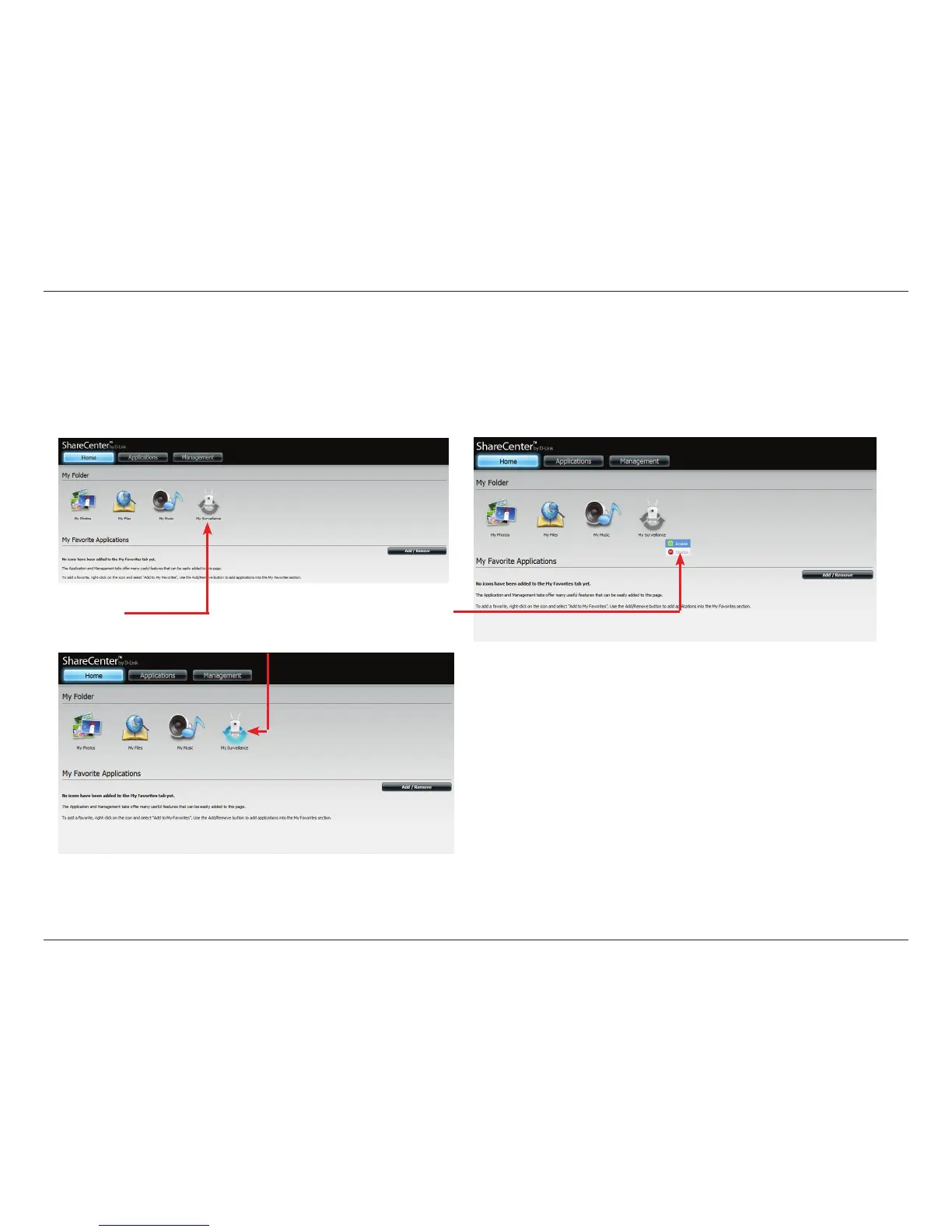
the NAS. My Surveillance can connect up to 4 cameras. Click the My Surveillance icon under the My Folder window in the Home tab. By default,
My Surveillance is disabled. To enable it, right-click the icon and click enable. Right-clicking only applies to this app and icon.
Disabled Right-click to Enable
The Blue arrows indicate its enabled.
Please Note: My Surveillance is compatible with the following
D-Link cameras:
DCS-930/930L, DCS-932/932L, DCS-1100/1100L, DCS-1130/1130L,
DCS-5230/5230L, DCS-942L, DCS-2103/2130, DCS-2210/2230,
DCS-5222L/5211L
More cameras will be supported in the future. Please visit your
local D-Link support site, for an updated list of supported cameras.












 To Next Page