
 Need help?
Do you have a question about the D-Link DP-301 and is the answer not in the manual?
Explains how the DP-301 enhances network printing services by managing print file traffic and supporting multiple protocols.
Details the rear panel layout including the printer port (LPT), network port (RJ-45), and power input socket.
Explains the status signals from the Pw/Tx, Link/Rx, and LPT LEDs on the front panel during operation.
Instructions for carefully removing items from the package and verifying all components are present.
Step-by-step guide for connecting the DP-301 to the printer and network before powering on.
Details automatic testing procedures, including LED and component tests, performed upon startup.
Guides on performing operational tests and mounting the DP-301 using Velcro.
Covers management standards (SNMP), MIBs, diagnostic LEDs, and environmental/physical characteristics.
Lists power supply requirements, dimensions, weight, operating/storage temperatures, humidity, emissions, and safety certifications.
Details warranty periods for hardware, power supplies, fans, spare parts, and the software portion of the product.
Provides instructions on how to submit a warranty claim, including obtaining case and RMA numbers.
Lists conditions not covered by warranty and defines D-Link's liability limitations and disclaimers.
Specifies the governing law for the warranty and identifies product trademarks.
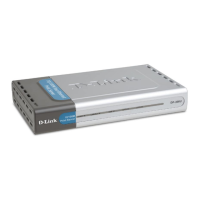
The D-Link DP-301 is an Ethernet/Fast Ethernet Multiprotocol Print Server, designed to streamline network printing services. This compact device connects to your Ethernet or Fast Ethernet network, allowing you to strategically place printer services anywhere within your network. Its primary function is to manage the flow of print files from workstations or file servers to connected printers, significantly accelerating print job delivery compared to using a file server or a PC as a print server.
The DP-301 offers several key usage features that enhance network printing efficiency and flexibility. One of its main benefits is offloading the workload of managing print file traffic from your file servers. This frees up your file servers to dedicate their full capacity to file access and other direct services for network users. In peer-to-peer network environments, workstations can print directly to the DP-301 without imposing an additional load on other workstations or servers.
The print server is equipped with an IEEE 1284 compliant high-speed bidirectional parallel printer port. This advanced port allows for much faster data transmission to high-speed laser printers than a standard PC's parallel printer port, enabling these printers to operate at their full capacity. This is particularly advantageous for environments with high-volume printing needs.
Its compact and portable design makes the DP-301 a cost-effective alternative to PC-based print servers. Since it connects to your file servers directly through the network, you have the flexibility to station the printer at the most convenient location for users, optimizing accessibility and workflow.
The DP-301 boasts extraordinary flexibility in terms of network operating systems and protocols. It supports a wide range of environments, including:
The device's rear panel features a printer port (labeled LPT), a network port (RJ-45 receptacle), and a power input socket. The LPT printer port is configurable through the PS Admin program or via Telnet commands, offering versatile setup options. The network port supports both 10Base-T Ethernet and 100Base-TX Fast Ethernet, with NWay autonegotiation functionality. This allows the DP-301 to automatically detect and set its data rate to the highest possible speed supported by your network, ensuring optimal performance.
For power, the DP-301 uses a 12V 0.5A DC power input. It is crucial to use the power supply included in your package, as substituting it with other equipment may void the warranty.
The DP-301 includes several features to assist with installation, self-testing, and ongoing monitoring. The front panel is equipped with three LED indicators: Pw/Tx, Link/Rx, and LPT. These LEDs provide crucial status signals during power-up, self-test routines, and normal operation.
Upon power-up, the DP-301 performs an automatic self-test. This process involves two main stages:
For operational testing and configuration, the DP-301 package includes the PS Admin software, a Windows-based setup and administration program. This program simplifies the configuration and management of your D-Link print servers. The PS Admin software features a "Print Test" function to confirm connections and functionality after installation and configuration. If a Windows environment is not available, the DP-301 also offers a Telnet interface for management communications, allowing all configuration and management commands to be issued and reports to be returned via Telnet.
The DP-301 can be placed on a printer's tabletop or conveniently mounted using the supplied Velcro strips. The bottom housing of the device has corner markers indicating the optimal placement for the Velcro loop tape. Users can choose a mounting surface and orientation that allows for easy visual access to the LED indicators and prevents cramping of the connected wiring.
The D-Link DP-301 is designed to be a reliable and user-friendly solution for enhancing network printing, offering robust protocol support, efficient print job management, and straightforward diagnostic features to ensure smooth operation.
 General
| Device Type | Print Server |
|---|---|
| Network Protocols | TCP/IP, IPX/SPX, NetBEUI |
| Print Server Type | External |
| Interface | Parallel |
| Ports | 1 x Parallel (IEEE 1284) |
| Supported Operating Systems | Mac OS, Linux |
| Management | Web-based management |












 To Next Page