DVG-6004S/6008S User’s Manual NAT/DDNS
These settings are only necessary when the gateway is set up behind an Internet sharing device that uses a
dynamic IP address and does not support DDNS.
Choose a DDNS Server: The current system allows users to choose either DynDNS、TZO、3322.org、PeanutHull
or a private server. You will need to apply for an account with DynDNS、TZO、3322.org、PeanutHull or a private
server before you type in the following information.
y Server address: the IP address or URL (Uniform Resource Locator) of the DDNS Server.
y Hostname: the URL of the system (or NAT) – applied from domain name registration providers (e.g.
www.dyndns.org).
y Login ID and Password: The ID and password used to log-in to the DDNS server.
y Behind NAT: Select this only when the system is set up behind a NAT device.
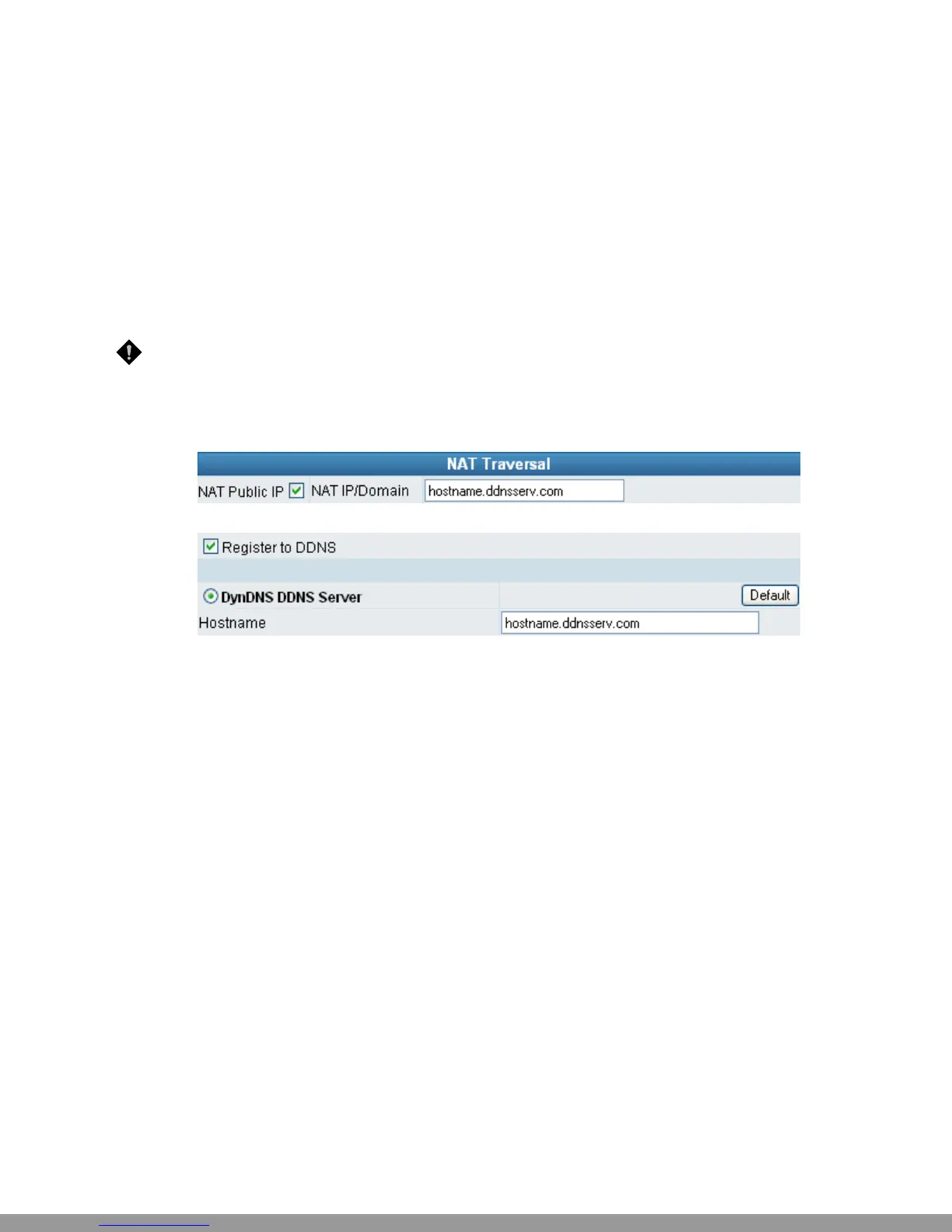
NOTE: If the gateway is set up under NAT, then enter the hostname in the NAT IP/Domain that is the
same as the Hostname of the DDNS.
Example:
NAT
DDNS
D-Link Systems, Inc. 18
This Manual: http://www.manuallib.com/file/2602385


 To Next Page