DVG-6004S/6008S User’s Manual Telephony Settings
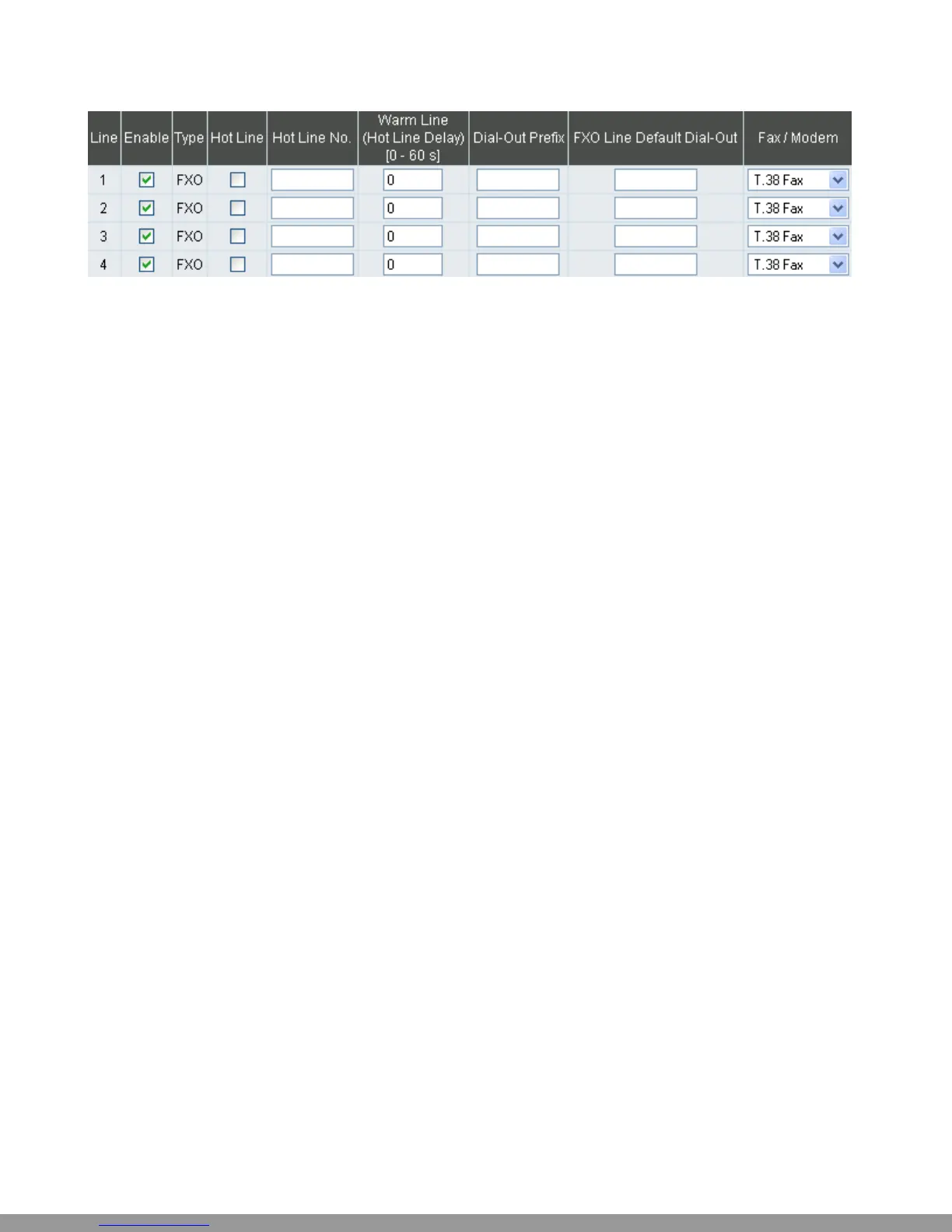
y Enable: Enable a line; if some lines are not used, disable them (Pause Function) to avoid unnecessary
waiting when an incoming call is diverting to this line.
y Hot Line: When receiving a call from an outside line, the gateway will divert the call to the assigned
hotline number.
y Hot Line No.: Enter the hot line number for an automatic dialing function.
y Warm Line: When the Warm Line function is in use, user can dial a number. Otherwise the system will
divert incoming calls from an outside line to the Hot Line Number after a set wait time.
Example:
Assume the assigned hotline for DVG-6004S/6008S line 1 is 701 and the Warm Line (Hot Line Delay)
is 5 seconds. If no extension number is dialed within 5 seconds, the call will be automatically diverted
to the assigned hotline (ext 701). The system allows users to record a voice prompt (e.g. “please enter
an extension number or wait for the operator to connect you”) to use in this situation.
Assume the assigned hotline for DVG-6004S/6008S line 2 is 702 and the wait time is 0 second. When
Port2 receives a call from an outside line, it will be automatically diverted to extension 702.
y Dial-out Prefix: It is the number dialed automatically by the system when the FXO interface diverts a
call to the PSTN by VoIP.
y FXO Line Default Dial-Out: Default number that FXO will dial out when it receive an incoming call
from VoIP.
Example:
If PBX extension needs to dial “0” to make a PSTN call, and the FXO ports are connected to PBX
extension. In this case, the Dial-out prefix should be set to “0”. If the PBX requires some delay time
before capturing a line, then the trunk prefix should be set as “0,” so that after dialing a 0, it will pause
for 1 second before dialing the destination number. Each comma represents a 1 second delay. If more
delay time is required, simply add more commas. Please note that if a Dial-out prefix is set, the line
won’t be able to dial any PBX extension line.
D-Link Systems, Inc. 22
This Manual: http://www.manuallib.com/file/2602385


 To Next Page