DWR-953 Wireless AC1200 4G LTE Router
with Gigabit Ethernet Ports
User Manual
Configuring via Web-based Interface
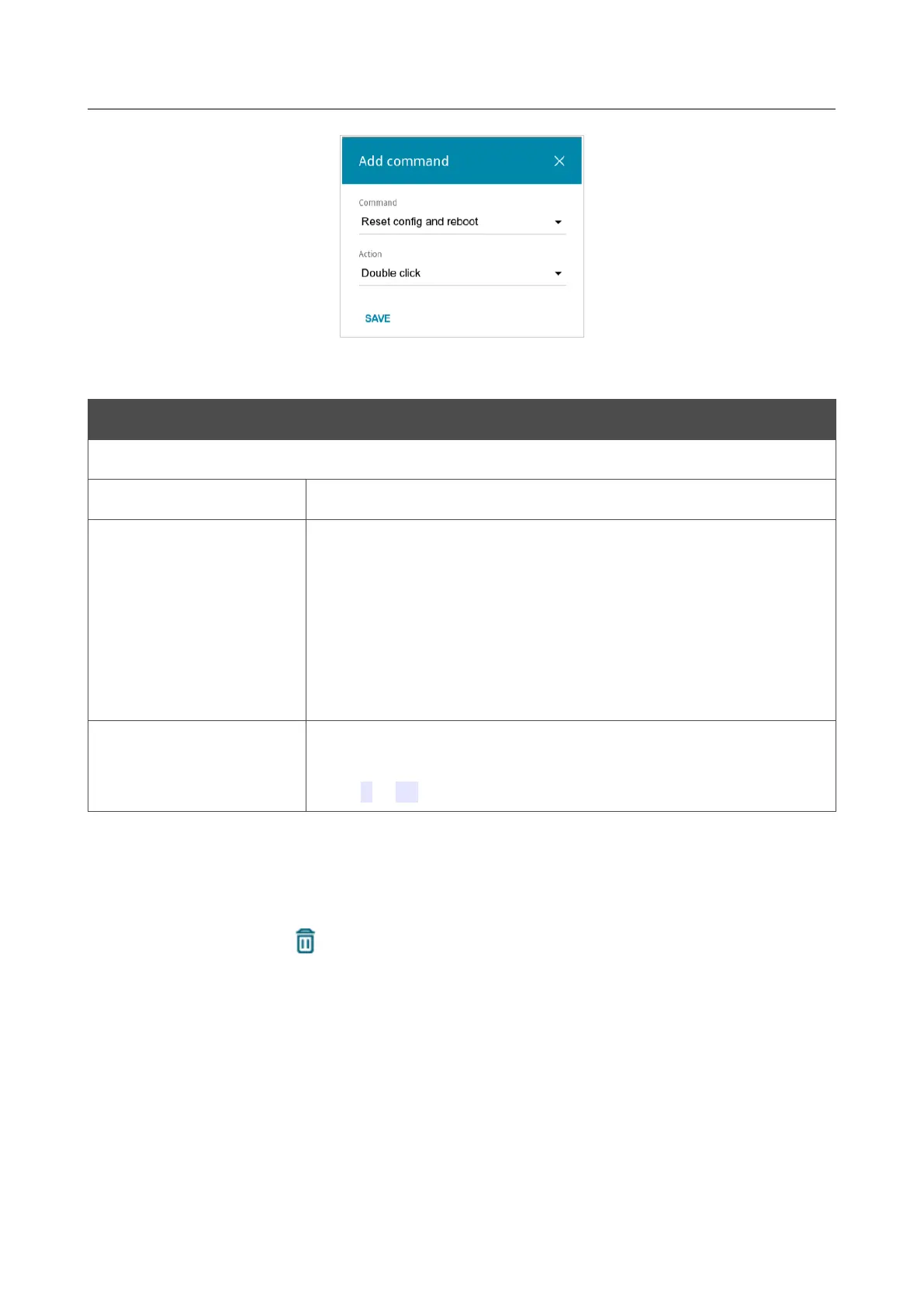
Figure 175. The window for adding a command.
In the opened window, specify the following parameters:
Control Description
Reset / Wi-Fi / WPS
Command
From the drop-down list, select a command.
Action
From the drop-down list, select an action for the command.
• Single click: One short press of the button lasting less than
one second.
• Double click: Two short presses of the button.
• Long press: Pressing of the button for several seconds.
When this value is selected, the Button press duration
section is displayed.
Button press duration
Specify a period of time (in seconds) within which you should hold
the button to perform the specified action. You can specify values
from 2 to 60.
Click the SAVE button.
To edit the parameters for a command, select the relevant line in the table. In the opened window,
change the needed parameters and click the SAVE button.
To remove a command, select the checkbox located to the left of the relevant line in the table and
click the DELETE button ( ).
After specifying the needed parameters, click the APPLY button.
Page 231 of 264



 To Next Page