EXPRESS DAILY INTENSIVE ECO TIMER
Bob has an analog display (black & white) only in English and 3 buttons.
1 | interfaCe
1.1 | Navigate through Bob interface
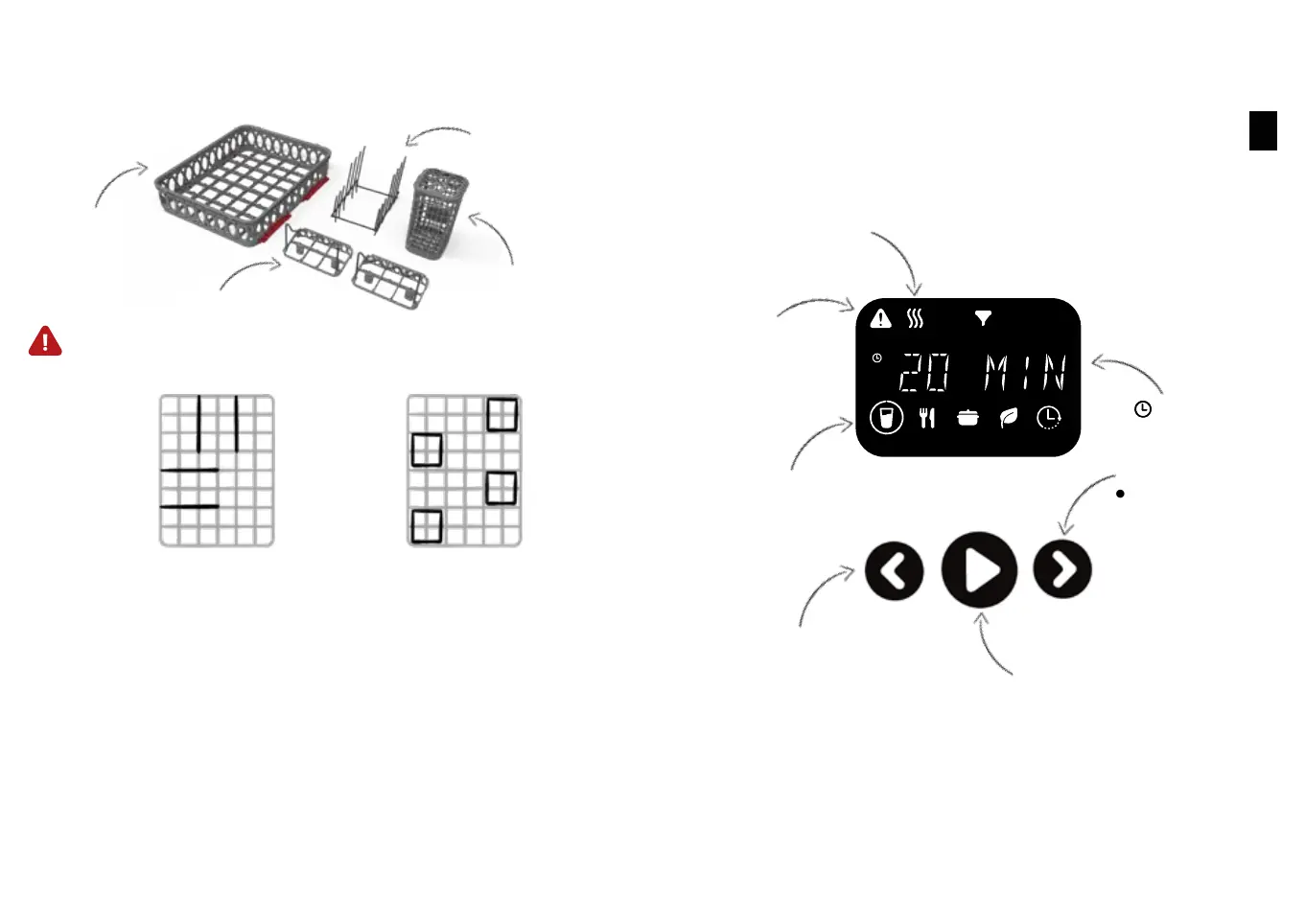
y Switch left
y Start Bob
y Start a program
y Pause a program
y Validate
y Switch right
Left button
Right button
Central button
Cycles icons and names
Cycle duration
2 | QuiCK utiliZation Guide
Warning
Drying icon
At the end the door opens for drying
5 | ConfiGure your baSKet
Bob adapts to multiple types of dishes thanks to its modular design and
can thus be used all sorts of occasions.
Module for 6 plates
2 modules for 4 glasses
Module for cutlery
Basket
The basket allows you to place the module in many different ways.
You can place the plate module
either in the middle of the
basket or at one of the two
sides.
Choose where you want to
place the cutlery module, or
remove it if you do not need it!
Place your forks and knives so that the closing of the door is not disturbed. In fact, sharp
elements can damage the seal and cause leaks.
76
EN


 To Next Page