71
Software Install & Upgrade
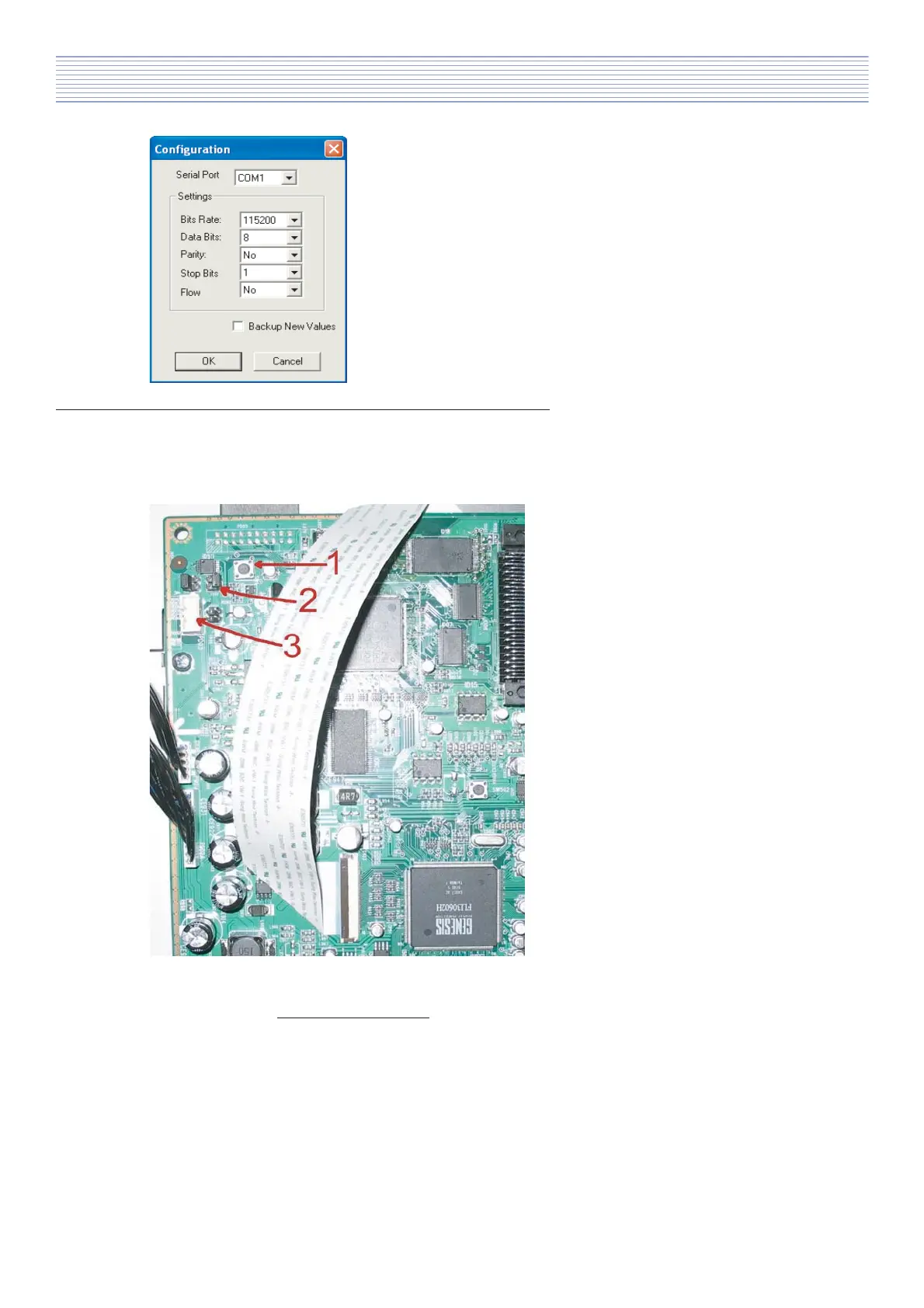
c). Set serial loader port configuration:
Properties -> „Configuration”.
5. Chassis SL-150 programming procedure for Genesis IC - PCB part.
If you adjust correctly application settings then you need to prepare PCB for programming.
Photo below shows normal state of PCB (model 20”). The most important point, which can be use for
programming, you can find as a marked point from 1 to 3.
1 - Switch SW2 (on PCB loc. SW1).
2 - Jumpers J1 (on PCB loc. P201-206).
3 - Programming port P2 (loc. PD03).
For programming you need to switch off
the TV-set and remove backcover.
Next make PCB configuration:
- remove jumpers J1 (please note con-
figuration to restore them after software
upgrade),
- connect RS232 upgrade JIG connector in
port P2.
(PCB photo 3)
If you finish prepare PCB to pogramming procedure then you can switch on TV-set to normal
operating mode (not stand by mode!!!).



 To Next Page