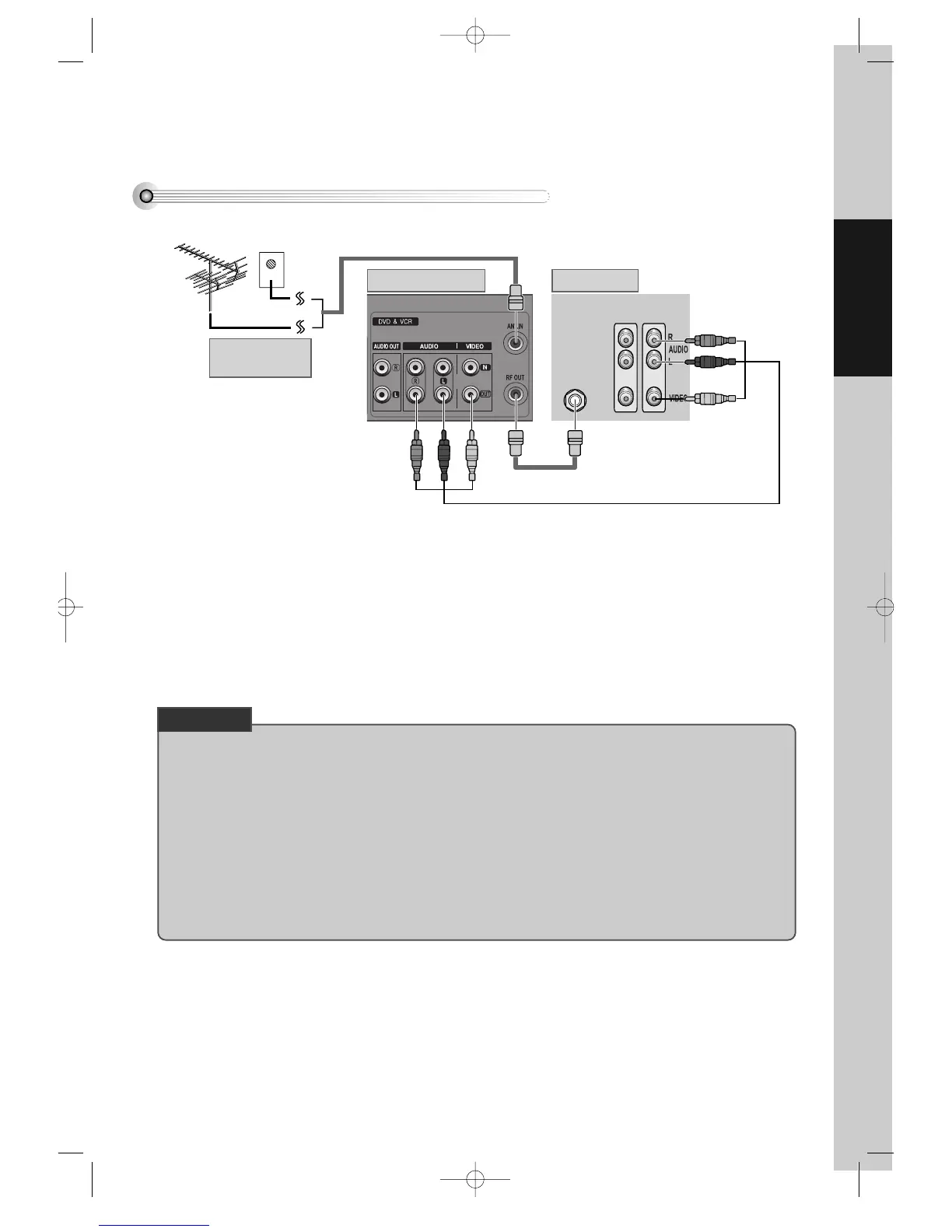
£ (If there is AUDIO/VIDEO INPUT jack in TV)
Connect VIDEO OUT jack in DVD-Video to VIDEO IN jack in TV, and AUDIO OUT jack in DVD-Video to
AUDIO IN jack in TV with connecting cable of Audio/Video jack.
Select VCR mode by pressing TV/INPUT button in TV, you can view more clear screen and sound than
connection with RF cable only.
• VHF: 2 ~13 channels of TV
• UHF: 14~69 channels of TV
• CATV: Broadcasting is transmitted with cable from broadcasting station by contract with the station and consumers. It
does not need any antenna.
• In/Out jack in Audio/Video terminal:
- In: A jack used to receive signal required in this unit from other units.
- Out: A jack used to send signal of this unit to other units.
• Connect with Audio/Video terminal, you can enjoy more clear video and audio.
(Use OUTPUT button in this REMOTE to select video mode.)
CHECK UP!
DVD-Video(USA)_DV6T811N-LT 02.4.16 2:38 PM ˘`17



 To Next Page