PLAYBACK
BASICPLAYBACKOPERATION
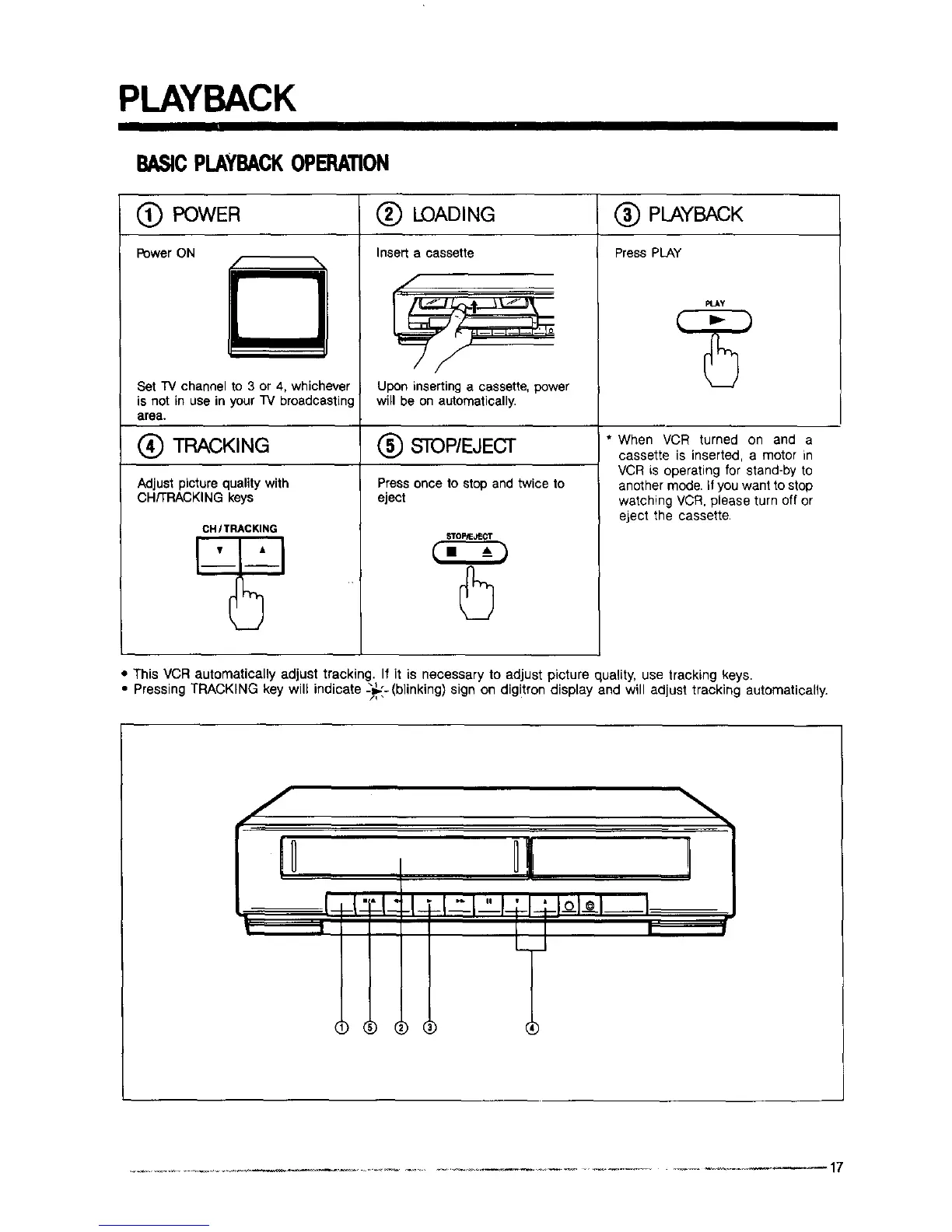
POWER
PowerON
/ -%
m
Set "IV channel to 3 or 4, whichever
is not in use in your _ broadcasting
area.
(_ TRACKING
Adjust picture quality with
CH/TRACKING keys
CHITRACKING
(_ LOADING
Insert a cassette
/
Upon insertinga cassette,power
will be on automatically.
(_) STOP/EJECT
Press once to stop and twice to
eject
STOP/EJECT
PLAYBACK
Press PLAY
PLAy
* When VCR turned on and a
cassette is inserted, a motor in
VCR is operating for stand-by to
another mode. if you want to stop
watching VCR, please turn off or
eject the cassette•
• This VCR automatically adjust tracking. If it is necessary to adjust picture quality, use tracking keys.
• Pressing TRACKING key will indicate -_,_'-(blinking) sign on digitron display and will adjust tracking automatically.



 To Next Page