CLOCK ADJUSTMENT
Accurate clock time is a must for all types of timer recording.
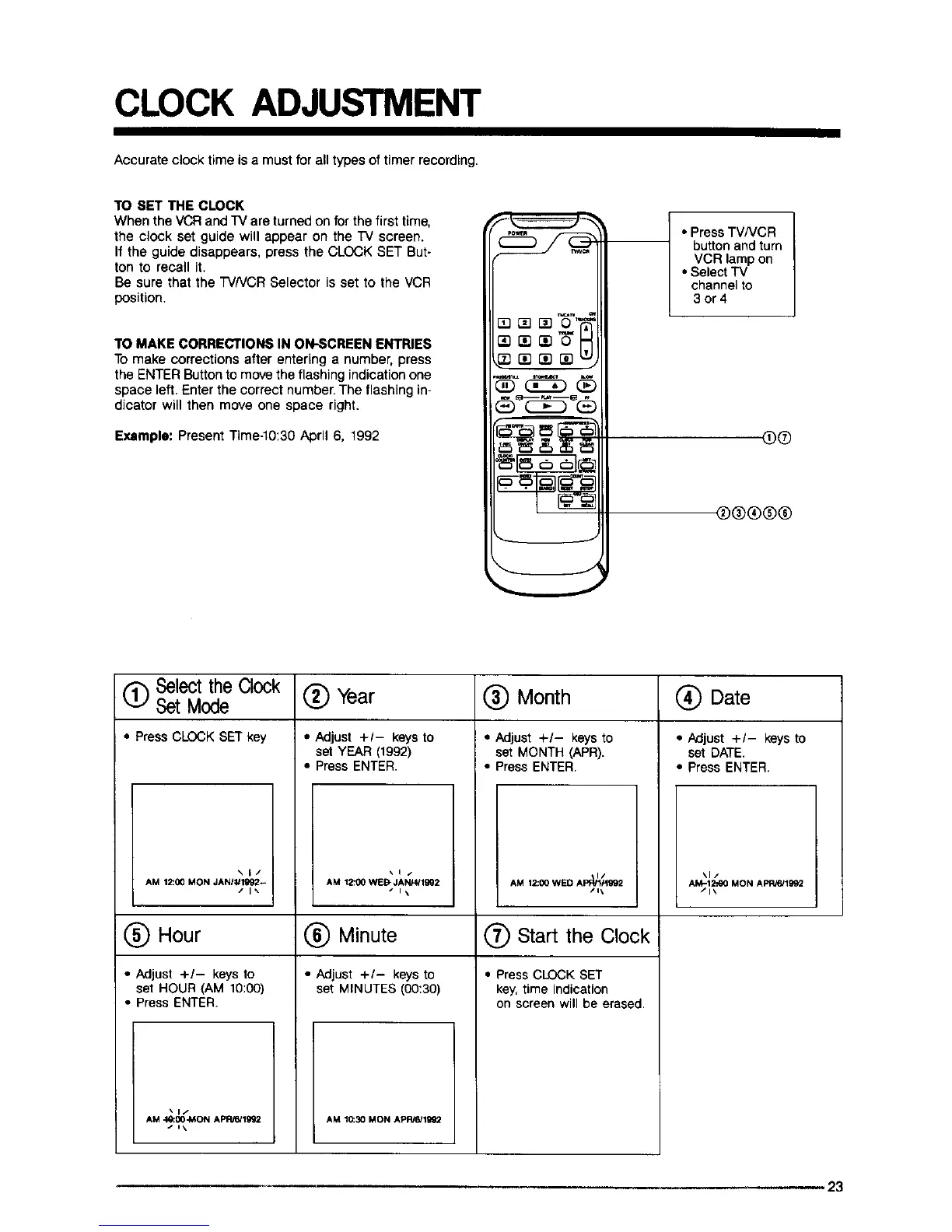
TO SET THE CLOCK
When the VCR and TV are turned on for the first time,
the clock set guide will appear on the TV screen.
If the guide disappears, press the CLOCK SET But-
ton to recall it.
Be sure that the TVNCR Selector is set to the VCR
position.
TO MAKE CORRECTIONS IN ON-SCREEN ENTRIES
TOmake corrections after entering a number, press
the ENTER Buttonto move the flashing indicationone
space left. Enter the correct number. The flashing in-
dicator will then move one space right.
Example: Present Time-10:30 April 6, 1992
• Press TVNCR
buttonand turn
VCR lampon
• Select "iV
channel to
3or4
O®
®®®®®
(_ Select the Clock
Set Mode (_) Year (_) Month
• Press CLOCK SET key
\1/
AM 12:00 MON JANI_lg92_
/1%
(_) Hour
• Adjust +/- keys to
set HOUR (AM 10:00)
• Press ENTER.
"*1/
AM _00MON APRR419g_
• Adjust +1- keys to
set YEAR (1992)
• Press ENTER.
\1/
AM 1_00 WEB" JANFg1992
s I\
(_ Minute
• Adjust +/- keys to
set MINUTES (00:30)
• Adjust +/- keys to
set MONTH (APR).
• Press ENTER.
I/
AM 12:00 WED APF_lPIg92
/1\
O Start the Clock
• Press CLOCK SET
key,time indication
on screen will be erased.
Date
• Adjust +/- keys to
set DATE.
• Press ENTER.
%1/
AM-12fl)0 MON APROn992
/1\
AM 10:30 MON APRJ6}11_
i
L
23



 To Next Page