IDENTIFICATION (2)
REALTIMECOUNTER
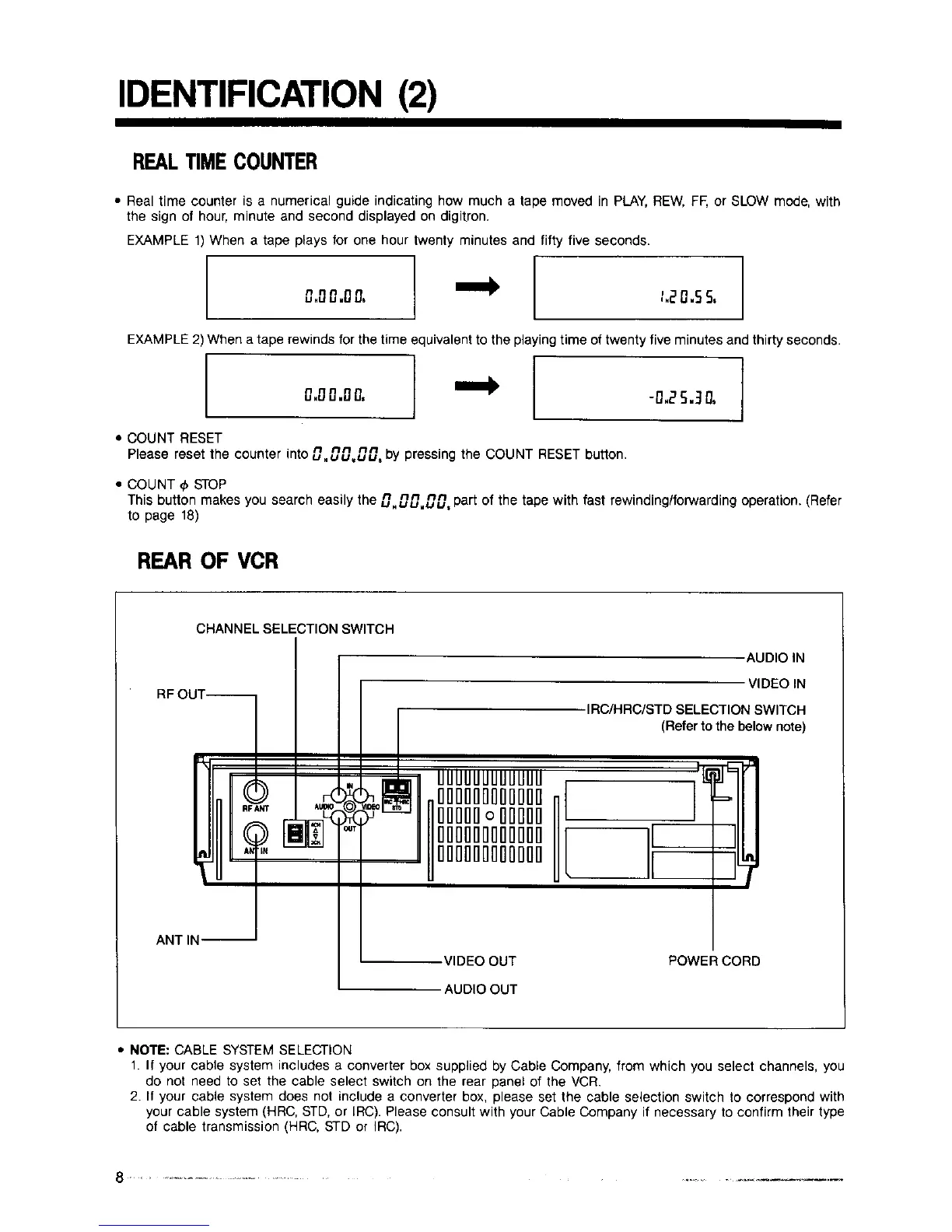
• Real time counter is a numerical guide indicating how much a tape moved in PLAY, REW, FF, or SLOW mode, with
the sign of hour, minute and second displayed on digitron.
EXAMPLE 1) When a tape plays for one hour twenty minutes and fifty five seconds.
0.00.00,
t.20.55,
EXAMPLE 2) When a tape rewinds for the time equivalent to the playing time of twenty five minutes and thirty seconds•
0.0.%00, ] -n,25.30,
• COUNT RESET
Please reset the counter " n nn nn
Intou.uu,.uu, by pressing the COUNT RESET button.
• COUNT _ STOP
This button makes you search easily the 0.00.00. part of the tape with fast rewinding/forwarding operation. (Refer
to page 18)
REAR OF VCR
CHANNEL SELECTION SWITCH
RFOUT--
I
AUDIO IN
VIDEO IN
IRC/HRC/STD SELECTION SWITCH
(Refer to the below note)
ANT IN--
.VIDEO OUT
AUDIO OUT
POWERCORD
• NOTE: CABLE SYSTEM SELECTION
1. If your cable system includes a converter box supplied by Cable Company, from which you select channels, you
do not need to set the cable select switch on the rear panel of the VCR.
2. If your cable system does not include a converter box, please set the cable selection switch to correspond with
your cable system (HRC, STD, or IRC). Please consult with your Cable Company if necessary to confirm their type
of cable transmission (HRC, STD or IRC).



 To Next Page